


Participating Frequently
September 16, 2021
質問

Develop Presets import show in presets but not in profiles

  • September 16, 2021
  • 返信数 8.
  • 570 ビュー

Hi Community,


I need help, beause I don't know what to do anymore.


I have a zipped file with some presets ats .xmp which is called PHLEARN PASTEL.


With the new interface of Lr Classic, I follow the correct instructions to import them (see screenshot below)
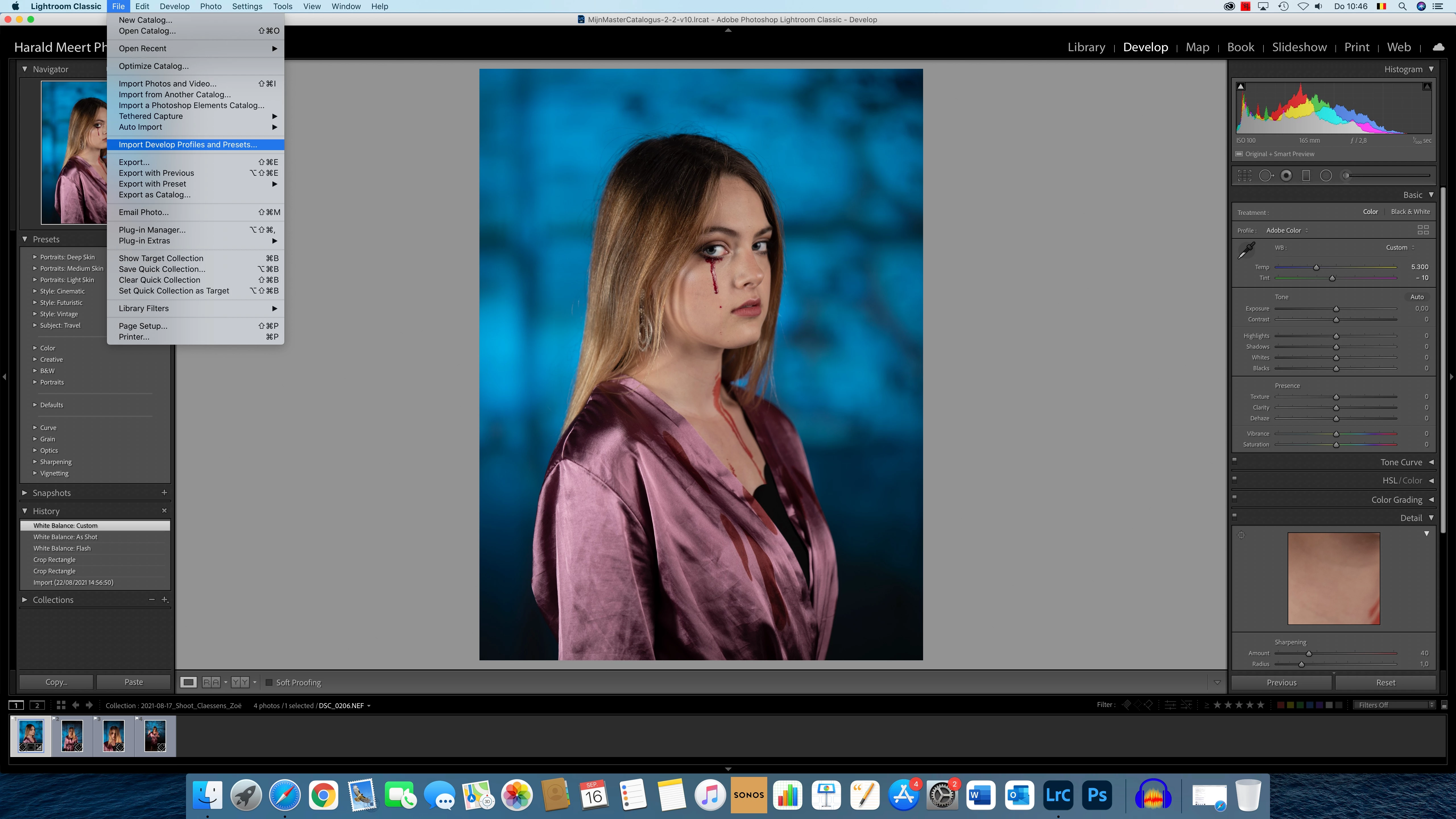
 

I choose my ZIP file
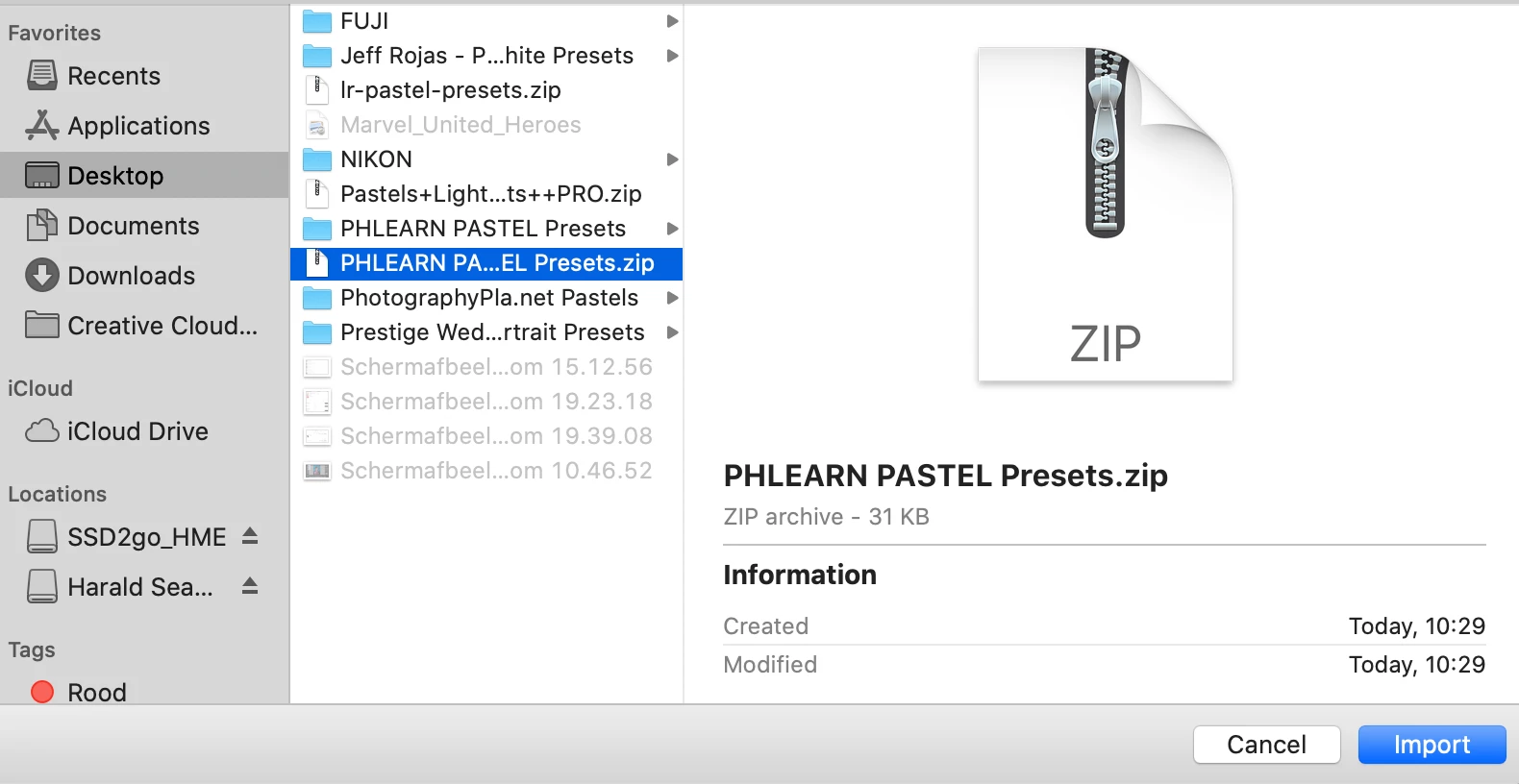


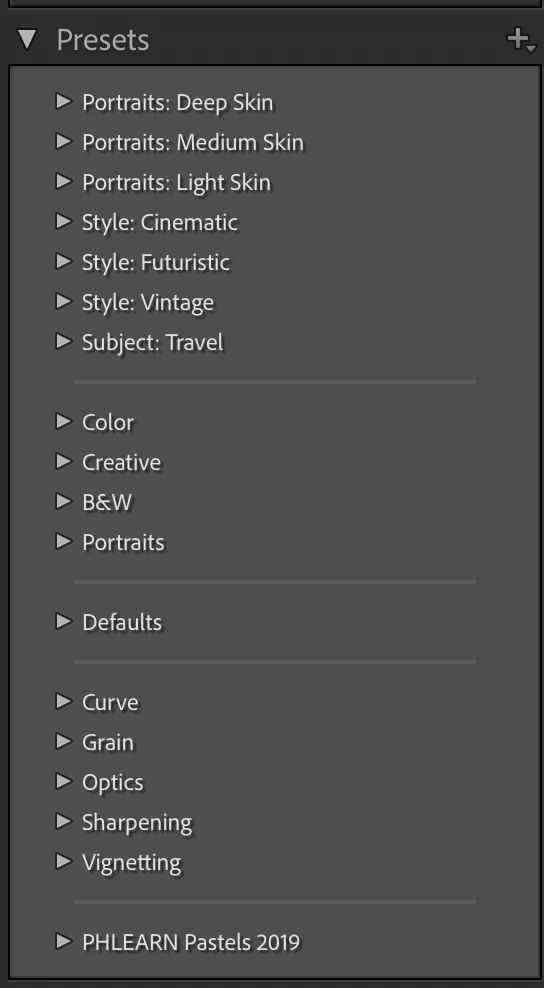
Lr Classic imports tehm nicely and I can find them in the preset module down under:


But when I look at my profile browser, they don't show up?  Even after restarting Lr Classic.  I cannot import them there, because Lr Classic tells me they already are imported. 
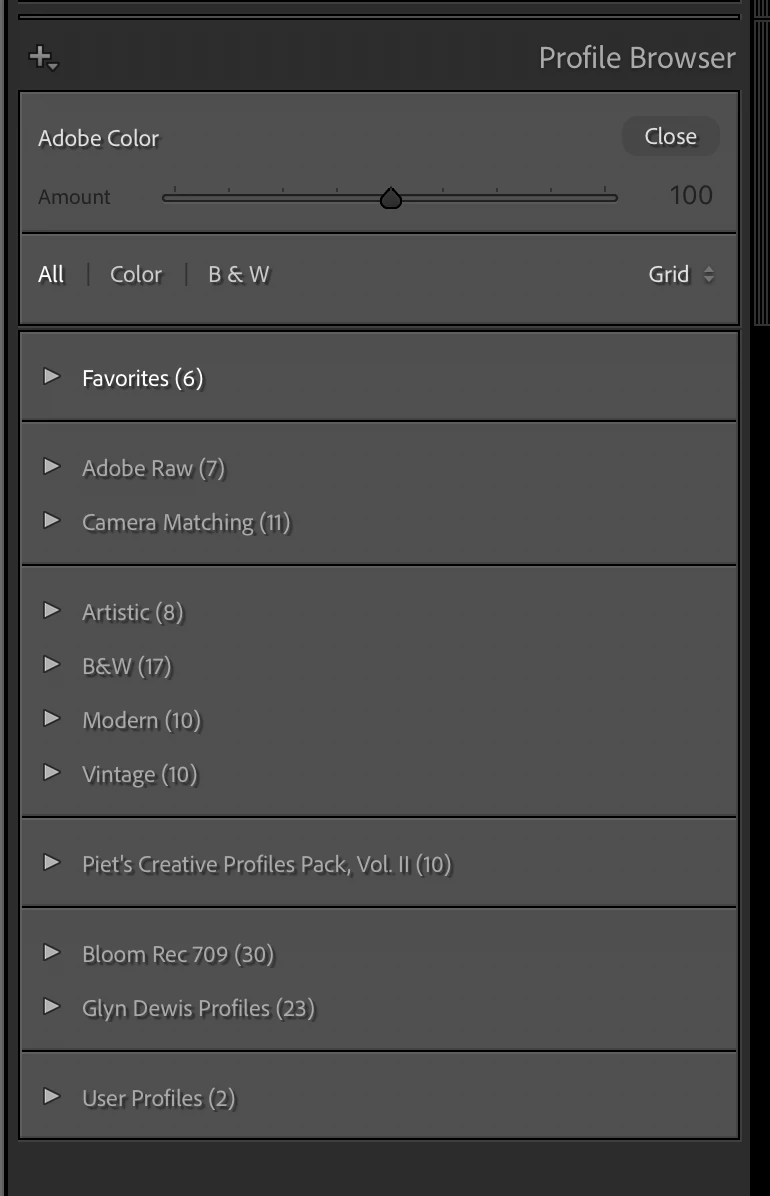


So can anyone help me out here?  I have been looking in this forum and on youtube, but I do not find anything about this matter.


Thanks for your help in advance!

このトピックへの返信は締め切られました。

返信数 8

DdeGannes
Community Expert
Community Expert
September 19, 2021

One last tr, please try unziping the file that I have marked and see if the profiles are there.


This one is clearer.


Regards, Denis: iMac 27” mid-2015, macOS 11.7.10 Big Sur; 2TB SSD, 24 GB Ram, GPU 2 GB; LrC 12.5,; Lr 6.5, PS 24.7,; ACR 15.5,; (also Laptop Win 11, ver 24H2, LrC 15.0.1, PS 27.0; ) Camera Oly OM-D E-M1.
DdeGannes
Community Expert
Community Expert
September 19, 2021

@Harald Meert, you also indicate that you do not know where the files were downloaded to,

See the article at the link below for more informat.

https://www.lightroomqueen.com/lightroom-classic-file-locations/


Regards, Denis: iMac 27” mid-2015, macOS 11.7.10 Big Sur; 2TB SSD, 24 GB Ram, GPU 2 GB; LrC 12.5,; Lr 6.5, PS 24.7,; ACR 15.5,; (also Laptop Win 11, ver 24H2, LrC 15.0.1, PS 27.0; ) Camera Oly OM-D E-M1.
DdeGannes
Community Expert
Community Expert
September 19, 2021

On Sept 16, the very day you started the thread I posted the following.


Regards, Denis: iMac 27” mid-2015, macOS 11.7.10 Big Sur; 2TB SSD, 24 GB Ram, GPU 2 GB; LrC 12.5,; Lr 6.5, PS 24.7,; ACR 15.5,; (also Laptop Win 11, ver 24H2, LrC 15.0.1, PS 27.0; ) Camera Oly OM-D E-M1.
Harald Meert作成者
Participating Frequently
September 19, 2021

Thanks for your help.


I noticed that the files are .xmp and suitable also as profiles.


On my former iMac, I had no issues to import them, now on my new iMac and since the latest update of Lr Classic, it doesn't work anymore...


Well, I have to find a work around.

DdeGannes
Community Expert
Community Expert
September 19, 2021

They can be used as a preset they are there. There in the last of the user presets the name is PHLEARN Pastels 2019 if you click on the triangle at the left it will face down and display the individual presets.


Regards, Denis: iMac 27” mid-2015, macOS 11.7.10 Big Sur; 2TB SSD, 24 GB Ram, GPU 2 GB; LrC 12.5,; Lr 6.5, PS 24.7,; ACR 15.5,; (also Laptop Win 11, ver 24H2, LrC 15.0.1, PS 27.0; ) Camera Oly OM-D E-M1.
JP Hess
Inspiring
September 18, 2021

I'm having difficulty understanding why you are expecting PRESETS to be displayed in the PROFILES panel. They are not supposed to.

Harald Meert作成者
Participating Frequently
September 19, 2021

When I want to import Profiles via the button in the Profile settings to import them, I get a warning that they already have been imported, but they don't show up

DdeGannes
Community Expert
Community Expert
September 19, 2021

Post a screen capture to demonstrate what you are referring to.


Regards, Denis: iMac 27” mid-2015, macOS 11.7.10 Big Sur; 2TB SSD, 24 GB Ram, GPU 2 GB; LrC 12.5,; Lr 6.5, PS 24.7,; ACR 15.5,; (also Laptop Win 11, ver 24H2, LrC 15.0.1, PS 27.0; ) Camera Oly OM-D E-M1.
DdeGannes
Community Expert
Community Expert
September 16, 2021

See the screen capture from you original post. They have been installed as Presets since they are probably not Profiles.

See the attached they show as Presets in your documents on your computer.

Regards, Denis: iMac 27” mid-2015, macOS 11.7.10 Big Sur; 2TB SSD, 24 GB Ram, GPU 2 GB; LrC 12.5,; Lr 6.5, PS 24.7,; ACR 15.5,; (also Laptop Win 11, ver 24H2, LrC 15.0.1, PS 27.0; ) Camera Oly OM-D E-M1.
Harald Meert作成者
Participating Frequently
September 18, 2021

according to the new Lightroom Classic, this is the way how to import them.

On my former iMac I had no issues, now, I do.


When I try to import in the profile section, I get the warning that is has already been imported, so where are they then?

DdeGannes
Community Expert
Community Expert
September 18, 2021

The Author stated. "When I try to import in the profile section, I get the warning that is has already been imported, so where are they then?"

Show a screen capture of the option you are useing to start the Import?

Is this what you are using, see the screen capture?


Your screen captures with your initial post shows that, it also shows the file you are importing are Presets and not Profiles.

They are showing in your user Presets, they will not appear in Profiles since they are not Profiles. This has been covered in an earlier post with screen captures.


Regards, Denis: iMac 27” mid-2015, macOS 11.7.10 Big Sur; 2TB SSD, 24 GB Ram, GPU 2 GB; LrC 12.5,; Lr 6.5, PS 24.7,; ACR 15.5,; (also Laptop Win 11, ver 24H2, LrC 15.0.1, PS 27.0; ) Camera Oly OM-D E-M1.
GoldingD
Legend
September 16, 2021

That YouTube video is for Lightroom Desktop, with a small bit about Adobe Camera RAW. It is not about Lightroom Classic.


Your first screenshot shows you are attempting to import into a file, wrong import. You should be importing via the presets panel, for presets.


Also, your presets panel does appear to show the preset in question, down at the bottom.


JohanElzenga
Community Expert
Community Expert
September 16, 2021

Presets and profiles are two different things. You seem to think that these are presets and profiles at the same time. That is not possible. It's either a preset or a profile, not both. A zip file could contain both some presets and some profiles, but that does not seem to be the case here.


-- Johan W. Elzenga
Harald Meert作成者
Participating Frequently
September 16, 2021

I know there is a difference between presets & profiles, but when I watched the following youtube film that explained how to import it, it shows exactly what I did, but they do not appear in my profiles:


https://www.youtube.com/watch?v=Xw7uwfn3zls&t=143s 


So, what did I do worng?  In the former versions of Lr Classic, I had no issues importing them, now I do.


So is there some help?

DdeGannes
Community Expert
Community Expert
September 16, 2021

Under the Presets folder click the arrow on the left of PHLEARN Pastels to expand the presets that's where you select the one you wish to apply. The Profile browser is for profiles not for presets.

https://lightroomkillertips.com/the-difference-between-lightroom-presets-and-creative-profiles/


Regards, Denis: iMac 27” mid-2015, macOS 11.7.10 Big Sur; 2TB SSD, 24 GB Ram, GPU 2 GB; LrC 12.5,; Lr 6.5, PS 24.7,; ACR 15.5,; (also Laptop Win 11, ver 24H2, LrC 15.0.1, PS 27.0; ) Camera Oly OM-D E-M1.