


Entwicklungseinstellungen werden nicht mehr auf Fotos angewendet
Seit kurzem (möglicherweise nach dem Update auf LR Classic 12.3) werden keinerlei bisher an Fotos gemachten Entwicklungseinstellungen auf das jeweilige Foto angewendet. Alle Fotos erscheinen wie original importiert. Auch das Öffnen des Develop-Moduls ändert zunächst nichts. Das History-Panel enthält nachwievor alle Einträge, die Entwicklungseinstellungen sind jedoch nicht gesetzt, d.h. alle Regler stehen auf den Initialwerten:
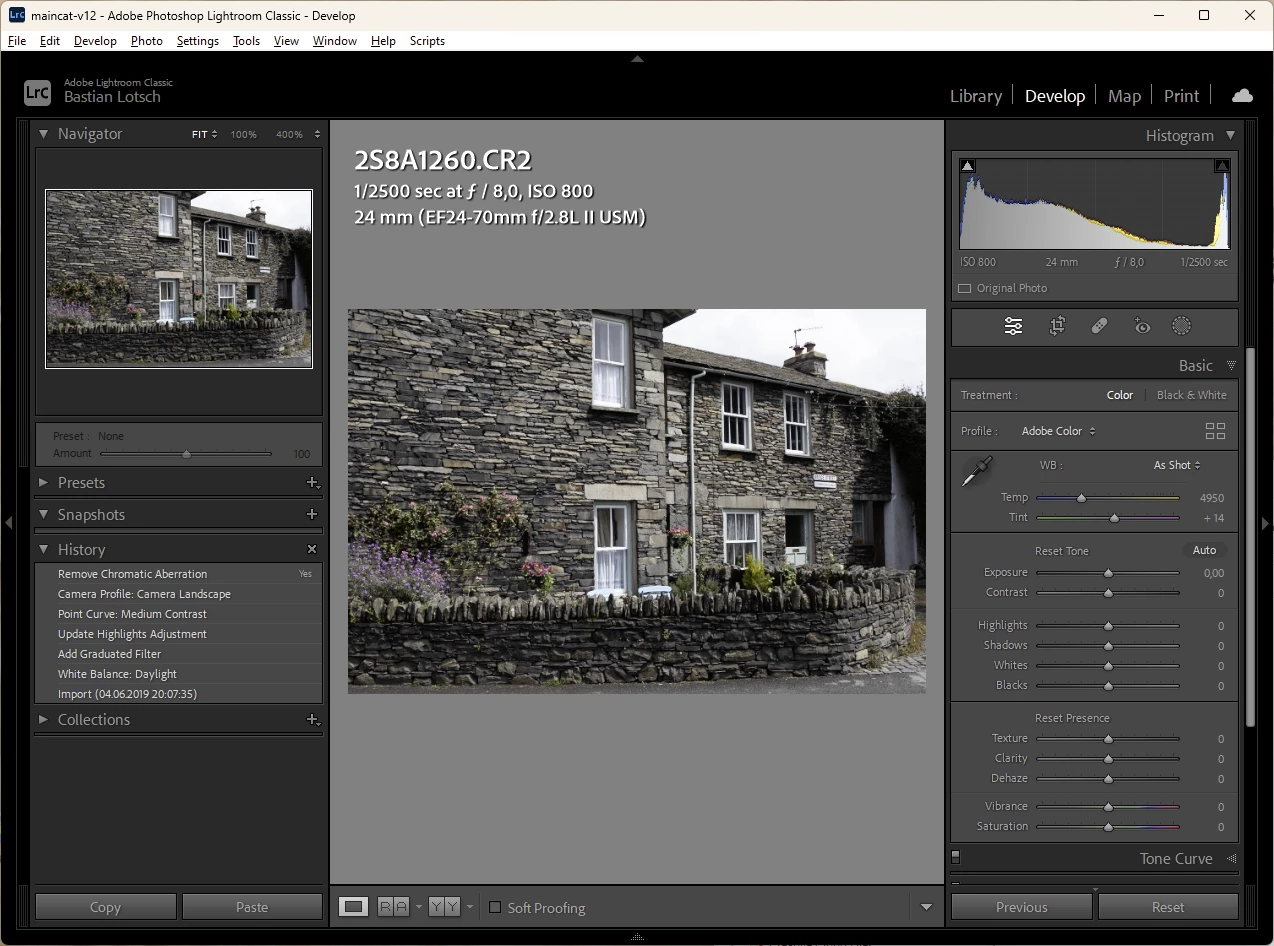
Wenn man genau hinsieht, ist History-Panel kein Zustand markiert. Das ist normalerweise nicht so. Ändert man in der Entwicklung etwas erscheint diese Änderung im Panel und wird entsprechend markiert.
Immerhin: Selektiert man manuell einen Eintrag im History-Panel werden die entsprechenden Einstellungen auf das Foto angewendet. Nur ist das keine Arbeit, die ich manuell für abertausende Fotos vornehmen möchte.
Eine Optmierung des Katalogs bringt leider nichts.
System:
Lightroom Classic 12.3 auf Windows 11 22H2
 AdChoices