



DClark064
Inspiring
May 12, 2017
解決済み

How to display full file path when reviewing photos in All Photographs?

  • May 12, 2017
  • 返信数 2.
  • 4702 ビュー

I am trying to prune duplicate photographs.  If I am looking at files in "All Photographs" I can see multiple copies of a photograph and the filename for each, but I cannot see the full path to the file.  This means it is difficult to determine where each is stored.  I can click on each of them and say display in Explorer or Go To Folder in Library, but that is extremely tedious.

Is there a way to get LR to display the full file path rather than just the file name?
このトピックへの返信は締め切られました。
解決に役立った回答 johnrellis

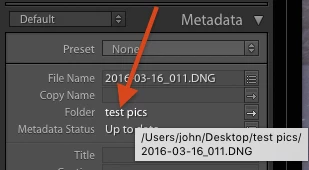
The Metadata panel on the right of Library shows the name of the folder containing the currently selected pic, and if you hover the mouse over the folder name, you'll see the full path:

返信数 2

Theresa J
Community Expert
Community Expert
May 12, 2017

You can also do a right click, or control click on an image and select Show in Explorer (PC), or Reveal in Finder (Mac). This will jump you out of Lightroom and to the location of the image on the hard drive.

johnrellis
johnrellis解決!
Legend
May 12, 2017

The Metadata panel on the right of Library shows the name of the folder containing the currently selected pic, and if you hover the mouse over the folder name, you'll see the full path: