


Inspiring
June 20, 2024
解決済み

How to generate a collection from list of files

  • June 20, 2024
  • 返信数 1.
  • 552 ビュー

I came across https://www.dropbox.com/scl/fi/lahw2k73ffqf6b283h0x4/file-list-to-collection.lua?e=2&rlkey=zm1xb47orp11g3pbo19sxfy7x&dl=0%C2%A0  which is probably what i need.

I am getting errors when asseccing to command:

catalog:findPhotoByPath (photoPath, false)

When the photoPath has hebrew fonts in it i see this:
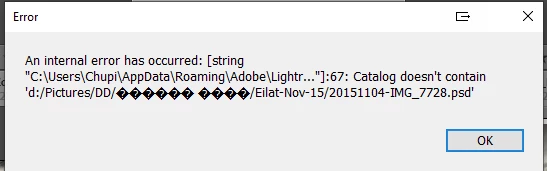
 

How can i fix this?


このトピックへの返信は締め切られました。
解決に役立った回答 danl42831687

Thanks...

Actually I managed to get it working.

I renamed the problematic folders.

Fromwhat i've read, LR can't handle non english in scripts.


返信数 1

johnrellis
Legend
June 21, 2024

Hmm, I wrote that script five years ago but don't remember it! Toubleshooting steps:


1. In LR Library, select that photo, right-click it, and do Show In Explorer.


2. In Windows Explorer, that file should be selected. Right-click it and do Copy As Path.


3. Paste that path here.


4. Attach the "files.txt" file you've been using here (as an attachment -- don't insert it).

danl42831687作成者解決!
Inspiring
June 28, 2024

Thanks...

Actually I managed to get it working.

I renamed the problematic folders.

Fromwhat i've read, LR can't handle non english in scripts.


johnrellis
Legend
June 28, 2024

"From what i've read, LR can't handle non english in scripts."


In general, LR does handle arbitrary Unicode characters correctly in scripts and plugins. I tested that script with a folder containing Cyrillic characters.  There have been a few bugs inside LR proper with non-US-English characters in file paths, but they're usually in very obscure corners of the app.