


解決済み
I can't enter anything in the text box for keywords
I have been adding keywords successfully. Suddenly I can't click in the text box at all. I can't add words or edit those that are already there. I have no idea how to fix this.

I have been adding keywords successfully. Suddenly I can't click in the text box at all. I can't add words or edit those that are already there. I have no idea how to fix this.
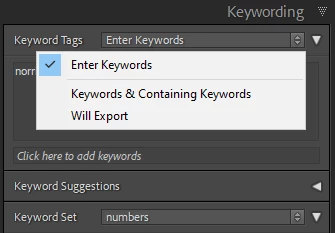
If you have been used to entering keywords directly in the main box of the Keywording panel - you may have clicked that main box onto one of its other modes. Those are used to display information in this main box - though you can still enter keywords in the small box below. Otherwise change the box back to 'Enter Keywords' mode by clicking to the right of "Keyword Tags" title.
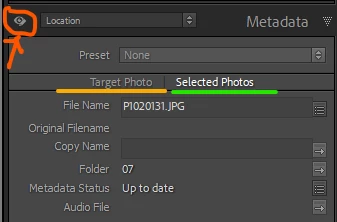
Other interface issues that sometimes trip people up, have to do with the Metadata panel (in case you have been entering keywords there). First there is an "eye" / "page" icon right at the top left of the panel, which switches between a mode that is just for new entry, and a mode that not only permits new entry but also displays whatever has already been entered. In the former mode it can look as if your entering of metadata has failed, when in fact that entry has succeeded (but is not being shown to you).
Another setting here changes behaviour for entering metadata onto multiple images together: the selector buttons "Target Photo" / "Selected Photos".
Enter your E-mail address. We'll send you an e-mail with instructions to reset your password.
 AdChoices