



straightlife
Inspiring
September 6, 2020
質問

Just want to upload a gallery of photos from Lightroom Classic

  • September 6, 2020
  • 返信数 3.
  • 625 ビュー

(First, all the how-tos I looked at are outdated. No little plus sign anywhere. Nahhh)

I created a gallery. That was easy.

It was easy to export it to my desktop. 

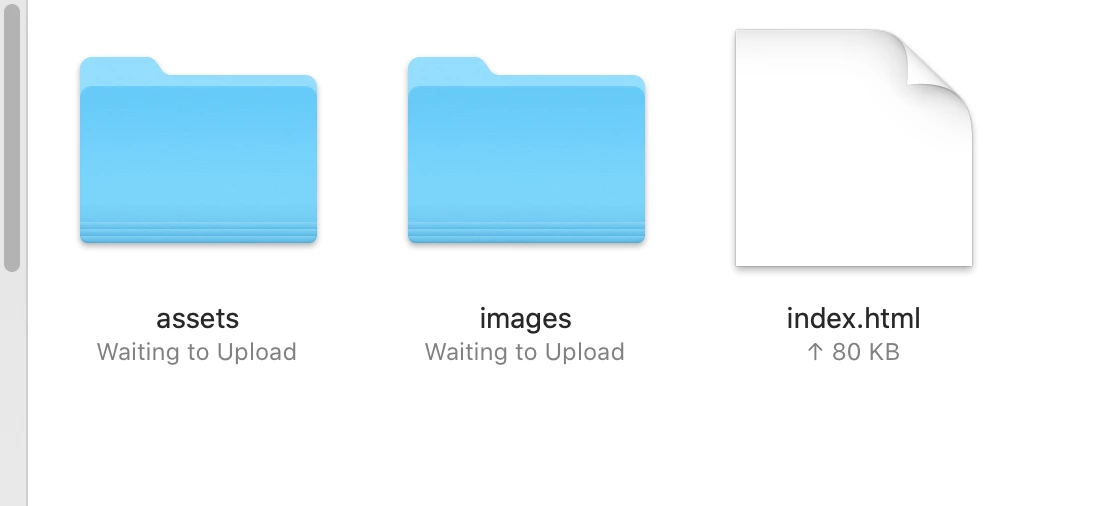
I wanted to upload it but kept getting a message about the ftp server being empty.

I did upload it to creative cloud, tho it doesn't show up there.

Is there any simple way to uploat about fifty photos at once to a web page I can offer a link to??????

I've got a terrific little weebly account but photos have to be uploaded one by one.


このトピックへの返信は締め切られました。

返信数 3

Rob_Cullen
Community Expert
Community Expert
September 7, 2020

Okay you are using Lightroom-Classic v9.4

So, if you are 'happy' with sharing photos in a Web link to anyone, then 'Exporting' of files from Classic is not needed.

All you need to do is create a Standard COLLECTION in Lr-Classic and mark it to 'Sync'. Set LrC to Sync from the Cloud icon.

You can 'Sync' thousands of photos this way from Lr-Classic.

The files synced to the web will have a 'long edge' pixel dimension of 2560 pixels.If you allow downloads, anyone given a link by you, can download JPGs of the 2560px files.


My Collection in LrC- 

My public link to the photos-

https://adobe.ly/2LcgALI


Regards. My System: Windows-11, Lightroom-Classic 15.1.1, Photoshop 27.3.1, ACR 18.1.1, Lightroom 9.0, Lr-iOS 10.4.0, Bridge 16.0.2 .
straightlife
straightlife作成者
Inspiring
September 7, 2020

Well I did that. clicked on the little cloud. But when I said "upload" it gave me an error message about an FTP server.

Rob_Cullen
Community Expert
Community Expert
September 7, 2020

Sorry, but I am completely 'off track' with my post.

I have been talking about syncing files to the Adobe ecosystem, and this is done as per my post above.

You are wanting a gallery in 'Weebly', for which I have no knowledge.

Perhaps 'Weebly' has a forum that can help with your 'FTP server' problem.


Regards. My System: Windows-11, Lightroom-Classic 15.1.1, Photoshop 27.3.1, ACR 18.1.1, Lightroom 9.0, Lr-iOS 10.4.0, Bridge 16.0.2 .
Just Shoot Me
Legend
September 7, 2020

So people don't have to download the image you have attached to your post please Edit your post to remove the Attached screen shot and Include it in the body of the text of your post.

You do that by Clicking the "More..." link at the bottom of your post, Selecting "Edit Message" and then use the "Insert Photos" icon in the tool bar at the top of the Post/Reply/Edit dialog box like this.


Thank you.

GoldingD
Legend
September 6, 2020

Please post your System Information as Lightroom Classic (LrC) reports it. In LrC click on Help, then System Info, then Copy. Past that information into a reply. Please present all information from first line down to and including Plug-in Info. Info after Plug-in info can be cut as that is just so much dead space to us non-Techs.


straightlife
straightlife作成者
Inspiring
September 7, 2020

Lightroom Classic version: 9.4 [ 202008061458-dbb2971e ]
License: Creative Cloud
Language setting: en-US
Operating system: Mac OS 10
Version: 10.15.6 [19G2021]
Application architecture: x64
Logical processor count: 8
Processor speed: 4.2 GHz
SqLite Version: 3.30.1
Built-in memory: 65,536.0 MB
Real memory available to Lightroom: 65,536.0 MB
Real memory used by Lightroom: 998.8 MB (1.5%)
Virtual memory used by Lightroom: 7,869.4 MB
Memory cache size: 36.0MB
Internal Camera Raw version: 12.4 [ 555 ]
Maximum thread count used by Camera Raw: 5
Camera Raw SIMD optimization: SSE2,AVX,AVX2
Camera Raw virtual memory: 26MB / 32767MB (0%)
Camera Raw real memory: 46MB / 65536MB (0%)
Displays: 1) 5120x2880, 2) 1920x1200

Graphics Processor Info:
Metal: AMD Radeon Pro 580


Application folder: /Applications/Adobe Lightroom Classic
Library Path: /Users/lauriepepper/Pictures/Lightroom/Lightroom Catalog-2.lrcat
Settings Folder: /Users/lauriepepper/Library/Application Support/Adobe/Lightroom

Installed Plugins:
1) AdobeStock
2) Aperture/iPhoto Importer Plug-in
3) Facebook
4) Flickr
5) Nikon Tether Plugin

Config.lua flags: None

AudioDeviceIOBlockSize: 512
AudioDeviceName: $$$/dvaaudiodevice/SystemDefaultAndEffectiveDeviceName=System Default (Built-in Output)#{comment}DVAAU-4201250: Open the audio hardware preferences page.
AudioDeviceNumberOfChannels: 2
AudioDeviceSampleRate: 44100
Build: LR5x42
CoreImage: true
GL_ACCUM_ALPHA_BITS: 0
GL_ACCUM_BLUE_BITS: 0
GL_ACCUM_GREEN_BITS: 0
GL_ACCUM_RED_BITS: 0
GL_ALPHA_BITS: 8
GL_BLUE_BITS: 8
GL_DEPTH_BITS: 24
GL_GREEN_BITS: 8
GL_MAX_3D_TEXTURE_SIZE: 16384
GL_MAX_TEXTURE_SIZE: 16384
GL_MAX_TEXTURE_UNITS: 8
GL_MAX_VIEWPORT_DIMS: 16384,16384
GL_RED_BITS: 8
GL_RENDERER: AMD Radeon Pro 580 OpenGL Engine
GL_SHADING_LANGUAGE_VERSION: 1.20
GL_STENCIL_BITS: 8
GL_VENDOR: ATI Technologies Inc.
GL_VERSION: 2.1 ATI-3.10.16
OGLEnabled: true
GL_EXTENSIONS: GL_ARB_color_buffer_float GL_ARB_depth_buffer_float GL_ARB_depth_clamp GL_ARB_depth_texture GL_ARB_draw_buffers GL_ARB_draw_elements_base_vertex GL_ARB_draw_instanced GL_ARB_fragment_program GL_ARB_fragment_program_shadow GL_ARB_fragment_shader GL_ARB_framebuffer_object GL_ARB_framebuffer_sRGB GL_ARB_half_float_pixel GL_ARB_half_float_vertex GL_ARB_imaging GL_ARB_instanced_arrays GL_ARB_multisample GL_ARB_multitexture GL_ARB_occlusion_query GL_ARB_pixel_buffer_object GL_ARB_point_parameters GL_ARB_point_sprite GL_ARB_provoking_vertex GL_ARB_seamless_cube_map GL_ARB_shader_objects GL_ARB_shader_texture_lod GL_ARB_shading_language_100 GL_ARB_shadow GL_ARB_shadow_ambient GL_ARB_sync GL_ARB_texture_border_clamp GL_ARB_texture_compression GL_ARB_texture_compression_rgtc GL_ARB_texture_cube_map GL_ARB_texture_env_add GL_ARB_texture_env_combine GL_ARB_texture_env_crossbar GL_ARB_texture_env_dot3 GL_ARB_texture_float GL_ARB_texture_mirrored_repeat GL_ARB_texture_non_power_of_two GL_ARB_texture_rectangle GL_ARB_texture_rg GL_ARB_transpose_matrix GL_ARB_vertex_array_bgra GL_ARB_vertex_blend GL_ARB_vertex_buffer_object GL_ARB_vertex_program GL_ARB_vertex_shader GL_ARB_window_pos GL_EXT_abgr GL_EXT_bgra GL_EXT_bindable_uniform GL_EXT_blend_color GL_EXT_blend_equation_separate GL_EXT_blend_func_separate GL_EXT_blend_minmax GL_EXT_blend_subtract GL_EXT_clip_volume_hint GL_EXT_debug_label GL_EXT_debug_marker GL_EXT_depth_bounds_test GL_EXT_draw_buffers2 GL_EXT_draw_range_elements GL_EXT_fog_coord GL_EXT_framebuffer_blit GL_EXT_framebuffer_multisample GL_EXT_framebuffer_object GL_EXT_framebuffer_sRGB GL_EXT_geometry_shader4 GL_EXT_gpu_program_parameters GL_EXT_gpu_shader4 GL_EXT_multi_draw_arrays GL_EXT_packed_depth_stencil GL_EXT_packed_float GL_EXT_provoking_vertex GL_EXT_rescale_normal GL_EXT_secondary_color GL_EXT_separate_specular_color GL_EXT_shadow_funcs GL_EXT_stencil_two_side GL_EXT_stencil_wrap GL_EXT_texture_array GL_EXT_texture_compression_dxt1 GL_EXT_texture_compression_s3tc GL_EXT_texture_env_add GL_EXT_texture_filter_anisotropic GL_EXT_texture_integer GL_EXT_texture_lod_bias GL_EXT_texture_mirror_clamp GL_EXT_texture_rectangle GL_EXT_texture_shared_exponent GL_EXT_texture_sRGB GL_EXT_texture_sRGB_decode GL_EXT_timer_query GL_EXT_transform_feedback GL_EXT_vertex_array_bgra GL_APPLE_aux_depth_stencil GL_APPLE_client_storage GL_APPLE_element_array GL_APPLE_fence GL_APPLE_float_pixels GL_APPLE_flush_buffer_range GL_APPLE_flush_render GL_APPLE_object_purgeable GL_APPLE_packed_pixels GL_APPLE_pixel_buffer GL_APPLE_rgb_422 GL_APPLE_row_bytes GL_APPLE_specular_vector GL_APPLE_texture_range GL_APPLE_transform_hint GL_APPLE_vertex_array_object GL_APPLE_vertex_array_range GL_APPLE_vertex_point_size GL_APPLE_vertex_program_evaluators GL_APPLE_ycbcr_422 GL_ATI_blend_equation_separate GL_ATI_blend_weighted_minmax GL_ATI_separate_stencil GL_ATI_texture_compression_3dc GL_ATI_texture_env_combine3 GL_ATI_texture_float GL_ATI_texture_mirror_once GL_IBM_rasterpos_clip GL_NV_blend_square GL_NV_conditional_render GL_NV_depth_clamp GL_NV_fog_distance GL_NV_light_max_exponent GL_NV_texgen_reflection GL_NV_texture_barrier GL_SGI_color_matrix GL_SGIS_generate_mipmap GL_SGIS_texture_edge_clamp GL_SGIS_texture_lod