


Exit
  • Global community
    • Language:
      • Deutsch
      • English
      • Español
      • Français
      • Português
  • 日本語コミュニティ
  • 한국 커뮤니티
0

Lightroom 6 Zipped my Catalogue on external hard drive and won't open

New Here ,
Oct 08, 2022 Oct 08, 2022

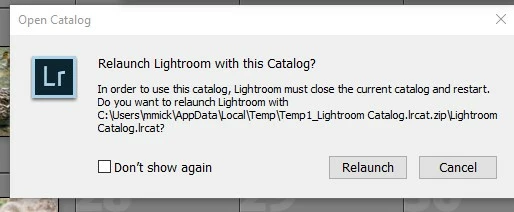
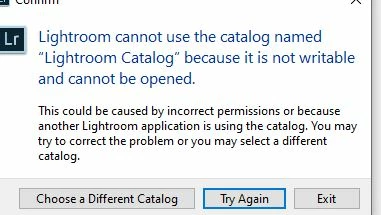
I backed up my Lightroom 6 Windows catalogue to an external hardrive and it would not open when I checked to make sure it was correct. The catalogue file was zipped and would load through lightroom. I clicked on the file again and got the following error messages. How do I fix this? I want a working backup on an external hard drive. Thanks. J
Screenshot 2022-10-08 140823.jpgCapture.JPG

TOPICS
Windows
229
Translate
Report
Community guidelines
Be kind and respectful, give credit to the original source of content, and search for duplicates before posting. Learn more
community guidelines
LEGEND ,
Oct 08, 2022 Oct 08, 2022

Unzip the file first.

Translate
Report
Community guidelines
Be kind and respectful, give credit to the original source of content, and search for duplicates before posting. Learn more
community guidelines
Community Expert ,
Oct 08, 2022 Oct 08, 2022

As @dj_paige says!

And you are trying to open a Catalog on the C:\drive (Not an External drive!), and it is hidden deep in your system files for some unknown reason. Not the best place for a Catalog! (better in a {Pictures} or {Documents} folder.)

2022-10-09 06_51_52-Window.jpg


"Another Lightroom Application is using the catalog." is an error message that a 'Lock' file is present with a catalog, preventing it from opening. LOCK FILE DELETION - LR-CLASSIC 


Regards. My System: Windows-11, Lightroom-Classic 15.0, Photoshop 27.0, ACR 18.0, Lightroom 9.0, Lr-iOS 10.4.0, Bridge 16.0 .
Translate
Report
Community guidelines
Be kind and respectful, give credit to the original source of content, and search for duplicates before posting. Learn more
community guidelines
New Here ,
Oct 08, 2022 Oct 08, 2022

Using Lightroom 6 not classic. Cannot find a  lock file.

Translate
Report
Community guidelines
Be kind and respectful, give credit to the original source of content, and search for duplicates before posting. Learn more
community guidelines
Community Expert ,
Oct 08, 2022 Oct 08, 2022

The reason this backed-up Catalog file appears sitting deep within the user profile in the C: drive, is because Windows has extracted a copy of it from the Zip file 'on the fly'. Such things go into your user's local "temporary files" place. And in here, there are not the needed user permissions for this extracted Catalog copy to be openable.


So it will be necessary to actively extract / save a copy out of the Zip file, into another more standard file system folder, on whichever drive makes most sense.


Personally I prefer not to use the computer user account's Pictures or Documents 'library' folder for the Catalog itself, nor for the image files that are imported to this Catalog. Rather, I prefer a simple file system location, which will be computer-user-neutral and will show no special behaviour.

Translate
Report
Community guidelines
Be kind and respectful, give credit to the original source of content, and search for duplicates before posting. Learn more
community guidelines
Community Expert ,
Oct 08, 2022 Oct 08, 2022
LATEST

I agree with Richard.

On another note, opening a Backup Catalog in an “obscure” location where the support files like Previews data etc, are not located in the same folder is not a good idea.


See an option at the link below.

https://www.lightroomqueen.com/community/threads/test-your-catalogs-and-backups-how-to.34657/


Regards, Denis: iMac 27” mid-2015, macOS 11.7.10 Big Sur; 2TB SSD, 24 GB Ram, GPU 2 GB; LrC 12.5,; Lr 6.5, PS 24.7,; ACR 15.5,; (also Laptop Win 11, ver 24H2, LrC 15.0, PS 27.0; ) Camera Oly OM-D E-M1.
Translate
Report
Community guidelines
Be kind and respectful, give credit to the original source of content, and search for duplicates before posting. Learn more
community guidelines