



skyrunr
Inspiring
October 28, 2017
解決済み

Lightroom Classic Severe Slowness and Memory Leaks!

  • October 28, 2017
  • 返信数 7.
  • 8972 ビュー

MANY other users are having this issue as well.  I'm running an i7 32GB SSD gaming system.  After 3-5 minutes of using Lightroom memory is leaking to 3-5GB just viewing an image in the light table.  It gets so bad I can't even zoom in and out of a photo; everything crawls!  I work in software and hardware technical support, and nothing in my system resources is maxing out.  It is also very interesting that I'm paying for a subscription and there is no other option for support other than this forum.
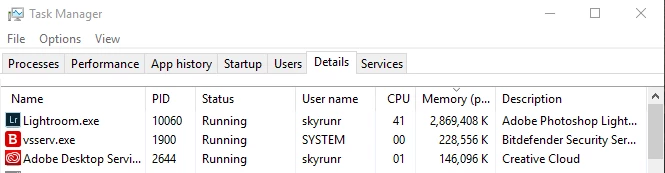
I'm going to go through all the textbook troubleshoot recommendations linked below, but this really shouldn't be necessary.    I don't think I can jump back to the last version without losing my recent catalog work, but I may have to try that next.  I spent a week trying other applications and unfortunately Lightroom has some significant advantages.  They need to focus on fixing the date issues, let me apply auto-levels and auto-wb on import, rotating video, and expand the file formats supported; such as PDF viewing for contact sheets etc.

Troubleshoot Adobe Lightroom problems, issues, or bugs

    このトピックへの返信は締め切られました。
    解決に役立った回答 skyrunr

    I'm closing this thread out to this one:Lightroom Classic CC seems slower than previous Lightroom version it replaced

    返信数 7

    skyrunr
    skyrunr作成者解決!
    Inspiring
    November 7, 2017
    Participant
    November 7, 2017

    I am running into the same issue. Sorry to say I can't add anything for help though. I have Windows 10 on a 6 month old Dell XPS computer with and i7 and 16 Gig RAM. Right now as I write this, the Develop module sitting at complete idle is drawing 2.7 Gigs of memory. Adobe, please help! Best of luck skyrunr and everyone.

    skyrunr
    skyrunr作成者
    Inspiring
    November 5, 2017

    The fix is to create new empty catalogs and import your old catalogs into them.  This is a real pain.  It isn't a perfect fix, but everything is working better for me!  It was in another thread so I wanted to post it here.


    1. Update to version 7.0.1

    2. Use of OpenGL instead of DirectX

    https://helpx.adobe.com/in/lightroom/kb/unable-to-back-up-catalog.html

    3. Create a new catalog and import from the old catalog

    4.  You have to set each new catalog's settings as desired


    I'm running 50GB raw cache on an SSD drive, GPU, smart previews, high resolution JPG's, unlimited video cache.  I also set lightroom.exe to be high priority in Windows tasks.

    good luck, lets get back to work!  (man this forum is awful, it doesn't tree/thread, it keeps jumping to the top, and I can't see what I'm typing...  ugh!

    skyrunr
    skyrunr作成者
    Inspiring
    November 6, 2017

    spoke too soon, after editing a photo for 10 minutes I couldn't zoom or preview basic presets...

    skyrunr
    skyrunr作成者
    Inspiring
    November 1, 2017

    I made some progress!

    Memory still spikes up a bit, but the program no longer bogs down!  Not all of these were changes, but I wanted to confirm all of the settings I had.  I can view, clone, zoom, navigate, and get work done again!

    • Updated my Video driver to the non-whql version (AMD R9 2xx)
    • Deleted all of the Lightroom preview folders (GB's)!  I'd say this was the main fix.  Note that there were duplicate folders for previews and for smart previews.  The smart preview folders have not re-appeared yet which I find interesting.
    • Increased camera raw cache to 10GB
    • Unchecked limit video cache
    • Checked use smart instead of originals for editing previews
    • Checked generate previews in parallel

    UPDATE2:

    • Installer of Lightroom Classic CC doesn't remove Lightroom CC; since my catalogs are updated I'm moving forward and manually uninstalled it.
      (Why they didn't name it "desktop/local/offline" instead of "classic" is beyond me!  Even just plain Lightroom would make more sense.  LOL)
    • There is also an update to Classic CC which did not come up under automatic updates, no problems with it yet.
      (No easy way to preview what was in it from the cloud interface either.  You'd they were new to software or something.)

    You may also want to try running the lightroom.exe as an administrator at least once.  I toggled this back off and didn't notice a difference.

    I hope this helps others, please post your results here, good luck!

    skyrunr
    skyrunr作成者
    Inspiring
    November 2, 2017

    Back to major slowness everywhere...  We better get two months free for this crappy release!

    adsfgew5434g5g
    Participant
    November 4, 2017

    Hey, I was having the same problem. I have all the things check you do. Increase your camera raw cache even higher mine is at 200 GB and I have the samsung m.2 960 pro 1TB. Also, I am editing extremely large merged hdr dng and tiff files. I optimize my catalog every new import and it makes things super fast. Are you on windows 7 or 10? I just made a new build and am updated to the latest windows 10 pro release and have installed all up to date drivers for video card, chipset and etc. Let me know if optimizing the catalog works. From my experience, you have to keep doing things to make sure everything is working optimal in lightroom. For example, (in the earlier lightrooms) I would also have to exit out of lightroom every 5-10 minutes becauese at about the 8-10GB gig mark for ram usage in lightroom it would become super slow.

    nortog360
    Participant
    October 29, 2017

    Adobe,

    I have same slowness. I have adequate memory. Previous version was running much faster. Import runs slower than before. Your notes indicated faster previews, faster imports... What happened? Please address!

    Thank you.

    AusViper
    Participant
    October 29, 2017

    I have the same issue as well. i7 PC SSD 16Gig Ram.

    After about 5 minutes of develop use, things like moving between images or using brushes slow down massively to the point it becomes pretty much unusable. Memory usuage in task manager shows lightroom up to 3.5 Gig!

    To get around this slowdown, I am basically closing lightroom and opening it back up again every 10 minutes or so to clear the memory.

    For an update supposedly focused on speed improvements.. this is far from it..

    tonyellisnyc
    Inspiring
    October 28, 2017

    The speed is unbearable. How do I revert back to lightroom 6 this is absurd.