

Known Participant
October 26, 2021
解決済み

Lightroom importing images... but not video files?

  • October 26, 2021
  • 返信数 1.
  • 1124 ビュー

Lightroom isnt importing video files, pretty sure it must a a setting ive not checked somewhere> ive tried purging cache ....no different.

Camera Sony RX100


thanks for any tips?

このトピックへの返信は締め切られました。
解決に役立った回答 tmickow
Hi LR version 10.4

Ok were getting therer…..thanks

Ive seen the folder called MP_root, inside is folder 100ANVDI so the vids are there and they will play in LR ….but no preview available? the main thing is they are now in Lightroom.

Moving to the develop module….dont suppose you can make basic adjustments exposure/shadows to video files can you?

Shaun
Sent from Mail for Windows

No, you can't work with video in Develop.

You can tweak some settings using the Quick Develop panel in the Library module.  If you're not seeing all the controls, click the little triangles to expand the sections...
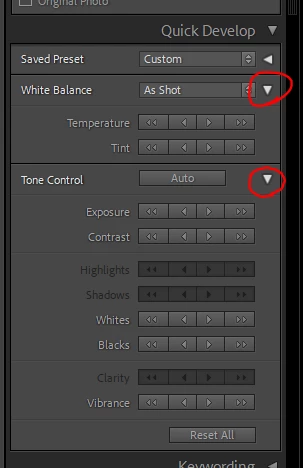
 

Overall, LrC isn't really good at dealing with video though, imho.  Outside of basic cataloging, I'd recommend looking elsewhere if you want real video editing capabilities.

返信数 1

Inspiring
October 26, 2021

Some details would help, like...

What version of Lightroom?

What OS?

What steps are you doing and where is the processing failing?

Are there any error messages?

Have you been able to import videos from this camera in the past?

Can you import videos from a different camera?


Known Participant
October 26, 2021
Hi
Windows 10
LR version 2-2-2-v10
Camera card to card reader
No error messages at import….but only importing still images no video files visible
Video files are MP4 (1080)
Still images RAW


Thanks for looking into

Shaun
Sent from Mail for Windows
Inspiring
October 26, 2021

No idea what Lr 2-2-2-v10 is.  You can click Help --> System Info to get the version number.


"no video files visible" - if no video files are showing up on the import screen, it sounds like you're not pointing at whatever folder they're stored in on the memory card.  If you're using the import source under the Devices section, try going to the Files section and navigating to the folder the videos are stored in.


As a troubleshooting step, you could also try copying the video files from the memory card onto your desktop using File Explorer and then see if you're able to import from there.


If those don't help, please add a screenshot of your import screen to this post.  Also, would then still like to know if this has ever worked and if you're able to import videos from another camera.