


Participant
July 5, 2021
質問

LR Classic 10.3 not recognising some of the files in my external hard disk

  • July 5, 2021
  • 返信数 3.
  • 930 ビュー

Hello!  I have found topics similar to this but they do not help with my specific problem so I am posting to see if any of you clever people can help.  Here goes....

I am a relative novice and learning fast but this has me stumped.   

I store all of the original files from my cameras on an external hard drive (Seagate 5 TB) to save space on my Macbook Pro.  I think I have a relatively sensible file organisation system.  The LR catalog resides on the Macbook Pro.  All was going fine until recently -  have a suspicion the problem started when I upgraded to the latest version of LR Classic.

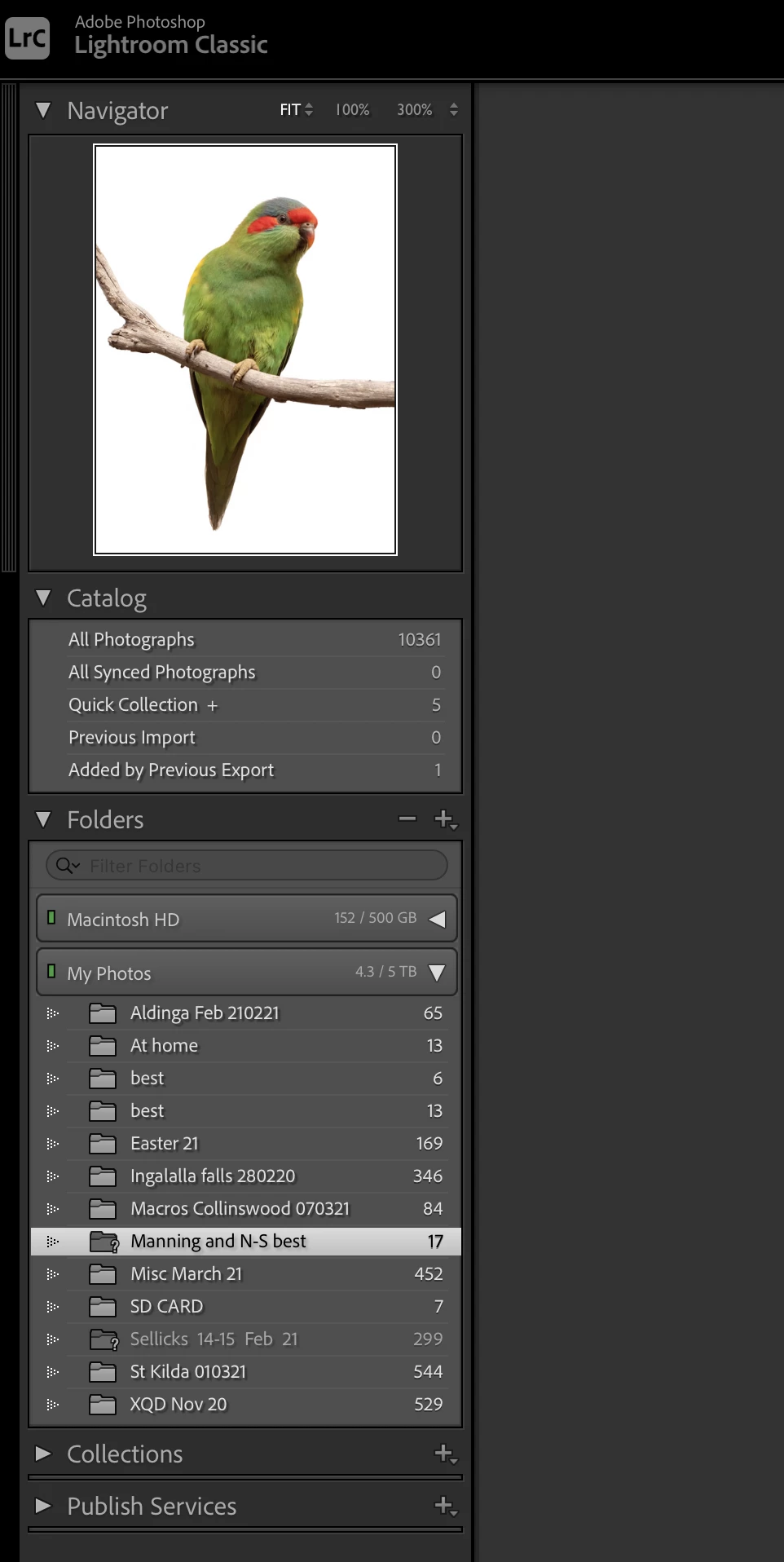
The problem is that most of (but not all) the folders relating to this external drive in the Lightroom Library module are missing.  2 of them are greyed out with a ? icon.  A few of them are there and the files are found when I go into Develop module, however many folders are simply not there and the thumbnails(when I click 'all photographs' in Catalog) have the ! icon on them.  In develop, I get the message "The file could not be found".  

One of the folders had a ? icon - I tried 'find missing folders' - took me to a backup folder on my computer's hard drive. When I chose that it disappeared from the LR folder list, orig files still 'missing'.  

I have not renamed or moved any of the files on the external drive. They are all still there and I can open the files with other programmes.  


I did recently move a lot of the files on my Macbook Pro to iCloud and deleted a lot of stuff but I did not move the LR catalogue which is still there on my computer's hard disc.   I can't believe that would have anything to do with the problem as a selection of the folders is still there and operable.  


I hope someone can shed some light on this - here are a couple of screenshots that illustrate the issue.  

This is a screenshot of my external hard drive (called "My Photos") content in Finder: 
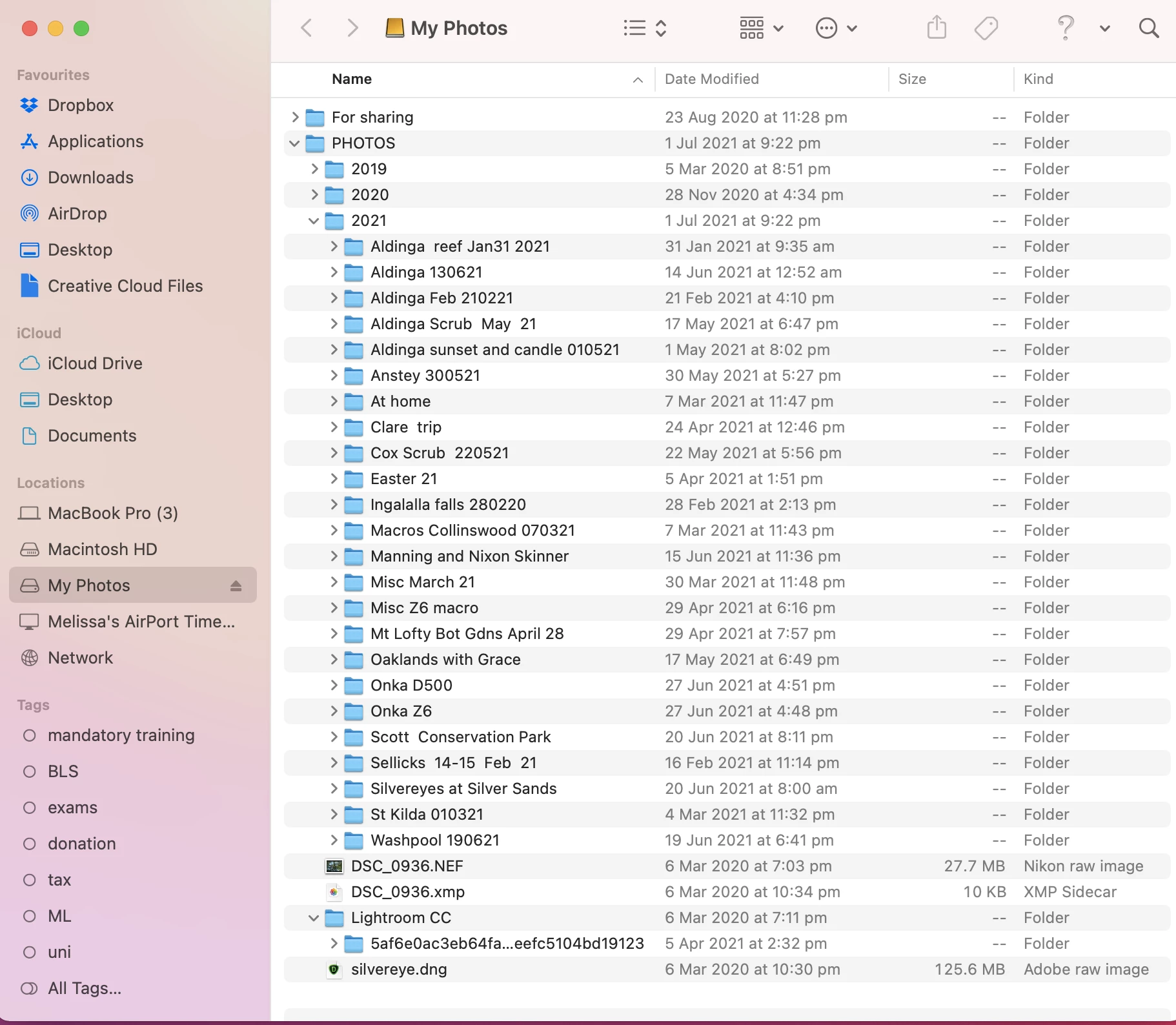
This is the Lightroom folder window in Library mode: The list of folders under '"MyPhotos" is quite short and for example, does not include the 2020 folder or the main 2021 folder, only a few subfolders from the main 2021 folder.  
 

このトピックへの返信は締め切られました。

返信数 3

Rob_Cullen
Community Expert
Community Expert
July 5, 2021

My belief is-

The 'Missing' Folder (with the ? called "Manning and N-S best") is where Lightroom-Classic believes the photos to exist.

But, I might suggest, they are in a Folder that is named differently "Manning and Nixon Skinner"-

Was the folder renamed using Mac Finder?

See Part 2 in the "Find Folder" link given by @GoldingD above, and relink the 'missing' folder.


The Method explained simply is-

1) [Right-Click] on the "Manning and N-S best" in Lr-Classic folders panel

2) Choose [Find Missing Folder...]

3) Search and select the "Manning and Nixon Skinner" folder in the Finder window that opens

4) Click on [Select Folder]


Regards. My System: Windows-11, Lightroom-Classic 15.1.1, Photoshop 27.3.1, ACR 18.1.1, Lightroom 9.0, Lr-iOS 10.4.0, Bridge 16.0.2 .
GoldingD
Legend
July 5, 2021
cmgap
Community Expert
Community Expert
July 5, 2021

I did recently move a lot of the files on my Macbook Pro to iCloud and deleted a lot of stuff but I did not move the LR catalogue which is still there on my computer's hard disc. I can't believe that would have anything to do with the problem as a selection of the folders is still there and operable.


This is exactly the problem. When you moved the folders Lightroom no longer knows where they are. Click on a Question Mark and Lightroom will show the path indicating where it thinks the folder should be. Click on the button that says Do you want to locate the folder and browse to the new location to reestablish the connection to the folder.


https://helpx.adobe.com/lightroom-classic/how-to/lightroom-move-folder-files.html


cmgap
Community Expert
Community Expert
July 6, 2021

Lightroom will not rename your folders - this is a manual process. Please reread my first response to "find missing folder" and show Lightroom where you've moved it to. Also be aware that using iCloud is not the same as using Creative Cloud storage which comes with your plan. Both cloud locations will give you the ability to increase your storage capacity so you may want to see which one you have more of.

Leame 作成者
Participant
July 6, 2021

Hi cmgap, thank you for your interest and input!    I think I may have misled you - when I cleaned up my computer I did not move any photo files to iCloud - I only mentioned that to clarify that the LR catalogue files are still on my computer.    My photo files (Nikon RAW files) have always been put straight on to my external hard drive from the camera card, and I haven't moved or renamed them.  I understand the concept of finding missing files for folders with a question mark, but my main problem is the folders that do not show up in LR at all.  


I am wondering if moving my LR catalogue files onto the external drive would be of any use - have seen that discussed in another thread.