


Participant
December 7, 2021
質問

Nikon 24-120mm f/4G lens profile issue

  • December 7, 2021
  • 返信数 2.
  • 805 ビュー

I have a problem with the Lightroom profile correction for my lens. I use a D750 with 24-120mm f/4G lens. Here is an example of an image who shows what the problem is.
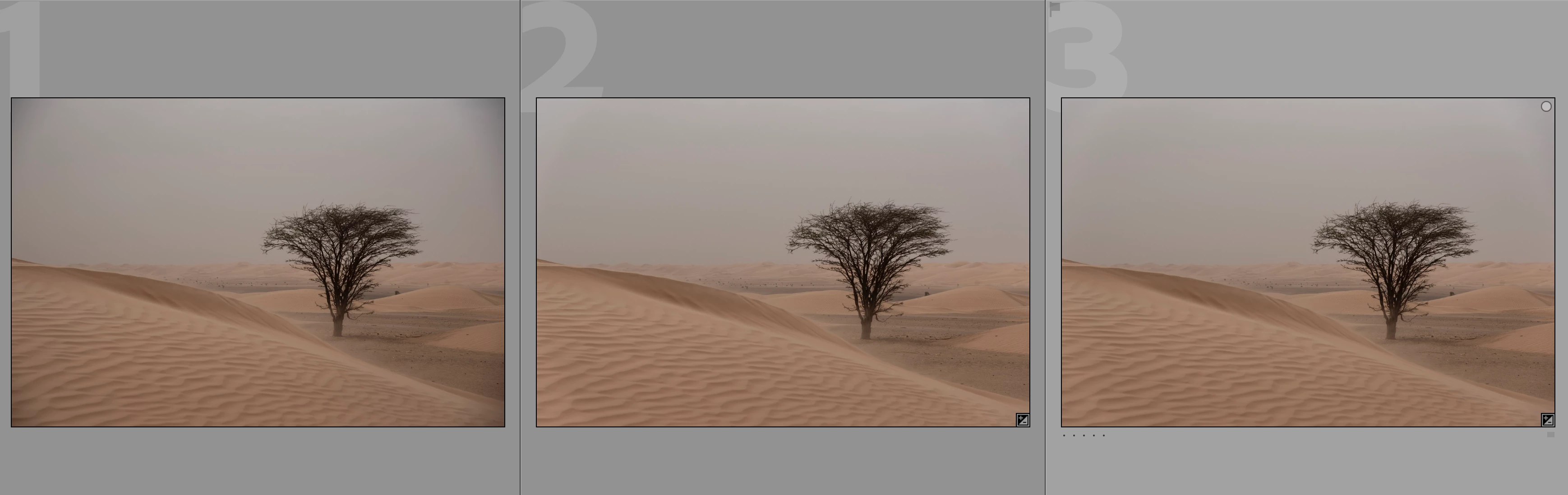


Image imported in Lightroom (LrC):


Image 1 - image without any preset.

Image 2 - image without any preset, but after check the box “Enable Profile Correction”. LrC selects profile “(profile Adobe (Nikon AF-S NIKKOR 24-120mm f/4G ED VR) v2”.

Image 3 - image without any preset, but after check the box “Enable Profile Correction” and change the profile to “(profile Adobe (Nikon AF-S NIKKOR 24-120mm f/4G ED VR)”.

Apparently there are two profiles for the 24-120mm f/4G. Both don’t work well.

It looks bad. I spent hours manually correcting this issue but I can’t get it right.


Image specs:

- ISO 200

- 82 mm

- f 5/6

- 1/4000 sec


Last month I shot 2,000 images and a few dozens of them have this problem. Most of the problem images have aperture 4, 5/6 or 8 and focal length from 24 to 120mm. Most of the problem images have a grey or blue sky.


I hope someone can help me, because I don’t know what to do.


Thanks in advance, Ronnie 

このトピックへの返信は締め切られました。

返信数 2

Todd Shaner
Legend
December 8, 2021

Try setting the camera's vignette control to Off. Normally the in-camera controls only affect the JPEG output, but Adobe has made some changes concerning "built-in" lens profiles used with raw files. Give it a try.

diyask作成者
Participant
December 8, 2021

Thank you @1654796. I will give it a try. Good suggestion for future images. But do you also know how to correct images which I already made?

Todd Shaner
Legend
December 8, 2021
quote

But do you also know how to correct images which I already made?


By @diyask


Use the Lens Corrections> Manual> Vignetting controls with the v2 lens profile selected. You may need to use three different settings (F4, F5.6, and F8 and higher). When you find the correct correction create a Develop preset for each one with only the below settings checked. You can then use the Filter Bar Lens and Aperture to select the NEFs shot at each of the three aperture settings.


GoldingD
Legend
December 7, 2021

What aspect of lens issues are you trying to correct?

Hard to figure out on these images a seen post share on a web page.


diyask作成者
Participant
December 8, 2021

Thank you for your reply @GoldingD . I have a problem with the vignet. If I use the profile correction the corners will color white. I do not know how to correct it. I tried it with manual vignet corrections, but you always see somegthing whit in the edges.