


davidupatterson
Participant
October 25, 2020
解決済み

Number of 'All Photographs' does not match "All Synced Photographs" across devices

  • October 25, 2020
  • 返信数 3.
  • 1645 ビュー

Hey all, 


Thanks for your help. Here are the numbers I'm looking at. As you can see, the total number of photos that my laptop is registering differs from that of the cloud (website) and my mobile app. How do I figure out where the extra photos are and what can I do to match it all up? Thanks for your help! 


Website (Cloud) LRCC: 


  • All Photographs: 349


Mobile LRCC:


  • All Photographs: 349


Laptop LRCC:


  • All Photographs: 363
    All Synced Photographs: 349
このトピックへの返信は締め切られました。
解決に役立った回答 DdeGannes

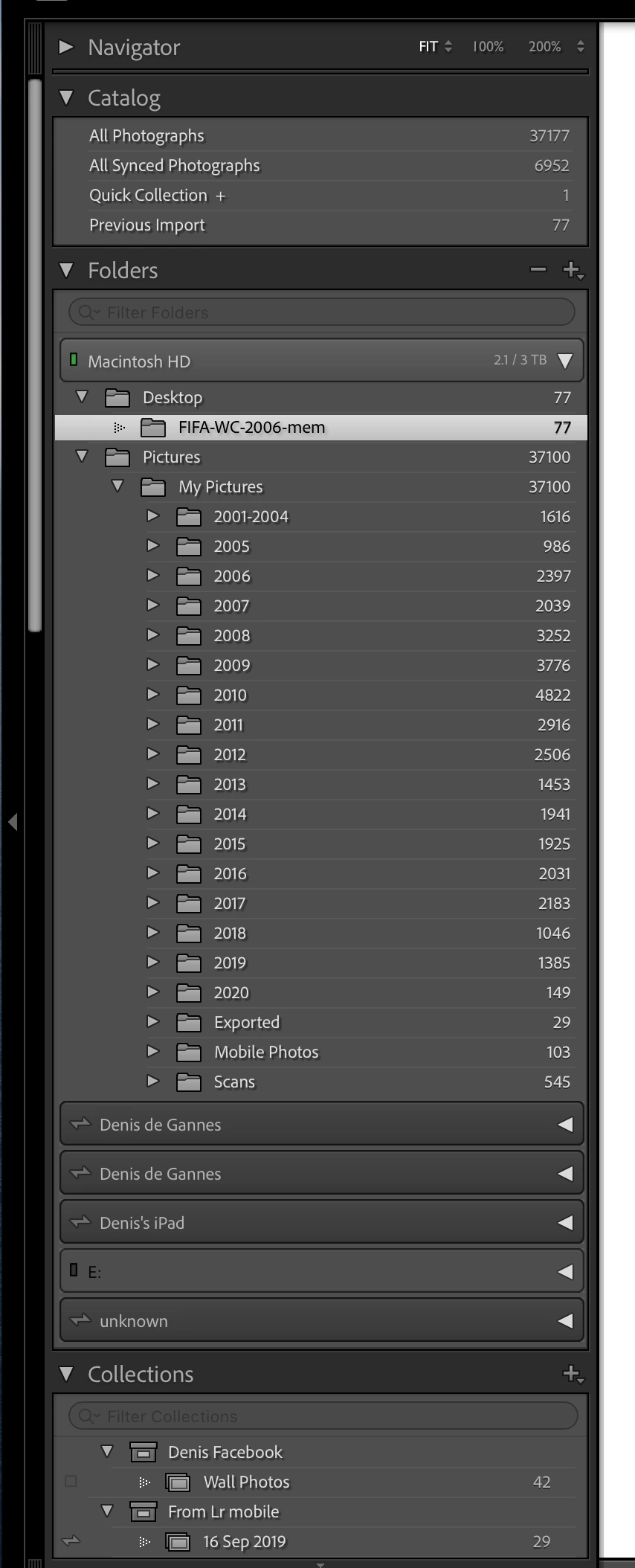
It's as "Just Shoot Me" describes. It is not unusual for the number of All Photographs to differ. See the screen capture of the left panel of my LrC Library module.

It shows All Photographs                = 37,177

And All Synced Photographs          =  6,952

In the Folder Structure of this is represented by

Desktop folder                                =       77

My Pictures folder                         = 37,100

Included in the My Pictures folder I have a folder designated as the location to store image files that have been synced from connected Mobile Devices, called Mobile Photos, that contains 103 files that are included in the All Synced Photographs the balance of 6,849 are images that have been synced from designated "Collections" from LrC. Hope this info can assist with your locating the difference on your system.

The 6,952 All Synced Photographs also show on all my 4 mobile devices as "All Photos".


返信数 3

Just Shoot Me
Legend
October 25, 2020

Also the All Synced Photos entry can show the number of Total Synced images even if you removed some.


A dialog box will pop up that IMHO is confusing. It asks something like "Do you want to remove these from the All Synced Photos" and then 2 buttons, No which is select and Yes which you have to switch to and or Click. If you take the Default action, No, then even if you DELETED From DISK images you have synced with the Web/Mobile system they will remain listed in thew All Synced Photos entry.


Yes Kind of Ridiculous.

davidupatterson
Participant
October 26, 2020

Thanks. In this case, it's 'all photographs' that seems off and the 'all synced photographs' is the correct number. In other words, it seems like there are extra photos in my laptop Lightroom app that aren't there on mobile, but I don't know which ones. I'm looking for an easy way to figure out where the discrepancy is. 

Just Shoot Me
Legend
October 26, 2020

You have posted in the Lightroom CLASSIC Forum amd now you say Lightroom App. Lightroom, Nothing After Lr, is a completely different program from Lr CLASSIC (LrC).


Also are you looking at Lr Mobile on  Mobile Device?


All Photographs shows all images that are in the LrC Catalog file. Not all of them are Synced with the Web and Mobile systems. Only ones that you have placed in  LrC Collections AND SYNCED those Collections to the Web/Mobile systems.


You really need to post screen shot of what you are seeing on your computer.

Just Shoot Me
Legend
October 25, 2020

And have you taken any pictures with your phone or pad that you imported into LrM?

davidupatterson
Participant
October 26, 2020

I haven't. Everything that's in my Lightroom account has a physical file stored on my laptop. That's why it's so confusing to me. Any other thoughts? 

Just Shoot Me
Legend
October 25, 2020

In the future, So people don't have to download the image you have attached, please use the Insert Photos icon found in the Tool Bar of the Post and Reply text entry dialog window as pictured below.
Since you Can't Edit your original post to remove the Attached screen shot Please include the screen shot you attached to a new reply to this conversation by clicking the Blue Reply button under your original post and use the Insert Photos icon in the tool bar.
The Insert Photos icon is this one in the Tool Bar.


Thank you.