


Participating Frequently
May 6, 2019
質問

Red and Blue Tones Blotching?

  • May 6, 2019
  • 返信数 2.
  • 1120 ビュー

Hello,

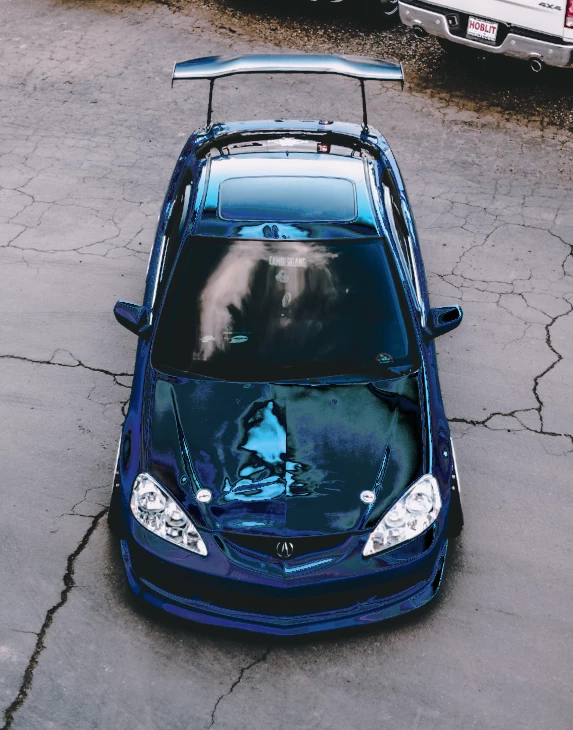
Recently my Lightroom has been doing this weird glitch to the blue and red tones of my images.  It only happens on my second monitor which I already color calibrated with a Spyder5Pro.  It's fine on my main monitor but I prefer to edit on my second monitor, and as soon as I drag Lightroom over to the second monitor this occurs.  Also, I've noticed the shadows/blacks become slightly lightened/faded as well as a result of this glitch.  If anyone has any idea of what could be causing it, please let me know as this annoys me very much.
このトピックへの返信は締め切られました。

返信数 2

Hilde Maassen
Participating Frequently
May 6, 2019

I would try to make a new color profile for the second monitor to see if this solves the problem.

astrocamstar作成者
Participating Frequently
May 7, 2019

Thank you for the idea, because of you suggestion I gave it a little experiment.  I realized that if I leave Lightroom on my main monitor and switch my second monitor's color profile to a default Windows color profile > drag Lightroom over to the second monitor > switch back to the calibrated color profile again on the second monitor, my issue becomes solved (until the next time I close Lightroom or drag it to the main monitor).  It seems as if all my Spyder5Pro-generated profiles for the second monitor cause this same issue, so I'm unsure how to keep it permanently fixed.

johnrellis
Genius
May 7, 2019

Some more troubleshooting steps:

1. Try disabling the graphics processor by unchecking Preferences > Performance > Use Graphics Processor. That will identify whether it's related to the use of the GPU.

2. Do you have two separate graphics cards, or are the two displays connected to the same graphics card? LR doesn't do well with multiple graphics cards, and Adobe recommends connecting both displays to the same card: Adobe Lightroom GPU Troubleshooting and FAQ

3. Update the graphics driver directly from the manufacturer's Web site: Adobe Lightroom GPU Troubleshooting and FAQ

4. Are your setting the option in the Spyder utility to generate version 2 or version 4 profiles?  Version 4 profiles are notorious for causing problems, so make sure you've got version 2 profiles.

johnrellis
Genius
May 6, 2019
weird glitch to the blue and red tones of my images.

You may have Show Clipping enabled -- clipped blacks show as blue, clipped highlights as red. Right-click one of the triangles in the Histogram and make sure Show Clipping is unchecked:

astrocamstar作成者
Participating Frequently
May 7, 2019

Thanks for the input, but it's not clipping unfortunately (if only it were that simple).  I believe clipping makes a solid bright blue/red blob, my blues and reds just become really distorted.