


Participant
March 8, 2017
解決済み

Reds are fine during editing, but after exporting to my phone they turn Orange

  • March 8, 2017
  • 返信数 3.
  • 2908 ビュー

After developing images with red in lightroom, I put the image to photoshop to edit minor things, and then after exporting the Optimized JPEG file to my phone for use in social media, and my phone shows them as an Orange colour. I'll provide an example.

Below is the Original

This is the export to the Phone

But, below is directly from the computer, without exporting to the phone.

Any ideas on what to do or what's going on?

このトピックへの返信は締め切られました。
解決に役立った回答 Todd Shaner

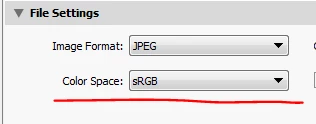
Your LR Export is set to Color Profile ProPhoto RGB, but the application you're using to upload to phone is removing the color profile. Most applications assume sRGB profile when the file has no embedded color profile. Try changing your LR Files Settings to sRGB. That should fix it.

返信数 3

johnc82534022
Participant
July 15, 2022

I'm recently experiencing the same issue and can tell you without a dought everyone else is wrong.  When you look at your photo in the develope module and it looks correct, and then there is a color shift in the library module, it means that ADOBE RAW is not working correctly.  I had to manually change white balance and color in the library module to fix the color shift and now all my exported JPG images are perfect.


Anshul247162149tiq
Participating Frequently
August 31, 2024

how you did that please explain


TheDigitalDog
Inspiring
September 21, 2020

If the phone where using a color managed OS (like an iPhone) then yes, ProPhoto RGB would preview fine like any other color profile. But when it isn't color managed, you have to dumb everything down to sRGB and still, without color management, a mismatch can occur. 

Author “Color Management for Photographers" & "Photoshop CC Color Management/pluralsight"
Todd Shaner
Todd Shaner解決!
Legend
March 8, 2017

Your LR Export is set to Color Profile ProPhoto RGB, but the application you're using to upload to phone is removing the color profile. Most applications assume sRGB profile when the file has no embedded color profile. Try changing your LR Files Settings to sRGB. That should fix it.

Participant
September 21, 2020

I am still having issues with my photos having the orange tint after chaning the export settings to sRGB from LR and PS. When I view the images on my phone they are orange but the same file viewed on the laptop or desktop is normal. Am I missing something? Please help. I am really struggling to figure this out. Thank you so much!