Exit
  • Global community
    • Language:
      • Deutsch
      • English
      • Español
      • Français
      • Português
  • 日本語コミュニティ
  • 한국 커뮤니티
2

Updating AI settings when masks are not selected in Sync window

Community Beginner ,
Aug 26, 2023 Aug 26, 2023

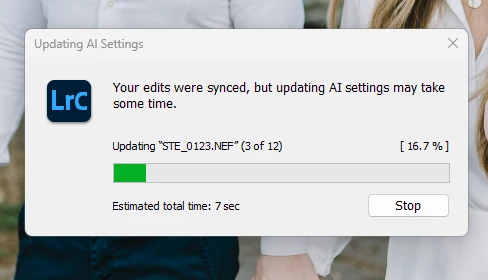
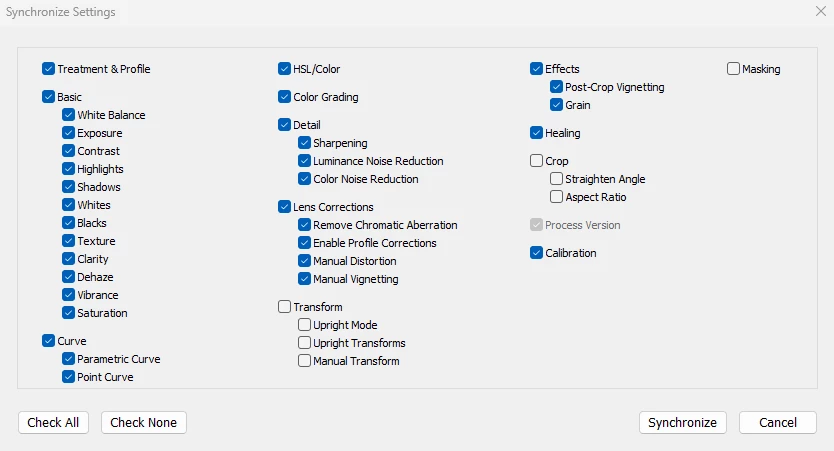
As mentioned in the subject, I've noticed that Lightroom is updating certain AI settings when I synchronize them with images, even when no masks are involved. Could this be a potential bug, or am I overlooking something on my end?

LR Classic 12.4
Camera Raw 15.4
Build [202306052221-b70c0975]
Windows 11
Screenshot 2023-08-26 131425.png


Screenshot 2023-08-26 131436.png


TOPICS
Windows
400
Translate
Report
Community guidelines
Be kind and respectful, give credit to the original source of content, and search for duplicates before posting. Learn more
community guidelines

correct answers 1 Correct answer

LEGEND , Aug 26, 2023 Aug 26, 2023

You've got Healing checked in the Synchronize Settings window. The Healing tool Content-Aware Remove is an AI command. So if you sync / paste an application of Content-Aware Remove, LR will recompute it for each target photo, displaying the Updating AI Settings progress scope.

Translate
Community Expert ,
Aug 26, 2023 Aug 26, 2023

It could be that the images you are pasting upon already had masks and this is triggering them to be updated but yeah probably a bug. When you're not pasting masks it should not have to update them.

Translate
Report
Community guidelines
Be kind and respectful, give credit to the original source of content, and search for duplicates before posting. Learn more
community guidelines
Community Beginner ,
Aug 26, 2023 Aug 26, 2023

Thank you, and yes, it appears that's the situation, as other images without masks don't trigger this issue.
Well, I've discovered a bug I guess.

Translate
Report
Community guidelines
Be kind and respectful, give credit to the original source of content, and search for duplicates before posting. Learn more
community guidelines
LEGEND ,
Aug 26, 2023 Aug 26, 2023

You've got Healing checked in the Synchronize Settings window. The Healing tool Content-Aware Remove is an AI command. So if you sync / paste an application of Content-Aware Remove, LR will recompute it for each target photo, displaying the Updating AI Settings progress scope.

Translate
Report
Community guidelines
Be kind and respectful, give credit to the original source of content, and search for duplicates before posting. Learn more
community guidelines
Community Expert ,
Aug 26, 2023 Aug 26, 2023
LATEST

Good catch. That indeed must be the cause

Translate
Report
Community guidelines
Be kind and respectful, give credit to the original source of content, and search for duplicates before posting. Learn more
community guidelines