


Participating Frequently
January 14, 2020
質問

Erroneous lens correction for Sigma 14-24 dg dn in Lightroom

  • January 14, 2020
  • 返信数 2.
  • 1119 ビュー

Hello,


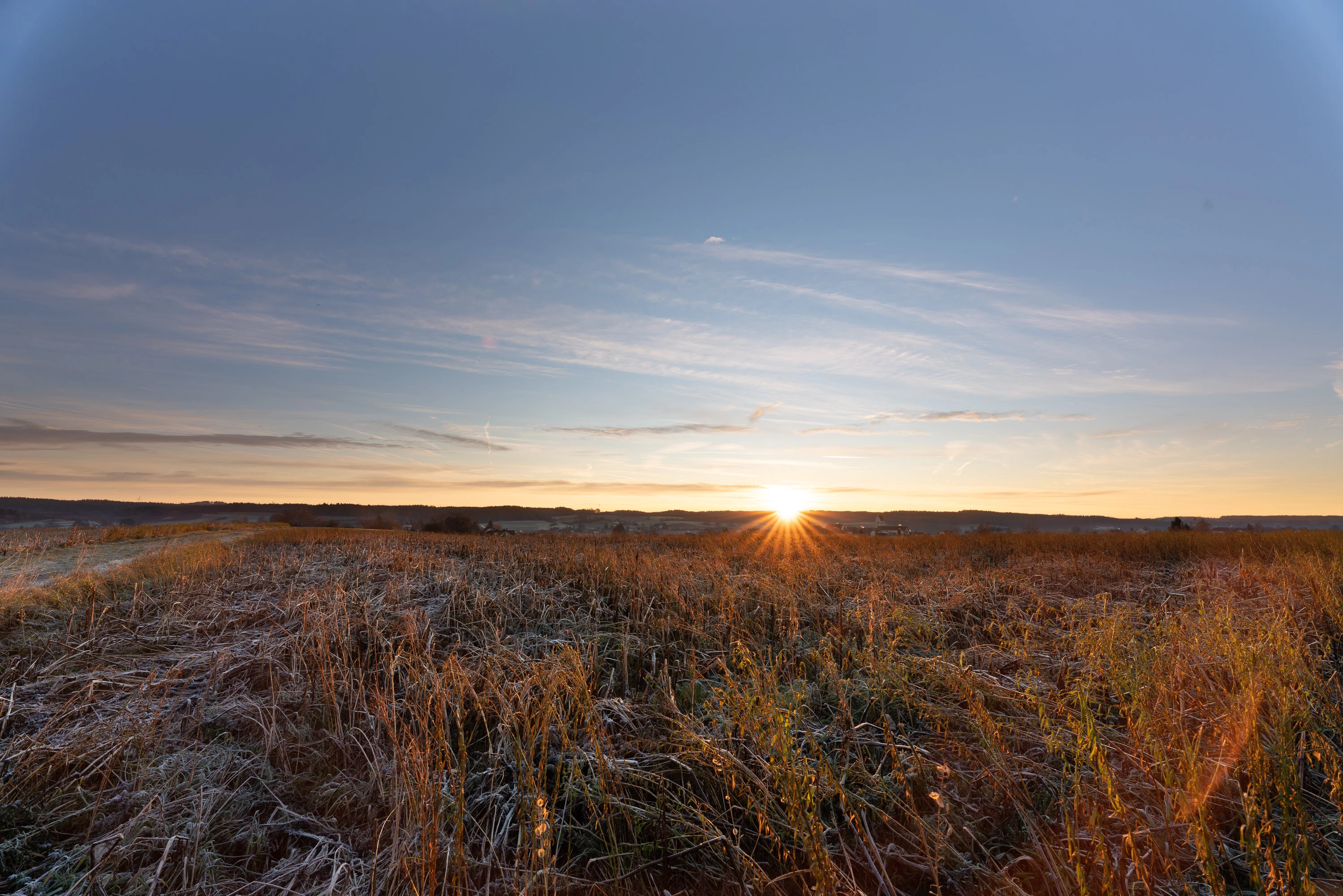
has anybody observed that the lens profile of the Sigma 14-24 dg dn leads to a kind of overcorrection of vignetting at 14mm?

I have attached an image taken at 14mm, the automatic lens correction in Lightroom being enabled.

One can clearly observe a white area including a thin white curve in the left and right corner of the image which is kind of disturbing.


I hope Adobe is able to correct this issue soon.


Regards,

Roman
このトピックへの返信は締め切られました。

返信数 2

Todd Shaner
Legend
January 14, 2020

"I hope Adobe is able to correct this issue soon."

To make that happen you'll need to report the issue at the Photoshop Family forum, which is monitored by Adobe Staff. Adobe had to create a v2 profile for the Sigma 14-24mm F2.8 DG HSM lens due to a similar issue. Place a link to your report in a reply here for others with the same issue.


https://feedback.photoshop.com/photoshop_family

romansellier作成者
Participating Frequently
January 15, 2020

Thank you for this hint. I was not aware that this is possible.

I will post the issue in the mentioned forum, then.

Community Expert
January 14, 2020

Depending on the profile, it may be possible to turn down the 'strength' of its vignetting correction, using the lower slider in the Lens Corrections panel / Profile tab.


Perhaps this profile was generated using an individual copy of this lens which exhibits different behaviour than your own one does. In that case, there is always the option to generate a custom lens profile that is exactly corrective for your own actual lens and camera, using the toolkit supplied by Adobe and printing out the needed checkboard targets to scale. That's quite a bit of work and larger versions of the targets may be needed with such a lens. But if this is equipment you rely on a lot, a custom profile may be worthwhile.


Ultra wideangle lenses are quite subject to flare, reflections, shadowing etc so there may have been something else going on there too / instead.

romansellier作成者
Participating Frequently
January 14, 2020

Thank you for the fast response.


Yes, it might be possible that the profile was generated with a lens copy behaving differently than my own lens.

Flares and reflections were not causing what I described, because the issue was also visible on photos which were not taken in the sun.

I now turned down the strength of the vignetting correction, and it seems that a value between 35-40 is the most fitting range for most photos given that I do not adjust the automatic LR correction for distortion.

It is only weird that individual copies of the Sigma lens would behave so differently with regard to vignetting.

Community Expert
January 14, 2020

I was speculating about the cause (unencumbered by actual facts 🙂 ). I only meant, some issue during creation of the profile, either with the lens itself or with the circumstances, might have lead to undesirable corrections then getting included. There may be no issue whatever with your own lens copy, or with your own shooting circumstances.


Glad turning down the vignette correction was of some help!