













Design the future of fashion, win Firefly Pro 👗✨
Get the most out of Lightroom with our community.
Recently active
Lightroom v9.6: Edit with Prompts, Remove Reflections More Cleanly, and Create with Confidence The September 2026 update to Lightroom (version 9.6) introduces AI-powered prompt-based editing, improved Reflection Removal, and expanded camera and lens support to help photographers work more efficiently and stay in flow. What’s New: The Lightroom (version 9.6) brings more control and flexibility to everyday creative workflows with the introduction of Prompt to Edit, allowing photographers to make complex restorations, retouching, and transformations simply by describing the edits they want or selecting from photographer-focused example prompts. Powered by the Nano Banana model, this new capability makes advanced editing faster and more intuitive. This release also delivers cleaner, more accurate Reflection Removal results on windows, glass, and water, reducing smudges and ghosting artifacts on challenging surfaces. In addition, Lightroom now supports newly added camera models and lenses,
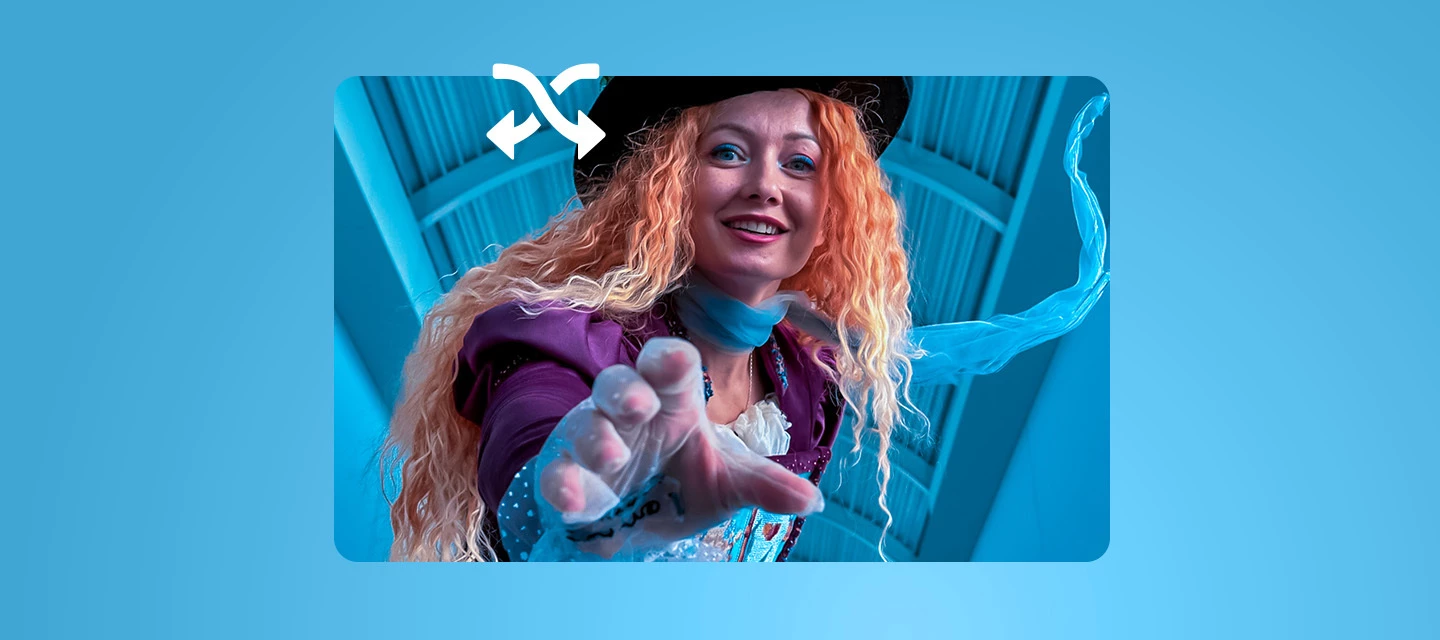
October 2026: "Mad Hatter"by Lisa CarneyJoin me live on October 5th at 9am PT on YouTube and Behance, where I'll be remixing the "Mad Hatter" image myself and answering your questions in real time! About the ImageThis month I'm sharing one of my favorite shots from a shoot at MAX— a whimsical Mad Hatter character reaching straight out of the frame, with curls of orange hair spilling out from under a black-and-white spotted top hat. I love the theatrical energy in her expression and that playful, come-closer gesture. It feels like she's pulling you right into the frame with her. There's so much personality and texture here, from the lace glove and the velvet gown to the hat details, that I can't wait to see how everyone reinterprets it.Have fun with the Remix and be sure to share yours! I'll announce my favorites at the end of the month and randomly select one entry to receive a complimentary 3-month Creative Cloud subscription. About Me: My name is Lisa Carney. I'm a photograph
Adobe is excited to receive requests for additional features you need to enhance your workflow. What can you do to increase the chances of being heard? Don't use the words "Feature Request" in your post's title. Search for and add to existing feature requests rather than creating duplicates. There is no advantage to creating a second request for any existing feature request. One request per thread! When creating an Idea or Feature Request thread, please keep requests for features to ONE request per thread. Doing this will allow others to vote on a single, specific feature and not confuse Upvotes amongst a list of feature requests. If an Idea thread has multiple requests in it, a moderator may ask you to split the multiple requests up into multiple threads so others can vote. In the event there remain multiple requests on a thread, the first item requested will be the arbiter of where the thread will be cross-referenced or merged. Describe how the feature will help your workflow. Des
The top crop border UI is misaligned with the grid. Auto-crop leaves a very small amount of unprocessed pixels in the corners (subtle at fit view, visible at 100%+ zoom). Not happening in 100% of cases, but occurs systematically and is easily reproducible.
Can we get halation simulation into Lightroom? Specifically Lightroom on iPad, but all versions should get it. Film photography is big right now. Lots of people love the look of film. But being Lightroom users means we miss out on some aspects of film because LR does not have the necessary tools. Halation is something we need to open other apps for and we need to know a bit about using layers and blend modes and stuff like that. Therefor it would be nice to just have this in the app. Here is what I’m thinking:A slider for strength/brightness.A slider for spread/area.A slider for sensitivity. Meaning a slider that adjusts what part of the photo gets halation. Will it be only the edges around very brightest parts? Or will it be more sensitive so that it applies halation to less bright parts too? (Hope that description made sense.)And lastly a way to change the color of the halation. (My native language is not English, so if I made spelling or syntax errors, I’m sorry.)
Bonjour,Je vais être clair ! j'ai un problème de synchronisation de LRC avec son cloud . j'ai un point d'exclamation sur l'icône cloud.Des photos ne sont pas synchronisées.Sur le version net, j'ai réalisé les recommandations concernant le journal d'erreur de synchronisation. Ça continue !Je fais quoi ? Enfin creative could ne m'intéresse pas et prend de le place dans mon ssd. Comment le supprimer sans interférer avec LRC ?Je suis à jour sur Mac OS Golden Gate et LRC.MerciC. Rondepierre
When I view my filmstrip, there is no way that I can see what number photo I am on, such as #135 out of 300. I can only see how many images I have selected, but not what number an individual image is. This is very frustrating because when I share an album for someone to view in a browser or on their phone, it clearly displays the images with their sequential matching numbers. When people tell me the like “#6, #100, #200, etc.” I have no way to reference this in my lightroom app. I do not think requesting that my friends make adobe accounts in order to use your cloud features is reasonable, as they only want a few images and sending me the numbers should be all that needs to happen. I find it incredibly frustrating that something as simple as numbering photos is so poorly implemented into this app, yet you keep pushing ai features that I wish I could remove entirely.
I am using the Adobe integration within ChatGPT with my Adobe Lightroom cloud catalogue.ChatGPT can successfully search my Lightroom catalogue and Adobe returns the expected assets, including filenames, asset IDs, file types, dates, orientation information and Adobe rendition URLs.The Adobe search-result interface can also display thumbnails of the Lightroom images to me.However, when ChatGPT attempts to obtain a model-readable preview of any Lightroom asset through the Adobe integration, the preview-resolution step fails.Adobe returns: previewUrl: null renditionUrl: null downloadUrl: null As a result, ChatGPT can search and identify photographs in my Lightroom catalogue but cannot actually inspect or analyse the image pixels.File formats testedThis has been reproduced with both: Fujifilm .RAF RAW files Standard .JPG / image/jpeg files Therefore, this does not appear to be related specifically to Fujifilm RAW support.For example, Lightroom successfully returned JPEG assets includ
When I open a photo and AI sharpen it, then export it immediately, it tries to export as an MP4 instead of a JPEG. I have to quit Lightroom and reopen it before I can export to a JPEG.
RonitYadav 100
When I open the app and go to the suggested filters, I’m unable to scroll through the filters once I get past the first few because it always bounces me back to the first few filters
Lightroom crashes upon launch on my Samsung s26 ultra. It crashes within a split second of opening. Have cleared cache, restarted my, uninstall and reinstall, and other troubleshooting. Nothing has helped to fix the problem. It was working fine a few days ago.
When I open Lightroom on my mobile it crashes a split second after open. It was working fine a couple days ago. I tried all the trouble shooting advice and nothing has solved the issue.
Anytime I try to open the app it either crashes or it freezes when I try to edit a photo making the app unusable I’m on version 11.6.21 and my device is on IOS 27.0.1
When downloading an image after using the tool to expand the the image, the image expanded border are deleted, leaving white borders. In addition, there are other download errors, such as blemishes appearing when something is removed, or images becoming noisy. None of the solutions offered have worked, neither changing the download format or quality, nor selecting the object detection option. In recent months, the application has only worsened the user experience. You pay a subscription for the best tools, and everything fails, even in the latest version.
I have two feature requests related to color grading.One wheel Currently, color grading is done on three separate wheels for each tone (highs, mids, shadows). I think it would be very useful to have an option to use 1 wheel to place all three grading points (like how DXO photolab does it). This would be very useful when grading using specific patterns (Y, triangle, line, etc). Pre-made pattern options If the one wheel feature is implemented, having a dropdown where we can choose a specific pattern (Y, triangle, etc) would be very useful. I could choose triangle, for example, and the three grade points would be placed onto the wheel for me. I could then turn the triangle to find the right mix of hues, and all three would turn at the same time, keeping the triangle shape. Then I could adjust the saturation of each independtly to taste. The dropdown could include all the color grading patterns that the adobe color palette site has (I think they are called color harmonies), and it c
AI sharpen just added a bunch of lines to my picture and destroyed the quality, so I had to un-do it. There should be some interaction between me and the AI if you're going to charge me credits, especially if the results are only good for the trash.
eg would 256GB be more useful than 128GB (not prepared to buy more than 256GB)? If connected to the Cloud or an external drive would 128GB be enough for initial processing?
put the watermark option on the web page for Lightroom cc, I have the option on my ipad but not on my MacBook.
This is the issue i am facing when i open the app on my iphone se 3rd gen. I tried reinstalling and resetting phone but nothing seems to work.
I have been able to move back and forth from 1 image to another by using the > and < keys, but this no longer seems to work. I have also used Fn + > without effect. Any suggestions?
Images render differently when you zoom in after brightness edits. Tested on 9.6 on MacOS 27 on an M5 Max MacBook Pro with compressed raw files from my a7R V. Seems to always be present to varying degrees but most noticeable after large changes, particularly if done with the curve settings.
Ability to use project indigo on iPhone Duo
When taking a picture in the app, using “PRO” mode, the sliders for ISO, SEC, FOCUS, … is not displayed correctly.Lightroom Mobile on iOS - v. 11.6.21 02B72C/264
Additional pre-set frame / border size at 3x4 or 4x3.
Remix with Firefly Community Gallery
Thousands of free creations to fall in love with and remix in Firefly.
Already have an account? Login
Enter your E-mail address. We'll send you an e-mail with instructions to reset your password.