


Participating Frequently
December 15, 2022
質問

Can't edit photo in Lightroom desktop due to syncing issue; can't reset settings

  • December 15, 2022
  • 返信数 4.
  • 2548 ビュー

I uploaded several photos my from laptop to Lightroom CC on OSX. I later edited these photos on Lightroom CC mobile on my iPhone.


While I can contiue to edit the photos on my iPhone or Desktop (and even on Lightroom Web), it's impossible for me for me to edit them on desktop any longer.


The desktop app gives the "Waiting for Settings" errors when I open any of the affted photos, showing a recent timestamp from my iPhone. My iPhone app shows that all photos have been synced. (I've made multipled edits on my phone to repeat this process.) But even after my phone finishes syncing, the desktop app still doesn't let me edit.


The official "solution" here is to "reset all settings",  Despite this working the (many) times this has occurred in the past, clicking "Reset" now does nothing.
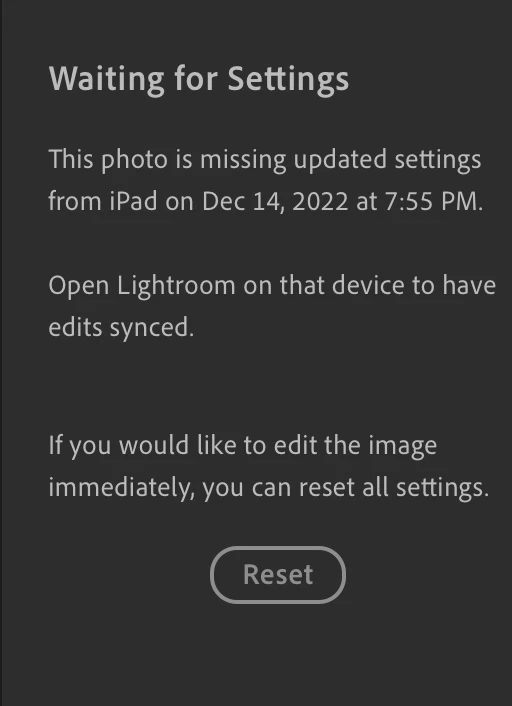


I've completely uninstalled and reinstalled Lightroom CC desktop multiple times, to no avail - even the nuclear Reset option doesn't work. There are no sync issues reported in lightroom web.


I've trusted Lightroom CC with my photos, and see no way of recovering my data.

このトピックへの返信は締め切られました。

返信数 4

David in Munich
Participant
May 8, 2023

I have had the same issue for over a year even after getting a new macbook pro and a new iphone. Very frustrsting and even more so that the reset bytton does nothing. A huge problem!! I no lonfer edit on my phone now - not the best work around 😞

Liam Coleman
Known Participant
December 30, 2022

Can someone from Adobe please comment on/look into this? This seems like a serious bug related to syncing. It is still happening to me as well with some photos. I have not been able to pick up on any kind of pattern so far as to which ones it starts randomly happening to, but it has only started happening in the last few months.

Jim Wilde
Community Expert
Community Expert
December 30, 2022

Adobe is currently on vacation, so don't expect an official response just yet.


However, I do believe that they are definitely looking into these problems (and in fact have fixed some of those that I've encountered in the recent past). I think most (but probably not all) of the problems (or at least the problems that I've encountered) are related to the use of AI Masks or content-aware healing. So far I've been able to deal with most of the "Waiting for Settings" situations by making a small adjustment to one of the global edit sliders (I just move the Texture slider one or two points), which has to be done in the app that the edits are syncing FROM. Have you tried that? I've never yet had to use that "Reset" option at the bottom of the "Waiting for Settings" dialog, but I may just have been fortunate.

Liam Coleman
Known Participant
December 15, 2022

I have had this exact issue arise a few times recently. It only started happening in the last couple of months, so it might be a bug introduced in a recent update. My workaround was to export the original image, delete the copy still in LR, then re-import the original. Yes, all edits would be lost at this point, but so far I have only had to do this with a small handful of photos, so it hasn't been a major problem to just edit then again. I hope whatever this sync error is gets ironed out soon.

Participating Frequently
December 16, 2022

It's sadly happening on the majority of my images now. Particularly infuriating is that I can't even export whatever previous (even if not latest) settings from my laptop. Exporting "Original + Settings" for any of these photos results in a basically empty xmp file, even though those settings CLEARLY exist in the cloud, given that they're reflected in Lightrom web.


This should terrify anyone that trusts Adobe to keep their edits safe.

Participating Frequently
December 15, 2022

I'd be happy to re-import my photos and attempt to reapply my edits to them - however, since the reset button doesn't work, and I can't figure out how to export my settings since everything is disabled while a sync issue is present, it sure seems like my edits are lost...


This is an unbelievably serious blemish on my trust in Adobe cloud.

Timothy.Spear
Inspiring
December 15, 2022

What does the sync cloud show? Little icon, top right in LrD.


Tim

Participating Frequently
December 16, 2022

Everything both on desktop and on mobile devices show "Synced and Backed Up", and every indication shows that it's not an issue with my phone or table syncing to the cloud: I can edit on my iPad, after which my desktop will get stuck "waiting for settings". But my edits will show up on my phone and on Lightroom web, where I can continue to edit fine, and those edits are then reflected back on my iPad.


All the while, my desktop app keeps updating the timestamp of the latest edits in the error message, but still insists its the fault of the other devices.


This used to happen to me maybe once or twice a month, but in the past week it's started to happen for the majority of images I edit on another device.


I even just deleted and rebuilt my laptop's catalog from the cloud, and it had no effect.