













Get the most out of Lightroom with our community.
Recently active
September 2026: “The Horse at the Window”by Celeste GuidiceAbout the ImageThis month I'm sharing one of my favorite barn shots — a curious horse leaning out of a Dutch door window, taking in the world outside. I love the contrast between the weathered gray shingles and his warm bay coat, and that little white blaze running down his face gives him so much personality. There's something about the quiet curiosity in his eye that makes this feel like the perfect end-of-summer image to remix.Have fun with the Remix and be sure to share yours! I'll announce my favorites at the end of the month.I can't wait to see your take on it! 😄 About Me: My name is Celeste Guidice. I've been an Adobe Community Expert since 2016 and founded the Nashua Adobe User Group back in 2012. I'm a commercial photographer and Lightroom coach based in New Hampshire, and I love sharing my images with this community every month. About Lightroom ReMix It: The “Remix it!” challenge is a fun, communit
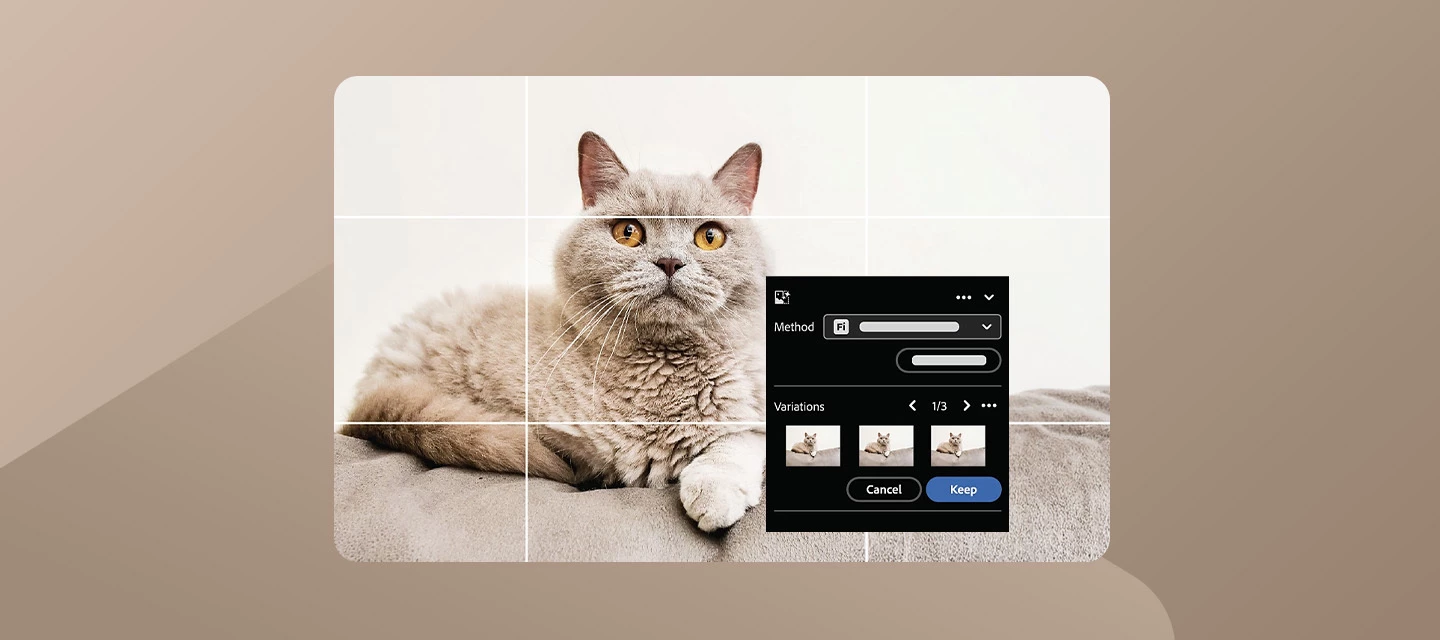
Lightroom v9.5 Is Live! Extend Photos with Generative Expand, Refine Masks with Precision, and Edit More Smoothly The August 2026 update to Adobe Lightroom (version 9.5) introduces AI-powered photo expansion, more precise masking controls, and performance enhancements to help photographers and creators work more efficiently and stay in flow. What’s New:Lightroom (version 9.5) brings more control and flexibility to everyday creative workflows with the introduction of Generative Expand, one of the release's most significant additions. This new Firefly-powered feature lets you extend photos beyond their original borders and intelligently generate content that blends naturally with the existing image, making it easier to recover poorly framed shots, create new aspect ratios for social media and marketing formats, reconstruct missing edges, or fill transparent gaps left behind after perspective corrections. Photographers can choose between Firefly Fill & Expand, which generates multiple
Adobe is excited to receive requests for additional features you need to enhance your workflow. What can you do to increase the chances of being heard? Don't use the words "Feature Request" in your post's title. Search for and add to existing feature requests rather than creating duplicates. There is no advantage to creating a second request for any existing feature request. One request per thread! When creating an Idea or Feature Request thread, please keep requests for features to ONE request per thread. Doing this will allow others to vote on a single, specific feature and not confuse Upvotes amongst a list of feature requests. If an Idea thread has multiple requests in it, a moderator may ask you to split the multiple requests up into multiple threads so others can vote. In the event there remain multiple requests on a thread, the first item requested will be the arbiter of where the thread will be cross-referenced or merged. Describe how the feature will help your workflow. Des
How do I remove AI from my Lightroom mobile and normal LR. My masking tools, remove tools and blur background tool- in LR are all intergrated and I'm not allowed to use AI I'm my photography class
Since I changed my phone, I can't connect to Lightroom Mobile. When I select connect with Adobe ID, it opens an Error Window : "bad_request Request parameters failed to meet all constraints". I'm on the last version of Lightroom 11.5.31 and the last version of Android 16 (August 5 2026).I can connect directly on Google, on account.adobe.com, but not on Lightroom Mobile. I already tried to uninstall the app.If anyone has an idea…Thanks by advance
Lightroom should recognize my camera so that I can add to my library. I can’t believe it doesn’t have that feature. That seems to basic. I have a very low opinion of the product.
When I go to mask a bird that has a mirror reflection of itself, it’s not catching the reflection like it use to. This seems to have been broken with the latest fix.It’s funny that DxO doesn’t have this issue.
When in lightroom and I click on the image I want to develop, I click edit in Adobe Photoshop 2026 but it won’t open up in photoshop. Photoshop opens but the photo will not pull in.
This would add a way to change the locational data to multiple selected photos at the same time. A suggestion is to integrate it into the copy edit settings feature or into presets. This is useful for film photography processing that won't have locational data due to the developing process.
The latest releases of Lr Mobile and Lr web are riddled with bugs. It's so frustrating as I've had photos from August which I'm unable to complete. The share to Google Photos option simply doesn't work at all from the Web version irrespective of what device or browser is used. It works for a single photo but not when many are selected. The box to connect simply doesn't appear. You can replicate by selecting several photos and then choosing the Send to Google Photos option from the bottom right. Nothing happens. I've tried several machines and several browsers including Chrome, Edge, Samsung and Brave. Annoyingly the option works on my phone but the ability to select multiple photos at once also no longer works so I have to tediously select the photos one at a time. Not ideal when there's several hundred. It's really not good enough for a paid premium product.
Hi, I have an active Adobe Lightroom 1TB subscription purchased directly through Adobe. My Lightroom Android app is signed into the same Adobe ID, but Premium features such as Masking are still locked. I tried “Restore your purchase,” but it has been stuck on “Restoring purchases. This may take a while” for over an hour. Please help me sync/activate my subscription on Lightroom mobile.
Hi,I'm experiencing an issue with Generative Expand in Lightroom Desktop 9.5.1 on Windows.When I enable Enable Expand in the Crop tool and extend the crop boundary outside the original image, both Method and Generate remain greyed out. Therefore, Generative Expand cannot be started at all.The issue is reproducible:On every photo I have tested With RAW and other images Even when extending the crop boundary only slightly After restarting Lightroom and Windows On two different Windows PCsMy Adobe subscription is Lightroom 1 TB and I currently have 249 generative credits available.Other Firefly features work normally. In particular, I regularly use Generative Remove in Lightroom Desktop without any issues.I also tested Generative Expand in Lightroom Mobile using the same Adobe account and cloud library, and it works correctly there.Generative Expand had also worked previously, shortly before this problem appeared.This seems to indicate that the problem is specific to Lightroom Desktop rath
Filtering for “unflagged” images works fine in Lightroom Desktop, for both regular albums and smart albums. But many of those same albums are not filtering for “unflagged” items in Lightroom Web.
I get repeated denoise errors. My camera raw version 18.5.1 is not working with the Lightroom version 15.5.1.
Why does my system keep crashing when I try to remove people in Lightroom
Two years ago, Apple released the iPhone 16 series which included the new ‘camera control’ button. Unfortunately, while most third-party camera applications (and of course the stock iOS camera app) support launching from this button, Lightroom still does not.Please add the option to launch the Lightroom camera directly from the Camera Control button.
Now that the iPhone 15 Pro has an action button that can be customized to run any app Shortcut, it would be great to be able to use it to launch the Lightroom Camera. However, there seems to be no such shortcut available at present.
It is very useful, especially for street photography, to be able to quickly open the camera without face id unlock and so on. Just press camera control button while getting the phone out of the pocket, and you are ready to shoot. Many different iOS camera apps already implement it, but I find Lightroom camera the best out now, especially with instant upload to the cloud.
After the April 2026 update, the search function seems to have (somehow) gotten worse. I know that the update says it addresses search problems but it seems to have broken things.In all of my photos in Lightroom, I identify people by name and put them into the captions. Prior to this, I could search lightroom and all of this person’s photos would show up. Suddenly I am getting the most BIZARRE results when searching people’s names. The name “Cait” brings back a ton of cat pictures for example - i guess it thinks i am looking for cats? Not everything needs AI. My entire workflow has been disrupted by this, does anyone know how to fix this?
I can´t import any files whatsoever into Lightroom. They just dont appear as if the folder was empty but the files are there. Please help!
In the Presets panel, under Recommended, I do not see the preset categories (Warm, Dark, Bright, Cinematic, HDR, etc.) that appear in Adobe's documentation and other users' screenshots. The app is fully updated, I've already compared it with Lightroom on my phone, and the feature is missing only on my iPad. I'd like to know if this is a bug, a staged rollout, or an account-specific issue.
Hi, I payed for a yearly premium subscription back in May of 2026. For some reason it’s saying it do not have the premium membership. I have verified that the payment went through.
Hello Lightroom team,With iPhone Duo arriving, it would be great to see a dedicated “laptop mode” in Lightroom mobile: One screen (or half) shows the image at full size. The other screen (or bottom half) shows the editing controls (sliders, masks, presets, histogram).This would mirror the efficiency of dual‑monitor and Reference View workflows on desktop and make serious mobile editing much more practical on foldable devices.Current mobile behavior (tapping to hide/show controls, press‑and‑hold for before/after) is good, but a persistent split layout would be a big productivity boost.Thanks for considering this.
We are under a business account and another employee had the libraries and licensed photos under their account. I went through support to help with the transfer and now as the account/contract owner my adobe stock library is empty. I saw another post where it seems someone with a similar issue was able to get help recovering the content. Due to this being a business account I am really hoping this is possible for my case so I don’t have to spend hours finding the exact licensed photos our teams use. Any insight and help is much appreciated, thank you.
Key word search in relevance order gives the most relevant hits last.How to reproduce:1) Search for any known key word added in Light Room Classic.2) Choose search order "Relevance". Expected result: The most relevant search hits (images with the specified key word) should be first.Actual result: The least relevant search hits come first (even totally irrelevant images). There is no option to reverse the order.
Remix with Firefly Community Gallery
Thousands of free creations to fall in love with and remix in Firefly.
Already have an account? Login
No account yet? Create an account
Enter your E-mail address. We'll send you an e-mail with instructions to reset your password.