Exit
  • Global community
    • Language:
      • Deutsch
      • English
      • Español
      • Français
      • Português
  • 日本語コミュニティ
  • 한국 커뮤니티
419

P: Lightroom Classic>Edit in PS: Long Delay+Erroneous Error Message opening Ps Beta 2024 25.0

Explorer ,
Jul 27, 2023 Jul 27, 2023

I just recently updated Photoshop Beta to 2024 v25.0 on my Windows 11 machine.


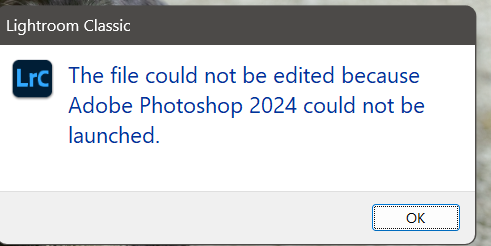
Now when I try to open photos from LR 12.4 using the "edit in...", it hangs up for a time and then comes up saying "The file could not be edited because Adobe Photoshop 2024 could not be launched."


When I hit "Ok" it then opens the file in Photoshop 2024. 


This happens with every file, even if Photoshop 2024 is already up and running at the time. 


This does not happen with 2023 v24.7.

Bug Fixed Locked
TOPICS
Desktop-macOS , Desktop-Windows
265.2K
Translate
Report
Community guidelines
Be kind and respectful, give credit to the original source of content, and search for duplicates before posting. Learn more
community guidelines

correct answers 1 Pinned Reply

Adobe Employee , Aug 16, 2023 Aug 16, 2023

Greetings all,


Lightroom Classic 12.5 released this evening.  If used in conjunction with PS Beta 25.0 or later, this erroneous error message plus long open wait time should be mitigated. Please install LrC 12.5 and make certain that your Beta is up to date.


If you do not see the update in your Creative Cloud Application, you can refresh it by hitting [Ctrl/Cmd]+[Alt/Opt]+[ R ].

Note: It may take up to 24 hours for your update to be available in your Creative Cloud app.


This thread will be

...
Status Fixed
Translate
replies 1160 Replies 1160
1,159 Comments
Explorer ,
Jul 29, 2023 Jul 29, 2023

Up until an hour ago it was not a problem to export images directly from Lightroom to photoshop and then back again. Now when I export to Photoshop 2023, photoshop opens up but there is no image at all. Any help?

Translate
Report
Community Beginner ,
Jul 29, 2023 Jul 29, 2023

I am having the same issue on PC right now.  This just started today...

Translate
Report
New Here ,
Jul 29, 2023 Jul 29, 2023

I am having the same or similar problem. I'm using Lightroom Classic, and when I try to export as layers in Photoshop, nothing goes through. I even try exporting to Photoshop Beta, same problem, nothing transfers.


Translate
Report
Community Beginner ,
Jul 29, 2023 Jul 29, 2023

I use Lightroom Classic 12.4 and Photoshop 24.7.0. Suddenly today the link between them seems to be broken. If I'm working on a photo in Lightroom and try to "edit in Photoshop" Lightroom will launch Photoshop, but the photo no longer opens in Photoshop. This has happened across all catalgoues. Is there a way to relink them or to fix the problem?

Translate
Report
Community Expert ,
Jul 29, 2023 Jul 29, 2023

This is a known issue.  In fact if you have a very quick look down the threads, getting on close to every one is replorting the same issue.

Translate
Report
Community Beginner ,
Jul 29, 2023 Jul 29, 2023

Two days ago I suddenly was unable to send images from LR Classic (12.4) to Photoshop Beta (25.0). I followed the directions to uninstall LR Classic, Photoshop 2023 and Photoshop Beta and then reinstalled all the programs in the order recommended. The link between PS 2023 works and I can send images to the program but PS Beta still is very problomatic. When I direct LR to send an image to PS Beta the progam opens but the file is not transferred. I then get the following messages: "The file could not be edited because Adobe Photoshop (Beta) could not be launched" and the "Lightroom was unable to prepare the selected file at (location and file name) for editing. It will not be opened. I tried a second round of deleting LR, PS and PS (beta) and reinstalling again without any appreciable changes.

Translate
Report
Adobe Employee ,
Jul 29, 2023 Jul 29, 2023

@agile_build157F  , @CLPSRQ 

This issue is likely different that the issue you are experiencing. I recommend your reviewing this thread as it relates to the Photoshop Beta released on Thursday. 
https://community.adobe.com/t5/photoshop-beta-bugs/p-lightroom-not-opening-photos-properly-in-photos... 


Rikk Flohr: Adobe Photography Org
Translate
Report
Explorer ,
Jul 29, 2023 Jul 29, 2023
I had to downgrade PS Beta two revisions. And it is now working
Translate
Report
New Here ,
Jul 29, 2023 Jul 29, 2023

System: Windows 10

Lightroom Version 6.4

Photoshop 2023 Version 24.7

Photoshop 2024 Beta Version 25.0

Camera Raw Version 15.4.1


Having similar issues with Lightroom showing error message while trying to open photos in Photoshop 2024beta. After a while the file opens.  In addition, Lightroom is no longer showing PS 2023 as an option to edit photos. LR only shows PS 2024 as the default choice of external editor although PS 2023 app is installed and is updated in the creative cloud.   


"Open as layers in Photoshop" doesnt work at all. 


Any help will be much appreciated.


Thanks


Translate
Report
Community Beginner ,
Jul 29, 2023 Jul 29, 2023

I noted the same thing today...I did get an error message after I closed PS stating that LR could not open Photoshop.  Can't say for certain this worked in earlier version of LR Beta because this is the first time I tried it.

Andy Royce
Translate
Report
New Here ,
Jul 29, 2023 Jul 29, 2023

Having problems transfering images directly from Lr desk top.  After some minutes I get a message saying problems opening Ps Beta, then when I click on OK it suddenly opens.  This has only happened since I updated to v 25.

Translate
Report
New Here ,
Jul 29, 2023 Jul 29, 2023

i having a same problem..

Translate
Report
Explorer ,
Jul 29, 2023 Jul 29, 2023

Also experiencing same problems after updating to Beta v25.0 tonight.


I get the following two errors after several minutes of idle waiting. 

Screenshot 2023-07-29 at 11.34.30 PM.png

Screenshot 2023-07-29 at 11.36.53 PM.png


The AgStoreProviderSession error is randomly found in the Adobe forums with no solutions listed going back over 6 years.


I've also had a few files open with extreme errors like this:

Screenshot 2023-07-29 at 11.18.21 PM.png


Will probably be installing the previous version of Photoshop Beta for the time being as I'm working under deadline right now and don't have time to waste on this.

Translate
Report
Explorer ,
Jul 29, 2023 Jul 29, 2023

I'm getting the following issues, after several minutes of files not opening from LR Classic 12.4 into Photoshop Beta v25.0.


Screenshot 2023-07-29 at 11.34.30 PM.png

Screenshot 2023-07-29 at 11.36.53 PM.png

The AgStoreProviderSession error is randomly found in the Adobe forums with no solutions listed going back over 6 years.


I've also had a few files open with extreme corruption like this:

Screenshot 2023-07-29 at 11.18.21 PM.png

Screenshot 2023-07-29 at 11.14.56 PM.png


I'll be reverting to an older version for now as I don't have time to deal with this type of severe issue right now.


Screenshot 2023-07-29 at 11.50.21 PM.png


Translate
Report
Explorer ,
Jul 29, 2023 Jul 29, 2023
Translate
Report
Explorer ,
Jul 29, 2023 Jul 29, 2023

Something of note, possibly in relation to the problems taking place.


In Photoshop v25.0 RAW files opened from Lightroom generate TIF or PSD files (depending upon your setting) placed beside the original file before it opens in Photoshop v25.  This is reflected in the file that is open in the tab in Photoshop:

Screenshot 2023-07-29 at 11.18.21 PM copy.png


Reverting back to Photoshop 24.7, no such file is generated (as has been the normal case for as long as I can remember), and the file that is open in Photoshop is the Lightroom edited RAW file itself, presumably stored in RAM, as is typical behavior.  The TIF/PSD/PSB/etc file is generated by Photoshop upon saving.

Screenshot 2023-07-30 at 12.01.08 AM.png


Seems to me there is a problem with v25 where Lightroom is being expected to create a file saved to disk for Photoshop to open, which explains why this dialogue shows when editing in v25 when the file finally opens after waiting several minutes, and you don't get it when reverted back to v24.7.

Screenshot 2023-07-29 at 11.14.40 PM copy.png

Translate
Report
Explorer ,
Jul 29, 2023 Jul 29, 2023

Reverted back to v24.7 and things are working normal again.


Looking forward to v25.1 being stable and releasing very soon.

Translate
Report
New Here ,
Jul 29, 2023 Jul 29, 2023

The same is happening to me.  Lightroom Beta opens but the file does not.  How do I roll back to the previous version of Beta until they fix this bug.

Translate
Report
Explorer ,
Jul 29, 2023 Jul 29, 2023

Actually, one behavior I am noticing in v24.7 is that when you open a file from Lightroom into Photoshop it does not automatically switch to Photoshop's window, although the file is instantly opened.  Typically when hitting ⌘+E to Edit in Photoshop it will also automatically switch to Photoshop's window, whether it is already open or not; not the case with v24.7.

Translate
Report
Explorer ,
Jul 29, 2023 Jul 29, 2023

reverted back to last version of the beta. all good now.

Translate
Report
New Here ,
Jul 29, 2023 Jul 29, 2023

I have an issue transferring image from Lightroom to Photoshop (Beta) for editing. I click 'Edt-in' in Lightroom and select Photoshop (Beta), Photoshop (Beta) opens but image does not transfer and open.  If I go back to Lightroom and wait for approx 2-3 minutes a messge comes up. See attched. 

I click OK, the error disappears and the image transfers to Photoshop (Beta) for editing. No issues with transferring back to Lightroom after editing.

20230730 R1.jpg

Translate
Report
New Here ,
Jul 29, 2023 Jul 29, 2023

Same issue.  I have a deadline to meet.  I cannot see any solution being posted?

Translate
Report
Community Beginner ,
Jul 29, 2023 Jul 29, 2023

I get the same issues but if you leave it for a few minutes, you then get this error. If you click ok, it then opens in the bataScreenshot 2023-07-30 072729.jpg

Translate
Report
Explorer ,
Jul 30, 2023 Jul 30, 2023

Ever since I upgraded my instance of Photoshop (Beta) to the latest (as of 29 July) release on my Macs running the current Mac OS, when I try to edit in Ps from LrC, Photoshop opens but there is then a lengthy delay with nothing happening, and then LrC reports that Photoshop could not be launched. Then, some time later, the image appears in Photoshop anyway. 

Translate
Report
Community Beginner ,
Jul 30, 2023 Jul 30, 2023

After the lates PS-Beta Update, LR fails, when opening pictures in PS-Beta.
PS window pops up, but remains black.

Translate
Report