


Exit
  • Global community
    • Language:
      • Deutsch
      • English
      • Español
      • Français
      • Português
  • 日本語コミュニティ
  • 한국 커뮤니티
1

P: Importing Adjustment Presets is not Working in PS 26.7
Community Beginner ,
May 22, 2025 May 22, 2025

Error.jpg

This bug referenced here is happening in Photoshop 26.7. 

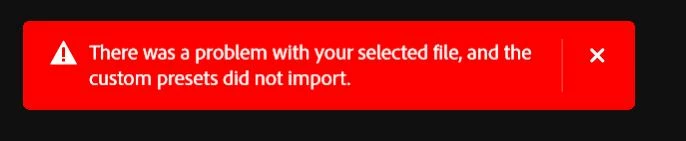
As mentioned in that thread, the bug occurs with presets that were created and functioning in earlier verisons (26.6.1) and presets that were created and exported in the latest 26.7. Each import attempt results in the error message in red: 

"There was a problem with your selected file, and the custom presets did not import."


Would love a workaround beyond dialing back to 26.6.1 or a general ETA on a bug fix update! TIA! 

Bug Fixed
TOPICS
macOS , Windows
888
Translate
Report
Community guidelines
Be kind and respectful, give credit to the original source of content, and search for duplicates before posting. Learn more
community guidelines

correct answers 1 Correct answer

Adobe Employee , Jul 07, 2025 Jul 07, 2025

This issue has been fixed with the recent update.


Thanks,

Cory - Photoshop Product Manager

Status Fixed
Translate
18 Comments
Adobe Employee ,
May 22, 2025 May 22, 2025

Hey @LifelongUser

Thank you for including a link to the previously reported bug in Photoshop Beta. I'm reaching out to the team and will reach out if we need more details. 


^CM

Translate
Report
Community Beginner ,
May 22, 2025 May 22, 2025

Sure thing! Thanks! 

Translate
Report
Adobe Employee ,
May 23, 2025 May 23, 2025

Hi @LifelongUser


I attempted to reproduce the issue on my end by importing an Adjustment Preset created in version 26.6.1 into 26.7, but I didn't encounter the error. Could you please share a sample Adjustment that I can test? Also, let me know if the attached Preset I created works for you. (I've DM'ed the file)


^CM

Translate
Report
Community Beginner ,
May 24, 2025 May 24, 2025

I cannot import Adjustment Presets into photshop 2025. A red warnig box appears. I am running Windows 11. I have the latest Photoshop. I have tried starting it twice but nothing works.

Translate
Report
Community Expert ,
May 24, 2025 May 24, 2025

@Gusray Are you able to provide a screenshot of the red warning box could offer more specific clues for further troubleshooting. Where are you getting the presets? Preset files themselves could be corrupted or in an unsupported format for Photoshop 2025; sometimes older presets might not be fully compatible with newer versions, or they might need to be specifically for Photoshop's adjustment layers, not other Adobe programs.

Have a look at the permissions of the folder where you're trying to import them, or even the Photoshop installation directory, as Windows 11's security settings can sometimes block file operations. 

Have you reset Photoshop's preferences? (Hold down Ctrl Alt Shift immediately after launching Photoshop and click Yes when prompted to delete settings) as corrupt preferences can often cause unexpected behaviour. 


Translate
Report
Community Expert ,
May 24, 2025 May 24, 2025

@Gusray 


A link to those presets would be helpful.  We could test the files directly that way.

How far do you get?  Does the File Explorer window open?  Or do you see the warning dialog before that happens?

What exactly does the warning box say?  Show us a screen shot if you are able (Use the Windows Snipping Tool)


Mine is looking for .psap files.  Is the format you are trying to import?

image.png


Are you able to Export All Custom Presets?


You need to provide a lot more information (i.e. clues) before people can offer constructive advice.

Translate
Report
Community Beginner ,
May 25, 2025 May 25, 2025

Hi, The Presets are from Nucly which I have been using for a few years now. All other presets for brushes etc work. I also noticed on YouTube that in the presets box is a tab with My Presets on. I do not have this on mine. Screenshot (9).png

Translate
Report
Community Expert ,
May 25, 2025 May 25, 2025

Just to make sure: Which file format? 

Do you still have acces to the old Photoshop version or did you remove it? 

Translate
Report
Community Beginner ,
May 25, 2025 May 25, 2025

I don't have the old version. I uninstalled again today and clicked the yes box to uninstall all saved add on's then reinstalled but it is still not working. I have tried presets from other places as well but still get the red box .

Translate
Report
Community Expert ,
May 25, 2025 May 25, 2025
quote

I don't have the old version.

You may want to avoid uninstalling the old version when installing a new version in the future and first make sure the new version actually fits your needs. 


Again: Which file format? 

Translate
Report
Community Beginner ,
May 25, 2025 May 25, 2025

I have just made a Preset and exported it. I then tried to import it but got the red box again. According to Nucly Adobe are w aware of this and are working on a solution.

Translate
Report
Community Beginner ,
May 25, 2025 May 25, 2025

I have just gone back to a previous version of Photoshop and it is working now. Thanks for all the advice it is appreciated.

Translate
Report
Adobe Employee ,
May 27, 2025 May 27, 2025

Thank you @LifelongUser will have the team look into this.


Thanks,

Cory - Photoshop Product Manager

Status Acknowledged
Translate
Report
New Here ,
Jun 18, 2025 Jun 18, 2025

Hey there, I'm having the same issue with 26.7. I'm trying to import my adjustment presets onto a new computer so I don't think I have the ability to try an older version. My presets were made on a Mac but the new machine is a PC, maybe that's part of the problem? Has there been any update?

Translate
Report
Community Beginner ,
Jun 18, 2025 Jun 18, 2025

There was an update and I now use the new version which works fine so perhaps it is a Mac to PC problem 

Translate
Report
New Here ,
Jun 23, 2025 Jun 23, 2025

I ended up changing my boot drive from hdd to m2 because I realized I should have done that in the first place, and after redownloading photoshop the psap file loaded successfully. So problem solved for me

Translate
Report
Adobe Employee ,
Jul 07, 2025 Jul 07, 2025

This issue has been fixed with the recent update.


Thanks,

Cory - Photoshop Product Manager

Status Fixed
Translate
Report
Explorer ,
Jul 30, 2025 Jul 30, 2025
LATEST

I've the same error, was running 26.7 and just updated to 26.9, Still not fixed for me.


I've tried Anna McNaught Adjustment Presets and another from PhotoshopCAFE. Both were imported into earlier version of photoshop without error.

Translate
Report