


steveharrington1974
Known Participant
April 22, 2025

P: Photoshop 2025 v26.6 Bug - black document window

Photoshop 2025 v26.5 was working absolutely fine, then I made the mistake of updating to the latest patch, version 26.6.0 on my M4 Mac Mini.


After updating to 26.6, the actual document window is solid black - even if I open a photo or previous document...
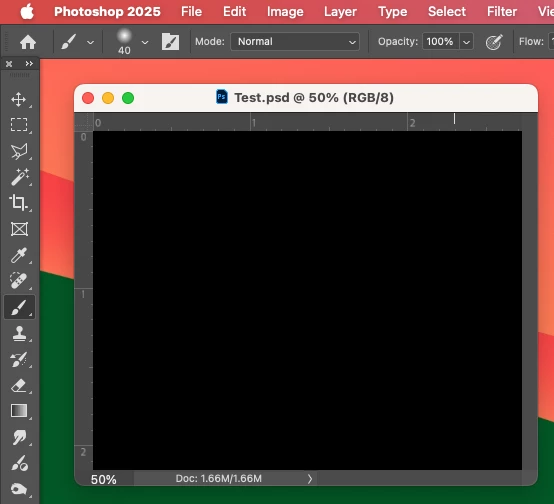


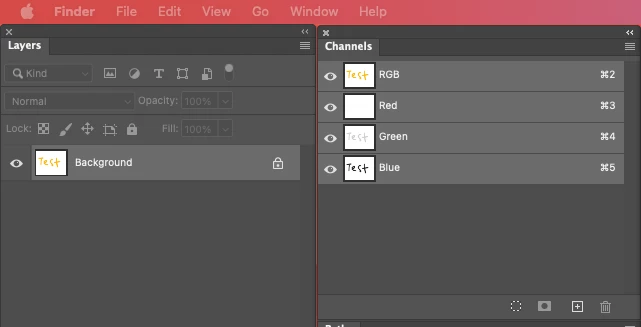
Even though the Layers and Channels palette preview thumbnails are showing what's in the document...


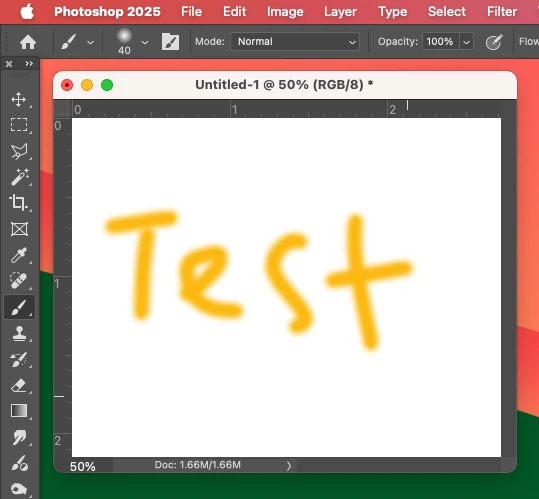
After digging around in Preferences, I tried turning off the "Use Graphics Processing" option and relaunching Photoshop afterwards, and it's working fine again...


I'm just wondering if this is a bug related to the M4 Mac Mini graphics driver compatibility with the version 26.6.0 release? And, if so, when can we expect a fix from Adobe. 


I've discovered the workaround for now, but obviously turning off the Graphics Processing setting will affect perfomance. Like I say, with this option switched on previously to the latest 26.6.0 release, it was working fine so it must be a new bug with 26.6.


I'm never updating this software ever again!!

返信数 179

Inspiring
April 28, 2025

Hardisk > Users > Your User Name > Libarary > Preferences > Adobe Photoshop 2025 settings > MachinePrefs.psp

Omdoudou
Participating Frequently
April 28, 2025


Et voila la solution !

in Finder Application "Go to folder" (Command+Maj+G) and write :

/Users/YOU/Library/Preferences/Adobe Photoshop 2025 Settings/MachinePref.psp
or
/Users/YOU/Library/Preferences/Adobe Photoshop (Beta) Settings/MachinePrefs.psp

Replace "YOU" with the user's name of your session
Delete this file and relaunch Photoshop


jeffreyS1767173
Participating Frequently
April 28, 2025

I looked for it and searched my entire machine.  There is no such file named MachinePref.psp.  Where is the Photoshop 2025 settings folder. Not in my preferences anywhere.

Participating Frequently
April 28, 2025

@heffSTL @Omdoudou Thanks.so much!
Y'all are rockstars. The MachinePrefs.psp fix worked on my M1 Mac Studio Ultra.
Happy! Happy! Joy! Joy!

ijustwanttogivethanks
Participant
April 28, 2025

Happened on my iMac

see image for system info.

Known Participant
April 28, 2025

All credit for the solution belongs to Omdoudou.

Participating Frequently
April 28, 2025

Worked for me too, Great detective work hefSTL many thanks.

Video Artist and DesignerHead of Video DesignNational Institute of Dramatic ArtSydney Australia
steveharrington1974
Known Participant
April 28, 2025

Brilliant trouble-shooting there! That's worked for me, I can now turn "Use Graphics Processor" back on and RGB documents are displaying properly again. Well done, you should work for Adobe as they can't even be bothered to test their software before releasing it into the wild.

Participant
April 28, 2025

Deleting the MachinePrefs.psp file also seems to have helped me. The day will show whether everything really works.

martinr48087970
Participant
April 28, 2025

Worked for me too.  Deleting the MachinePrefs.psp file and restarting Photoshop creates a new MachinePrefs.psp file and that resolves the black screen problem.