Known Participant
April 2, 2014
解決済み

Brush strokes become jagged after a few seconds

  • April 2, 2014
  • 返信数 13.
  • 31133 ビュー

I've tried just about everything to narrow down and eliminate this problem, with no luck.

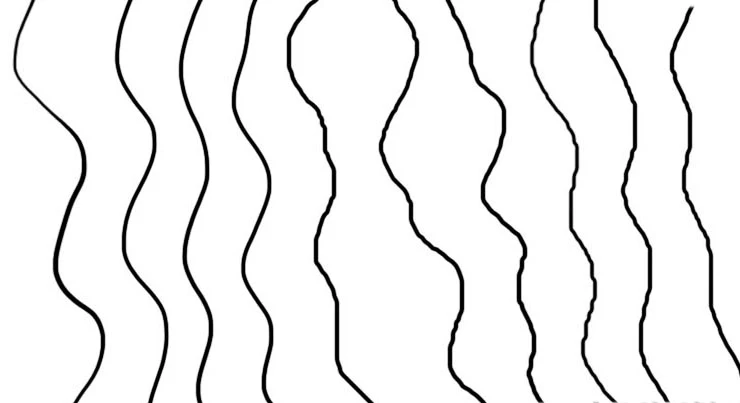
When I first start PS and paint a line with a simple hard round brush, it's nice and smooth. After about 15 seconds (or 4-5 lines), the lines become jagged.They're not pixely - it's more like what happens if you have smoothing turned off. The effect is more pronounced when I paint zoomed out, as if the input data is constrained to the zoomed out pixel size.

This is not a tablet problem - it happens with the mouse as well.

It does not happen with the lasso selection tool, so it seems limited to the brush tool.

Here's an image showing a series of brushstrokes, going from left to right.  You can see how the stroke quality degrades from the first stroke (on the left) which is nice and smooth, to the strokes on the right which are jagged.  You need to view the image at 100% to see what's happening clearly.

The fact that this problem doesn't appear when I first start the program, then creeps in, is really perplexing!  Once it starts it never goes away.

    解決に役立った回答 JJMack

    Trevor, not true!  You need to think about how mouse and stylus input data works to understand that, I'm pretty sure, this is a brush smoothing issue. It's not brush wobble.  It's not jitter.  In fact I think the program is working properly, but the notion of smoothing is kind of unintuitive so we don't always understand how important it is.

    With physical pencil, as you try to draw a smooth line slowly, if the pencil tip moves very slightly, the mark will also do that in exactly the same amount.But with a stylus, a small movement may not register if you have not moved to the next screen pixel, or may register disproportionately if you were already close to the edge of that pixel where a very slight movement (less than a pixel) puts you over the edge.  So you move the equivalent of 1/4 of a pixel, but the stylus jumps a whole pixel, or you move almost a whole pixel (3/4) but the stylus doesn't move at all.  Anyone can see this quite easily for him/herself.   The stylus movement on screen is constrained to the (relatively coarse) grid of screen pixels.  This is why the effect is magnified when painting zoomed out. At 25% the above example would be you move 1/4 of a screen pixel, and the cursor jumps a whole (screen) pixel, which is actually 4 bitmap pixels.

    So for example If you try to paint a vertical line, you will often see something that it looks like this:

    |

      |

    |

    |

    because you didn't move perfectly vertically, staying within one column of (screen) pixels.

    How is PS to know whether you want this, or whether you are really trying to draw a smoothish vertical line?  I say smoothISH because I, for example, do not want a perfect vertical line, but I do want a smooth line, like what would happen with a real pencil or brush.  That's what smoothing takes care of, but in programs like Painter (where it's called "damping") you can set its level, whereas in PS it's just a check box. 

    Damping and smoothing essentially round off the stylus input, so things like the stray bit of line in the above example don't appear.  The same thing happens when you use the shift key to make straight lines - PS only receives the first and last positions of the cursor, then connects them with a smooth line. This is the same as how painting very quickly creates a smoother line - there is simply less granularity, timewise, in the input.  I think that might, ironically, be why this "problem" does not appear right away. When you first start a program stuff is still loading and going on in the background and the stylus input may not have full granularity yet.

    BTW, If I wanted to draw a perfect vertical line I would use the shift key, but that's not how I usually want my work to look. Sometimes I do and it's fine, but typically I want a more "freehand" but smooth quality.

    Thank you all so much for giving ideas on this.  Honestly my best workaround is to rely heavily on "rotate view" so I can make marks more quickly and accurately.


    Then I think you may want to look for something like http://lazynezumi.com/home

    http://rahll.deviantart.com/journal/Lazy-Nezumi-stroke-smoothing-for-Photoshop-408711470

    返信数 13

    Participant
    July 3, 2014

    I have exactly the same symptoms on Intuos4 CS6 windows 7, typing this while I wait for 6.2 download

    I too have bought LN in vain, and that's when I discovered that it had the delay effect on window switching because everytime I touch  setting in LN the brushstroke was beautiful until a couple of strokes later

    if this works for me I suspect the older wacom drivers have something which compensates for windows 7's mouse interpolation problems, because this particular  kind of jiggle turns up in MS paint with a mouse as well (even if you use a ruler) minus the first few good strokes.

    Participating Frequently
    April 2, 2014

    Does it always happen when drawing things on the right side? It could be interference from a monitor, speakers, or some other device. On an old Wacom I had, the cursor would jitter when I drew up near the top of the tablet, because it was placed too close to the monitor and interfering with the signal. Try moving your tablet and (wireless?) mouse away from any other electronic device and see if it helps.

    Known Participant
    April 3, 2014

    It actually happens when drawing with a mouse, so I don't think it could be caused by interference with the tablet.  FYI the tablet is a Cintiq, so it's not monitor interference either.

    Participant
    October 23, 2014

    What does your system look like.  To tell you the truth I don't seem to be having any of the problems you are having with the mouse or Wacom pen.    I don't like installing Plug-in I have no intention of using.  Particulart Photoshop Plug-in for I keep plug-ins outside any Adobe folder and plug-installers a tend to install the plug-in in every version of Photoshop they find installed.  I just download a trial of LN and after it installed I removed all the plug-in it installed into different version of Photoshop one my system.  I copies the 32bit and 64Bit plug-ins into my Photoshop plug-ins trees.  My windows workstation is good but not top of the line good.  I do not see the jitter you seem to be getting with or without the plug-in enabled,  I'm no artiest all I can do is scribble fast and slow,  I do not see bad jitter. Here is what my system looks like and what I see when I scribble fast and slow.

    Adobe Photoshop Version: 14.2.1 (14.2.1 20140207.r.570 2014/02/07:23:00:00) x64

    Operating System: Windows 7 64-bit

    Version: 6.1 Service Pack 1

    System architecture: Intel CPU Family:6, Model:13, Stepping:7 with MMX, SSE Integer, SSE FP, SSE2, SSE3, SSE4.1, SSE4.2, HyperThreading

    Physical processor count: 12

    Logical processor count: 24

    Processor speed: 1995 MHz

    Built-in memory: 40886 MB

    Free memory: 34973 MB

    Memory available to Photoshop: 37151 MB

    Memory used by Photoshop: 95 %

    Image tile size: 1028K

    Image cache levels: 4

    Font Preview: Extra Large

    TextComposer: Latin

    Display: 1

    Display Bounds: top=0, left=0, bottom=1080, right=1920

    Display: 2

    Display Bounds: top=0, left=-1360, bottom=768, right=0

    OpenGL Drawing: Enabled.

    OpenGL Allow Old GPUs: Not Detected.

    OpenGL Drawing Mode: Advanced

    OpenGL Allow Normal Mode: True.

    OpenGL Allow Advanced Mode: True.

    AIFCoreInitialized=1

    AIFOGLInitialized=1

    OGLContextCreated=1

    NumGPUs=1

    gpu[0].OGLVersion="3.0"

    gpu[0].MemoryMB=2048

    gpu[0].RectTextureSize=16384

    gpu[0].Renderer="Quadro 4000/PCIe/SSE2"

    gpu[0].RendererID=1757

    gpu[0].Vendor="NVIDIA Corporation"

    gpu[0].VendorID=4318

    gpu[0].HasNPOTSupport=1

    gpu[0].DriverVersion="9.18.13.3276"

    gpu[0].Driver="nvd3dumx.dll,nvwgf2umx.dll,nvwgf2umx.dll,nvd3dum,nvwgf2um,nvwgf2um"

    gpu[0].DriverDate="20140304000000.000000-000"

    gpu[0].CompileProgramGLSL=1

    gpu[0].TestFrameBuffer=1

    gpu[0].OCLPresent=1

    gpu[0].OCLVersion="1.1"

    gpu[0].CUDASupported=1

    gpu[0].CUDAVersion="6.0.1"

    gpu[0].OCLBandwidth=7.47813e+010

    gpu[0].glGetString[GL_SHADING_LANGUAGE_VERSION]="4.40 NVIDIA via Cg compiler"

    gpu[0].glGetProgramivARB[GL_FRAGMENT_PROGRAM_ARB][GL_MAX_PROGRAM_INSTRUCTIONS_ARB]=[65536]

    gpu[0].glGetIntegerv[GL_MAX_TEXTURE_UNITS]=[4]

    gpu[0].glGetIntegerv[GL_MAX_COMBINED_TEXTURE_IMAGE_UNITS]=[192]

    gpu[0].glGetIntegerv[GL_MAX_VERTEX_TEXTURE_IMAGE_UNITS]=[32]

    gpu[0].glGetIntegerv[GL_MAX_TEXTURE_IMAGE_UNITS]=[32]

    gpu[0].glGetIntegerv[GL_MAX_DRAW_BUFFERS]=[8]

    gpu[0].glGetIntegerv[GL_MAX_VERTEX_UNIFORM_COMPONENTS]=[4096]

    gpu[0].glGetIntegerv[GL_MAX_FRAGMENT_UNIFORM_COMPONENTS]=[2048]

    gpu[0].glGetIntegerv[GL_MAX_VARYING_FLOATS]=[124]

    gpu[0].glGetIntegerv[GL_MAX_VERTEX_ATTRIBS]=[16]

    gpu[0].extension[AIF::OGL::GL_ARB_VERTEX_PROGRAM]=1

    gpu[0].extension[AIF::OGL::GL_ARB_FRAGMENT_PROGRAM]=1

    gpu[0].extension[AIF::OGL::GL_ARB_VERTEX_SHADER]=1

    gpu[0].extension[AIF::OGL::GL_ARB_FRAGMENT_SHADER]=1

    gpu[0].extension[AIF::OGL::GL_EXT_FRAMEBUFFER_OBJECT]=1

    gpu[0].extension[AIF::OGL::GL_ARB_TEXTURE_RECTANGLE]=1

    gpu[0].extension[AIF::OGL::GL_ARB_TEXTURE_FLOAT]=1

    gpu[0].extension[AIF::OGL::GL_ARB_OCCLUSION_QUERY]=1

    gpu[0].extension[AIF::OGL::GL_ARB_VERTEX_BUFFER_OBJECT]=1

    gpu[0].extension[AIF::OGL::GL_ARB_SHADER_TEXTURE_LOD]=1

    License Type: Subscription

    Serial number: 96040035116912554961

    Application folder: C:\Program Files\Adobe\Adobe Photoshop CC (64 Bit)\

    Temporary file path: C:\Users\JOHNJM~1\AppData\Local\Temp\

    Photoshop scratch has async I/O enabled

    Scratch volume(s):

      E:\, 3.64T, 3.23T free

      F:\, 465.2G, 181.3G free

      C:\, 224.2G, 113.6G free

    Required Plug-ins folder: C:\Program Files\Adobe\Adobe Photoshop CC (64 Bit)\Required\Plug-Ins\

    Primary Plug-ins folder: C:\Program Files\Adobe\Adobe Photoshop CC (64 Bit)\Plug-ins\

    Installed components:

       ACE.dll   ACE 2013/10/29-11:47:16   79.548223   79.548223

       adbeape.dll   Adobe APE 2013/02/04-09:52:32   0.1160850   0.1160850

       AdobeLinguistic.dll   Adobe Linguisitc Library   7.0.0  

       AdobeOwl.dll   Adobe Owl 2013/10/25-12:15:59   5.0.24   79.547804

       AdobePDFL.dll   PDFL 2013/10/29-11:47:16   79.508720   79.508720

       AdobePIP.dll   Adobe Product Improvement Program   7.0.0.1786  

       AdobeXMP.dll   Adobe XMP Core 2013/10/29-11:47:16   79.154911   79.154911

       AdobeXMPFiles.dll   Adobe XMP Files 2013/10/29-11:47:16   79.154911   79.154911

       AdobeXMPScript.dll   Adobe XMP Script 2013/10/29-11:47:16   79.154911   79.154911

       adobe_caps.dll   Adobe CAPS   7,0,0,21  

       AGM.dll   AGM 2013/10/29-11:47:16   79.548223   79.548223

       ahclient.dll    AdobeHelp Dynamic Link Library   1,8,0,31  

       aif_core.dll   AIF   5.0   79.534508

       aif_ocl.dll   AIF   5.0   79.534508

       aif_ogl.dll   AIF   5.0   79.534508

       amtlib.dll   AMTLib (64 Bit)   7.0.0.249 BuildVersion: 7.0; BuildDate: Thu Nov 14 2013 15:55:50)   1.000000

       ARE.dll   ARE 2013/10/29-11:47:16   79.548223   79.548223

       AXE8SharedExpat.dll   AXE8SharedExpat 2011/12/16-15:10:49   66.26830   66.26830

       AXEDOMCore.dll   AXEDOMCore 2011/12/16-15:10:49   66.26830   66.26830

       Bib.dll   BIB 2013/10/29-11:47:16   79.548223   79.548223

       BIBUtils.dll   BIBUtils 2013/10/29-11:47:16   79.548223   79.548223

       boost_date_time.dll   DVA Product   7.0.0  

       boost_signals.dll   DVA Product   7.0.0  

       boost_system.dll   DVA Product   7.0.0  

       boost_threads.dll   DVA Product   7.0.0  

       cg.dll   NVIDIA Cg Runtime   3.0.00007  

       cgGL.dll   NVIDIA Cg Runtime   3.0.00007  

       CIT.dll   Adobe CIT   2.1.6.30929   2.1.6.30929

       CITThreading.dll   Adobe CITThreading   2.1.6.30929   2.1.6.30929

       CoolType.dll   CoolType 2013/10/29-11:47:16   79.548223   79.548223

       dvaaudiodevice.dll   DVA Product   7.0.0  

       dvacore.dll   DVA Product   7.0.0  

       dvamarshal.dll   DVA Product   7.0.0  

       dvamediatypes.dll   DVA Product   7.0.0  

       dvaplayer.dll   DVA Product   7.0.0  

       dvatransport.dll   DVA Product   7.0.0  

       dvaunittesting.dll   DVA Product   7.0.0  

       dynamiclink.dll   DVA Product   7.0.0  

       ExtendScript.dll   ExtendScript 2013/10/30-13:12:12   79.546835   79.546835

       FileInfo.dll   Adobe XMP FileInfo 2013/10/25-03:51:33   79.154511   79.154511

       filter_graph.dll   AIF   5.0   79.534508

       icucnv40.dll   International Components for Unicode 2011/11/15-16:30:22    Build gtlib_3.0.16615  

       icudt40.dll   International Components for Unicode 2011/11/15-16:30:22    Build gtlib_3.0.16615  

       imslib.dll   IMSLib DLL   7.0.0.145  

       JP2KLib.dll   JP2KLib 2013/10/29-11:47:16   79.248139   79.248139

       libifcoremd.dll   Intel(r) Visual Fortran Compiler   10.0 (Update A)  

       libiomp5md.dll   Intel(R) OMP Runtime Library   5.0  

       libmmd.dll   Intel(r) C Compiler, Intel(r) C++ Compiler, Intel(r) Fortran Compiler   12.0  

       LogSession.dll   LogSession   2.1.2.1785  

       mediacoreif.dll   DVA Product   7.0.0  

       MPS.dll   MPS 2013/10/29-11:47:16   79.535029   79.535029

       msvcm80.dll   Microsoft® Visual Studio® 2005   8.00.50727.6195  

       msvcm90.dll   Microsoft® Visual Studio® 2008   9.00.30729.1  

       msvcp100.dll   Microsoft® Visual Studio® 2010   10.00.40219.1  

       msvcp80.dll   Microsoft® Visual Studio® 2005   8.00.50727.6195  

       msvcp90.dll   Microsoft® Visual Studio® 2008   9.00.30729.1  

       msvcr100.dll   Microsoft® Visual Studio® 2010   10.00.40219.1  

       msvcr80.dll   Microsoft® Visual Studio® 2005   8.00.50727.6195  

       msvcr90.dll   Microsoft® Visual Studio® 2008   9.00.30729.1  

       PatchMatch.dll   PatchMatch 2013/10/29-11:47:16   79.542390   79.542390

       pdfsettings.dll   Adobe PDFSettings   1.04  

       Photoshop.dll   Adobe Photoshop CC   CC  

       Plugin.dll   Adobe Photoshop CC   CC  

       PlugPlugOwl.dll   Adobe(R) CSXS PlugPlugOwl Standard Dll (64 bit)   4.2.0.36  

       PSArt.dll   Adobe Photoshop CC   CC  

       PSViews.dll   Adobe Photoshop CC   CC  

       SCCore.dll   ScCore 2013/10/30-13:12:12   79.546835   79.546835

       ScriptUIFlex.dll   ScriptUIFlex 2013/10/30-13:12:12   79.546835   79.546835

       svml_dispmd.dll   Intel(r) C Compiler, Intel(r) C++ Compiler, Intel(r) Fortran Compiler   12.0  

       tbb.dll   Intel(R) Threading Building Blocks for Windows   4, 1, 2012, 1003  

       tbbmalloc.dll   Intel(R) Threading Building Blocks for Windows   4, 1, 2012, 1003  

       updaternotifications.dll   Adobe Updater Notifications Library   7.0.1.102 (BuildVersion: 1.0; BuildDate: BUILDDATETIME)   7.0.1.102

       WRServices.dll   WRServices Mon Feb 25 2013 16:09:10   Build 0.19078   0.19078

    Required plug-ins:

       3D Studio 14.2.1 (14.2.1 x001)

       Accented Edges 14.2.1

       Adaptive Wide Angle 14.2.1

       Angled Strokes 14.2.1

       Average 14.2.1 (14.2.1 x001)

       Bas Relief 14.2.1

       BMP 14.2.1

       Camera Raw 8.3

       Camera Raw Filter 8.3

       Chalk & Charcoal 14.2.1

       Charcoal 14.2.1

       Chrome 14.2.1

       Cineon 14.2.1 (14.2.1 x001)

       Clouds 14.2.1 (14.2.1 x001)

       Collada 14.2.1 (14.2.1 x001)

       Color Halftone 14.2.1

       Colored Pencil 14.2.1

       CompuServe GIF 14.2.1

       Conté Crayon 14.2.1

       Craquelure 14.2.1

       Crop and Straighten Photos 14.2.1 (14.2.1 x001)

       Crop and Straighten Photos Filter 14.2.1

       Crosshatch 14.2.1

       Crystallize 14.2.1

       Cutout 14.2.1

       Dark Strokes 14.2.1

       De-Interlace 14.2.1

       Dicom 14.2.1

       Difference Clouds 14.2.1 (14.2.1 x001)

       Diffuse Glow 14.2.1

       Displace 14.2.1

       Dry Brush 14.2.1

       Eazel Acquire 14.2.1 (14.2.1 x001)

       Embed Watermark 4.0

       Entropy 14.2.1 (14.2.1 x001)

       Extrude 14.2.1

       FastCore Routines 14.2.1 (14.2.1 x001)

       Fibers 14.2.1

       Film Grain 14.2.1

       Filter Gallery 14.2.1

       Flash 3D 14.2.1 (14.2.1 x001)

       Fresco 14.2.1

       Glass 14.2.1

       Glowing Edges 14.2.1

       Google Earth 4 14.2.1 (14.2.1 x001)

       Grain 14.2.1

       Graphic Pen 14.2.1

       Halftone Pattern 14.2.1

       HDRMergeUI 14.2.1

       IFF Format 14.2.1

       Ink Outlines 14.2.1

       JPEG 2000 14.2.1

       Kurtosis 14.2.1 (14.2.1 x001)

       Lens Blur 14.2.1

       Lens Correction 14.2.1

       Lens Flare 14.2.1

       Liquify 14.2.1

       Matlab Operation 14.2.1 (14.2.1 x001)

       Maximum 14.2.1 (14.2.1 x001)

       Mean 14.2.1 (14.2.1 x001)

       Measurement Core 14.2.1 (14.2.1 x001)

       Median 14.2.1 (14.2.1 x001)

       Mezzotint 14.2.1

       Minimum 14.2.1 (14.2.1 x001)

       MMXCore Routines 14.2.1 (14.2.1 x001)

       Mosaic Tiles 14.2.1

       Multiprocessor Support 14.2.1 (14.2.1 x001)

       Neon Glow 14.2.1

       Note Paper 14.2.1

       NTSC Colors 14.2.1 (14.2.1 x001)

       Ocean Ripple 14.2.1

       Oil Paint 14.2.1

       OpenEXR 14.2.1

       Paint Daubs 14.2.1

       Palette Knife 14.2.1

       Patchwork 14.2.1

       Paths to Illustrator 14.2.1

       PCX 14.2.1 (14.2.1 x001)

       Photocopy 14.2.1

       Photoshop 3D Engine 14.2.1 (14.2.1 x001)

       Photoshop Touch 14.0

       Picture Package Filter 14.2.1 (14.2.1 x001)

       Pinch 14.2.1

       Pixar 14.2.1 (14.2.1 x001)

       Plaster 14.2.1

       Plastic Wrap 14.2.1

       PNG 14.2.1

       Pointillize 14.2.1

       Polar Coordinates 14.2.1

       Portable Bit Map 14.2.1 (14.2.1 x001)

       Poster Edges 14.2.1

       Radial Blur 14.2.1

       Radiance 14.2.1 (14.2.1 x001)

       Range 14.2.1 (14.2.1 x001)

       Read Watermark 4.0

       Reticulation 14.2.1

       Ripple 14.2.1

       Rough Pastels 14.2.1

       Save for Web 14.2.1

       ScriptingSupport 14.2.1

       Shake Reduction 14.2.1

       Shear 14.2.1

       Skewness 14.2.1 (14.2.1 x001)

       Smart Blur 14.2.1

       Smudge Stick 14.2.1

       Solarize 14.2.1 (14.2.1 x001)

       Spatter 14.2.1

       Spherize 14.2.1

       Sponge 14.2.1

       Sprayed Strokes 14.2.1

       Stained Glass 14.2.1

       Stamp 14.2.1

       Standard Deviation 14.2.1 (14.2.1 x001)

       STL 14.2.1 (14.2.1 x001)

       Sumi-e 14.2.1

       Summation 14.2.1 (14.2.1 x001)

       Targa 14.2.1

       Texturizer 14.2.1

       Tiles 14.2.1

       Torn Edges 14.2.1

       Twirl 14.2.1

       Underpainting 14.2.1

       Vanishing Point 14.2.1

       Variance 14.2.1 (14.2.1 x001)

       Variations 14.2.1 (14.2.1 x001)

       Water Paper 14.2.1

       Watercolor 14.2.1

       Wave 14.2.1

       Wavefront|OBJ 14.2.1 (14.2.1 x001)

       WIA Support 14.2.1 (14.2.1 x001)

       Wind 14.2.1

       Wireless Bitmap 14.2.1 (14.2.1 x001)

       ZigZag 14.2.1

    Optional and third party plug-ins:

       CUR (Windows Cursor) NO VERSION

       ICO (Windows Icon) NO VERSION

       Lazy Nezumi Pro 14.3.27.1855

       Reduce Noise 7.0.0.0

       ScriptListener 13.0

       StarFilter Pro 3 3.0.3.0

       SuperPNG 2.0

    Plug-ins that failed to load: NONE

    Flash:

       Mini Bridge

       Adobe Exchange

       Kuler

    Installed TWAIN devices: NONE


    I have the exact same issue.  There is jitter, and even using Nezumi, hasn't fixed it.

    What saddens me is that I am a huge fan of Adobe, yet nothing is being done about this. I use this product professionally, and believe me, it matters. 

    There are at least 2 more 'showstopper' bugs that I have found, unfortunately, I have Photoshop CS6, and I was told I'd have to upgrade to CC for support.  Never mind, that CC at work has the same issues, and I don't want to spend another $800 just to see nothing done about it.  These issues should be hotfixed - because it should have worked correctly to start with.

    JJMack
    Community Expert
    Community Expert
    April 2, 2014

    So can you clue us in. Are you using a PC or a Mac.  Windows 95 or 8 os 7 or osx ps 1 or ps cc little ram much ram propcessor type ! 

    JJMack
    Known Participant
    April 2, 2014

    Sorry, I'm using a PC with Win 7 SP1, CS6.

    8GB Ram; processor is AMD A6-3650 APU

    Radeon 5500 card

    Interestingly, if I draw a single line,very slowly for about two minutes, then a few more like that, the problem does not kick in until the fourth or fifth line. So it's entirly dependent on the number of marks made, not elapsed time.

    JJMack
    Community Expert
    Community Expert
    April 2, 2014

    I have no idea other then resetting your Photoshop Tools and your Photoshop  preferences and try turning off GPU support. Does this happen on all document sizes or just documents with a large number of pixels? Here what I see on a screen size document 1920x1080 12Px brush spacing 1% 

    JJMack