

Participant
January 12, 2020
質問

Brushes Preset Manager Option not Appearing

  • January 12, 2020
  • 返信数 3.
  • 44066 ビュー

I want to go into the preset manager so that I can rearrange and manage my brushes more efficiently but the option is not available for me. 

返信数 3

Fabiola Rodríguez
Participating Frequently
April 17, 2023

Hi there!

I had the same problem, and I found this great tutorial that solved this problem.

https://youtu.be/lCdMLIW-ySc

Yeeticus
Participant
July 2, 2020

Please put it back Adobe.  I loved that I could find all the things there.  Now I'm only seeing Contours and Tools.  Nothing else.  

If Adobe could fix it or put it back how it was that would be great.

Participant
March 29, 2021

i have the same problem ... trying to follow a tutorial but cannot go through because of this.. there must be a way around it


Participant
April 3, 2021

HI. Were you able to figure this problem out? I am having the same issue. 


Akash Sharma
Legend
January 13, 2020

Hi there,


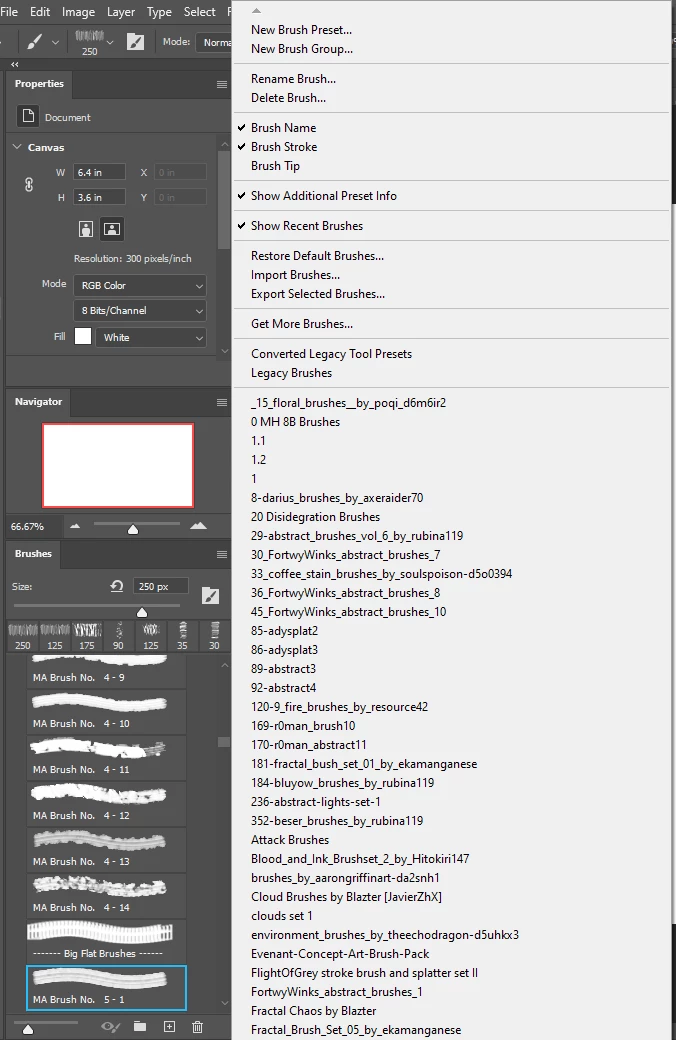
Sorry about the confusion caused as Brush Presets panel is not showing in the flyout menu in Photoshop 2020. 

The Preset Manager is being deprecated. You can use the Brushes Panel to do all those things you used to do in the Preset Manager without having to go into a dialog. The flyout menu lets you import and export, choose how to display the brushes, etc.
 
Thanks,
Akash
Participating Frequently
April 10, 2023

BRING BACK BRUSH THE PRESET MANAGER!!!!!!!!!!!!!

It is a lot easier to move brushes around when you have a never ending amount of brushes to sort.

Leave well enough alone.

Participant
April 10, 2023
Hi Sandi,

Thanks for your reply. It seems counter-intuitive; can you elaborate? And
have you a reply to the challenge of moving a brush, buried in a great mass
of brushes, into a position in the collection matrix where it can easily
be found, such as position number one?

Rob