

Participating Frequently
January 26, 2025
解決済み

Color jpeg to black & white and add red hair

  • January 26, 2025
  • 返信数 3.
  • 1207 ビュー

Photoshop 26.2.0

MacBook Pro

macOS Sequoia 15.1.1

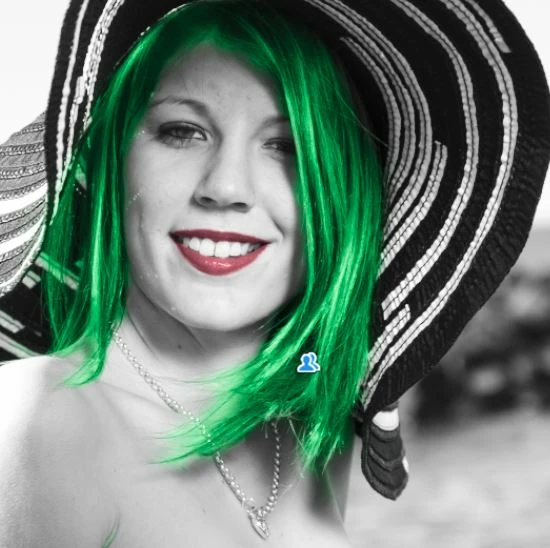
How do I change a color jpeg image to black & white, and go back to make the hair and lips red again?

Any information or YouTube videos would be great appreciated.

Thanks


解決に役立った回答 Rob_Cullen

Another method I might suggest is to use Adobe Camera Raw, or the Camera Raw Filter in Photoshop-

1) Convert to B&W (One button click)

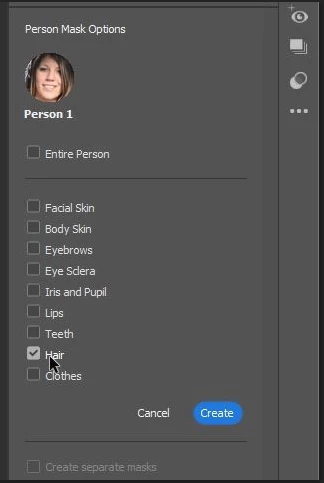
2) Use Masking to find "People" and create individual masks for  Hair and Lips,

3) make color changes with the Tone curve


返信数 3

Rob_Cullen
Community Expert
Rob_CullenCommunity Expert解決!
Community Expert
January 27, 2025

Another method I might suggest is to use Adobe Camera Raw, or the Camera Raw Filter in Photoshop-

1) Convert to B&W (One button click)

2) Use Masking to find "People" and create individual masks for  Hair and Lips,

3) make color changes with the Tone curve


Regards. My System: Windows-11, Lightroom-Classic 15.1.1, Photoshop 27.3.1, ACR 18.1.1, Lightroom 9.0, Lr-iOS 10.4.0, Bridge 16.0.2 .
jane-e
Community Expert
Community Expert
January 26, 2025

@Kevin34248585b0mr 


One way:

  • Copy the layer
  • Desaturate top layer with a Hue/Saturation adjustment layer
  • Select hair and lips, then invert selection
  • Create layer mask so hair and lips show from lower layer while remainder of top layer is desaturated


Jane


EDIT: Semaphoric posted while I was still typing.


Participating Frequently
January 26, 2025

Thanks so much for the quick reply...Unfortunately I am attempting to learn and do things with photoshop on my own and with YouTube videos. I can't seem to follow the steps you laid out. I am so sorry...I will attach a cropped closeup of her head area so you can see what I'm trying to do...Thanks again

D Fosse
Community Expert
Community Expert
January 26, 2025

This should be perfectly doable with the refine edge brush in Select and Mask. It's very good at separating hair from background, as long as there is sufficient contrast to begin with.


Alternatively, the blue channel should be useable for a mask here. Copy the blue channel into a mask, and use Levels or Curves to maximise the contrast in the mask.


But generally, this is where the general public completely misunderstands Photoshop. They think it's just a matter of pushing the right buttons. The truth is, sometimes you have to put in quite a bit of work.


The most important beginner's lesson is the reality check 😉

Semaphoric
Community Expert
Community Expert
January 26, 2025

Add a Black and White adjustment layer, and paint over the lips and hair on the mask with black to reveal them.

Participating Frequently
January 26, 2025

Thanks for the quick reponse...although I can probably take my time with the lips, I wouldn't know how to handle the strand of hair. Attached is a cropped close-up of her head area. Thanks for the info!
