


Ken Nielsen
Legend
July 14, 2024
解決済み

Completely lost in Photoshop: Where are preferences so I can turn off rich tool tips?

  • July 14, 2024
  • 返信数 3.
  • 2296 ビュー

I've never been so lost in Photoshop and been a user since 1988... These 'rich tool tips' have taken over the program and I'm not getting any work done because of the constant intrusion... Where are preferences as I look under Photoshop and there is no way to turn off these tool tips, there is no menu called 'preferences.'  Who ever thought this should be so hidden and. forced upon the lot of us who are simply trying to get our daily work done. Need help desperately to turn this tool tips stuff off please!
解決に役立った回答 Jeff Arola

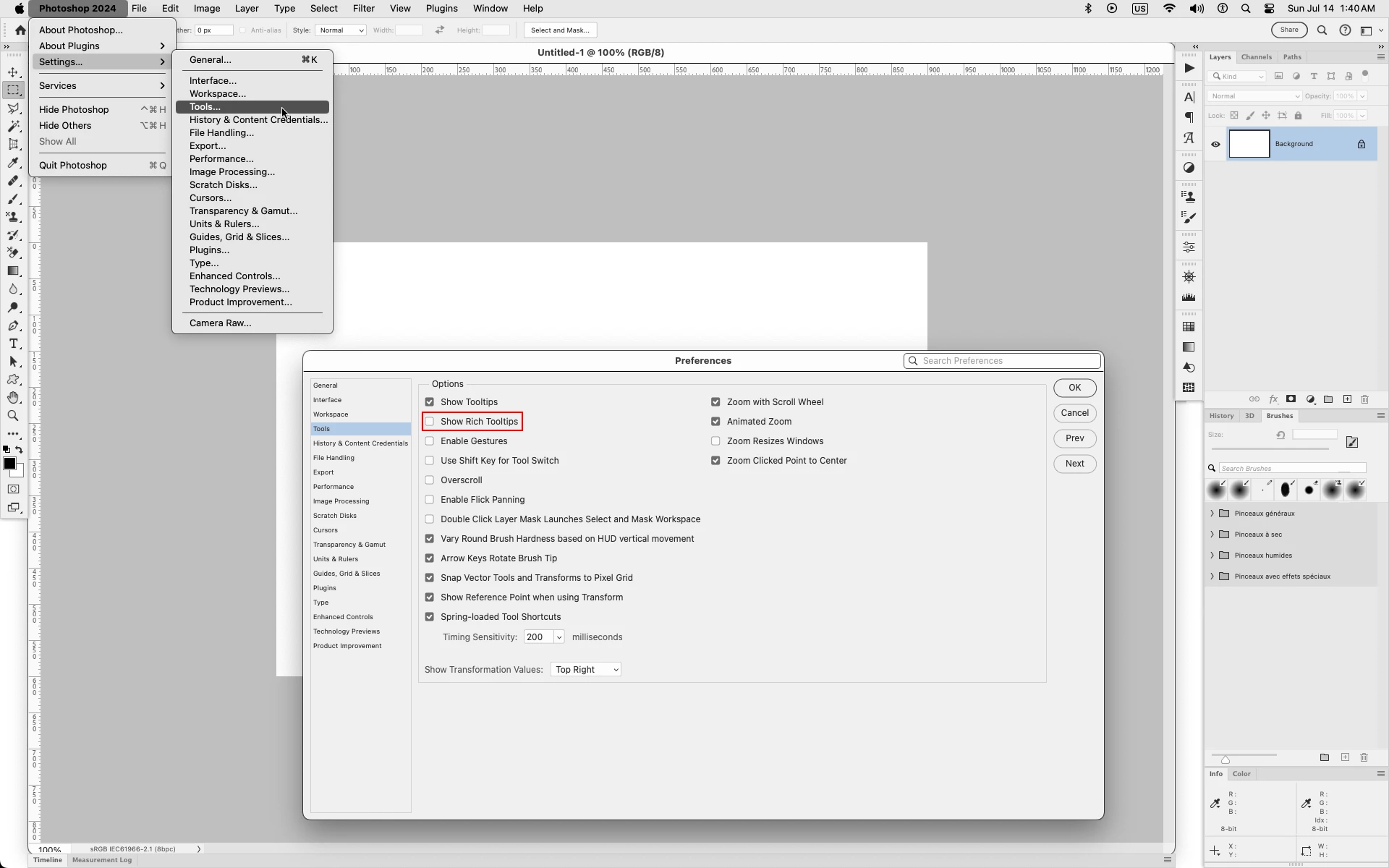
In recent versions of macOS, namely Ventura and Sonoma, Preferences are called Settings.

So that would be Photoshop 2024>Settings>Tools and uncheck Show Rich Tooltips


返信数 3

Participating Frequently
April 27, 2025

I went to Sonoma from Ventura and all my preferences disappeared. Photoshop said that version wouldn't work well. Well is doesn't work at all. 

barbara_a7746676
Community Expert
Community Expert
July 14, 2024

Preferences is under the Edit menu. When the dialog box opens, choose Tools, and turn off tool tips.

Ken Nielsen
Ken Nielsen作成者
Legend
July 14, 2024

Interesting, so in Sonoma, whether I choose 'settings' in the Photoshop menu, I can still go to the edit menu and choose preferences? I didnt see it but will go back and re-check. Thank you.

creative explorer
Community Expert
Community Expert
July 14, 2024

@Ken Nielsen I was curious when you wrote, I'm not getting any work done because of the constant intrusion
and then it hit me....I wonder if it's the 'Smart Guides' that is throwing you off instead. I know I normally turn this off in both applciation for Adobe Illustrator and Photohop (see smartGuides.png). Is it pink lines going everywhere when you try align things or move objects in Photoshop? 

If so, go to the main menu - view - show - uncheck smart guides

m
Jeff Arola
Community Expert
Jeff ArolaCommunity Expert解決!
Community Expert
July 14, 2024

In recent versions of macOS, namely Ventura and Sonoma, Preferences are called Settings.

So that would be Photoshop 2024>Settings>Tools and uncheck Show Rich Tooltips


Ken Nielsen
Ken Nielsen作成者
Legend
July 14, 2024

Ah, so good. Thanks for your help with this. World of difference to have this under control.