


Participant
January 2, 2020
質問

Exporting as PNG resulting in muted inaccurate colors - Photoshop 20.0.5 Windows 10
  • January 2, 2020
  • 返信数 2.
  • 814 ビュー


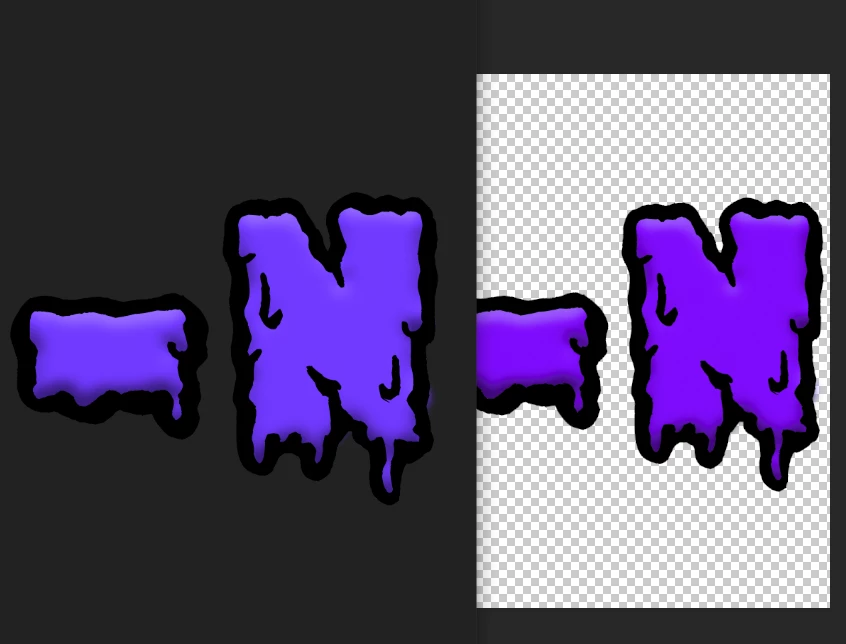
As you can see here the left image is the exported ick color image and the right is the corect image in photoshop. They're on the same monitor and everything seems to be correct but still it exports it so poorly. Anyone have any ideas as to why it's doing this? 😕😕 Really saddening.


Windows 10

PS Ver: 20.0.5 release

Mode: RGB 16Bit (also tried 8bit)

Assigned Profile: Working RGB : sRGB IEC61966-2.1

Tried both save as and export.


{Thread renamed by moderator}

このトピックへの返信は締め切られました。

返信数 2

D Fosse
Community Expert
Community Expert
January 2, 2020

Windows "Photos" is not color managed. It ignores both the embedded document profile and your monitor profile.


Photoshop is color managed, using both these profiles and converts correctly.


In other words - Photoshop is right, and Windows "Photos" is wrong. Nothing to do about that, except stop using it. Find another photo viewer that does color management correctly. Trust Photoshop (assuming your monitor profile is good).


BTW you are absolutely right to have "embed profile" checked in the Export dialog. Keep doing that; it is unfortunately unchecked by default. It won't help with apps that aren't color managed, but those that are will display correctly when the profile is embedded.

rayn12062426作成者
Participant
January 2, 2020

so both the windows image viewer and discord is wrong. That's crazy lol I was freaking out for nothing it seems. Thanks!

Sahil.Chawla
Adobe Employee
Adobe Employee
January 2, 2020

Hi Ryan,

As you're seeing a color difference when you export a png out of Photoshop, could you please try updating Photoshop to version 21.0.2 via the Creative Cloud Desktop app and see if it helps?

Also, could you try changing the screen color profile to sRGB IEC61966-2.1: https://www.lightroomqueen.com/how-do-i-change-my-monitor-profile-to-check-whether-its-corrupted/


Let us know how it goes.
Regards,
Sahil


rayn12062426作成者
Participant
January 2, 2020

Updated to the latest and same issue sadly 😕😕


In the Export options preview it looks correct but the end product is still washed out. It's like it's not mounting the right profile or something i dunno.


Left: PS Right: windows photo viewer


Preview


Exported logo. weirdly it looks okayish on the browser here and even with the screenshots comparing but actually seeing them next to each other for some reason it's night and day. I'm so confused.


EDIT: Yeah even looking at the EXACT image here on the browser next to the image in photo viewer they look different. I don't get it lol. I  open it and it looks wrong, i post it in discord to a friend, it looks wrong and washed out but here it's closer? Still wrong but closer. I'm even more confused now lol