trwalp
Known Participant
March 19, 2024
解決済み

Generative Fill cannot add a beard to a face

  • March 19, 2024
  • 返信数 1.
  • 2010 ビュー

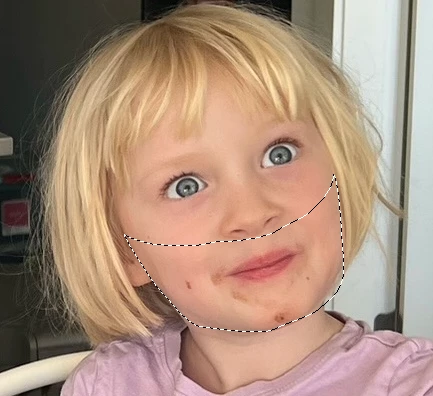
I opend a close-up photo of a person's face into PS 25.5.1.  I created a duplicate layer, outlined the area in the shape of a beard, and clicked Generative Fill, and entered "beard" for the prompt. The results were changes in the person's mouth expression, but no beard. 
このトピックへの返信は締め切られました。
解決に役立った回答 Kevin Stohlmeyer

So subject matter does play into AI results and in this case your young subject definitely works against you. Nothing would generate a beard, facial hair, mustache, etc. with the entire image showing.


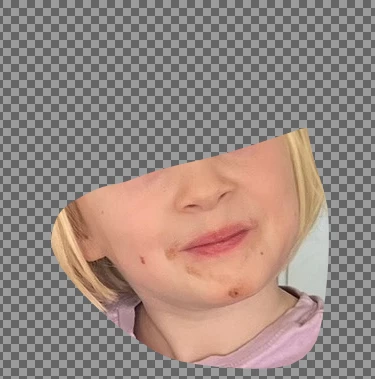
What I ended up doing was selecting the lower chin area and duplicating on to its own layer, then hiding the remaining image:

Thereby "tricking" the AI to ignore the age of the subject.

After generating, I simply turned the full image layer back on.


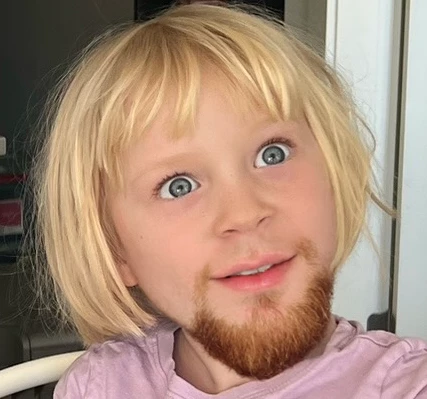
This was the best result out of 6:

返信数 1

Kevin Stohlmeyer
Community Expert
Community Expert
March 19, 2024

Can you show an example of your image with the selected area?

I also anticipate using the masking tools to remove an unwanted mouth at times when adding facial hair.

This is my process - normally I'm more descriptive than just "beard" but ran with your prompt for this example:


trwalp
trwalp作成者
Known Participant
March 20, 2024

Thank you @Kevin Stohlmeyer !  Attached is the picture.  I tried prompts other than simply "beard" but nothing generated anything close to what I asked for. Besides a mother's comment about the kid not having a beard like I do for hiding food bits, I was motivated to try it because of this short video where the author does exactly what I'm trying to do. (and you so successfully did, too!)

Kevin Stohlmeyer
Community Expert
Community Expert
March 20, 2024

So subject matter does play into AI results and in this case your young subject definitely works against you. Nothing would generate a beard, facial hair, mustache, etc. with the entire image showing.


What I ended up doing was selecting the lower chin area and duplicating on to its own layer, then hiding the remaining image:

Thereby "tricking" the AI to ignore the age of the subject.

After generating, I simply turned the full image layer back on.


This was the best result out of 6: