kristinaf57362956
Participating Frequently
August 2, 2019
解決済み

Healing Brush in Photoshop

  • August 2, 2019
  • 返信数 1.
  • 601 ビュー

I have trouble using the Healing Brush Tool in Photoshop. I watch the tutorial, I feel I'm doing what she says but still struggle. I click with the Alt key (Windows) to get the target and sample the surroundings, then I click off the Alt key and just drag across the unwanted object (in this case a wire along the sky) and nothing happens. But, if I then start clicking in the sky, I get plenty of wire marks, lol. Grrr. Any suggestions?

このトピックへの返信は締め切られました。
解決に役立った回答

Thank you!


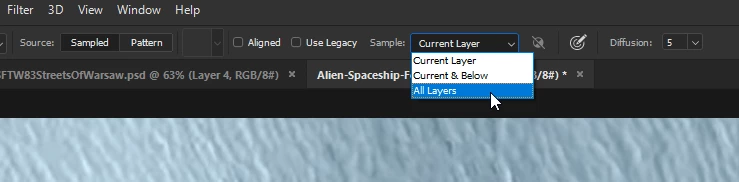
Select either Current & Below or All Layers from the drop down menu

返信数 1

August 2, 2019

Hi

Can you post a screenshot with all the pertinent panels opened

Also try resetting the tool

kristinaf57362956
Participating Frequently
August 2, 2019

How do I take a screenshot on my computer (PC)?

BeingKristina
kristinaf57362956
Participating Frequently
August 2, 2019

Select either Current & Below or All Layers from the drop down menu


That did it!!!!! Thank you so much!!!

BeingKristina