


joeh87907460
Inspiring
November 4, 2019
解決済み

How can I fix the color swatches in the updated 2020 photoshop?

  • November 4, 2019
  • 返信数 15.
  • 21605 ビュー

[Tone and title of the post edited by a moderator to match current community rules. One can disagree with choices made, but please, remember that whomever you are discontent with is also a human being that deserves respect.] PEC
I need to know how to undo what Adobe did to the color swatches in Photoshop. I liked it the way it was, and I litterally HATE what did to it. Who decided it would be a good idea to put them in a bunch of folders?


This is what it looks like now...
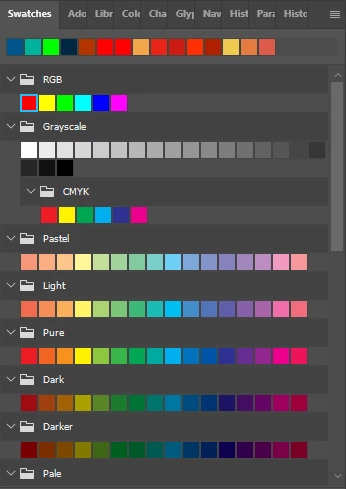


How can I undo what was done, and get the color swatches back like they were? 
解決に役立った回答 Jeff Arola

You can load the old Default Swatches from Required folder in the Photoshop program folder (windows) or Photoshop Application (mac right click show package contents) if you still have an older photoshop version installed.


返信数 15

karenf61822973
Participant
June 24, 2020

I still can't get the default swatches to load. Any other suggestions?

barharbor
Participant
July 31, 2020

Karen did you ever find a way? I cannot either and am incredibly frustrated. I'm on newest verion of PS (21.2.1) and newest Mac OS. 

Jeff Arola
Community Expert
Community Expert
February 22, 2020

Sujeka,


What operating system are you using?

Participant
February 22, 2020

Jeff Arola, I still have Photoshop 2018 on my computer. Can you please give detailed, step-by-step for morons instructions on how to load the old swatches into the new Photoshop? I am now running the 21.1.0 version (just switched over to supposedly fix an issue) and also absolutely hate the new swatch system. Makes my work so much slower and cumbersome! Thank you.

Jeff Arola
Community Expert
Jeff ArolaCommunity Expert解決!
Community Expert
November 5, 2019

You can load the old Default Swatches from Required folder in the Photoshop program folder (windows) or Photoshop Application (mac right click show package contents) if you still have an older photoshop version installed.


Valc2
Known Participant
January 20, 2021

Jeff

I am sorry to sound like an idiot btut new at photoshp and where does one find the color swatches in the first place? I have been trying everything to get my swatch panel to look similar to the one above. Please help

Joy-14
Participant
August 19, 2025

You should be able to go to window and open the colors thing. I have had to use window so many times because of a class that I am taking. Here is the link to the first video of this series of how to use Adobe Photoshop: .https://www.youtube.com/watch?v=N24fIAwkchk&t=0s. Your swatches panel might not look like the one from the video, but once you get there it is pretty easy to use.

davescm
Community Expert
Community Expert
November 4, 2019

You can drag swatches in /out of groups. To take them out click on the first in the group , shift click on the last then drag them above the groups to take them out. 

To put them in a group drag onto a folder


Dave

joeh87907460
joeh87907460作成者
Inspiring
November 4, 2019

Thank you for the quick reply. And thank you very much for trying to help.


However that wasn't what I was looking for. I just need to know how to completely undo the damage that adobe did with this "update" without having to drag from a bunch of folders and rearange in a new folder. I just need to know how to put them back exactly like they were before the so called "update". 


I suppose I was hoping that someone from adobe would read my post, feel ashamed enough of what they did that they would offer up a soloution like, "Do this, then click this button and restrart photoshop and it'll be back exactly like it was. We apologize for our stupidity in doing this and will refrain from ever doing it in the future." That'ts what they should do but knowing how the arrogant pieces of junk are, that probably won't ever happen...

Participant
June 10, 2020

YESSS IT' REALLY IS THAT FRUSTRATING!