

jgilbreath
Participating Frequently
October 3, 2019
解決済み

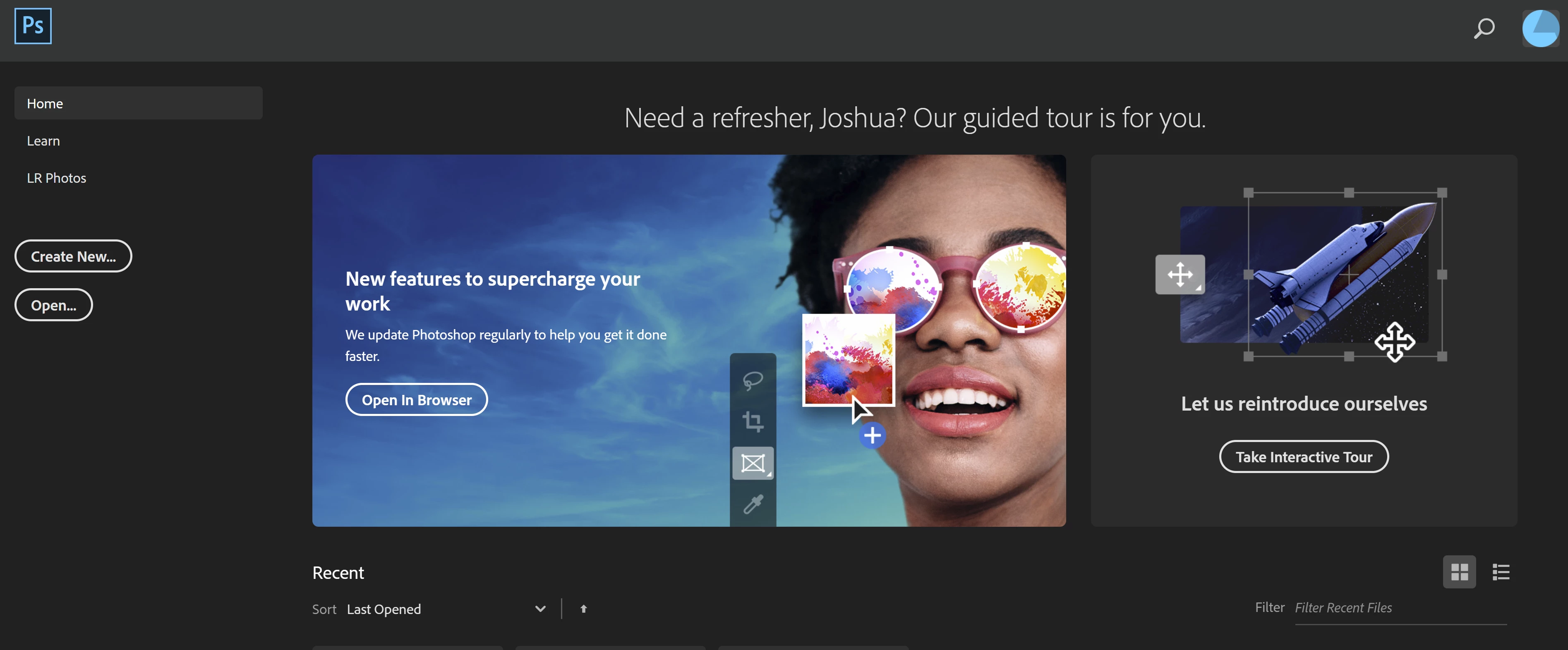
How do I remove the banner from the homepage?

  • October 3, 2019
  • 返信数 1.
  • 1365 ビュー

Can someone please explain to me how to remove the extremely large banner from the home page? This banner isn't present in any other locations I have PS installed. 


Thank you!
    このトピックへの返信は締め切られました。
    解決に役立った回答 lambiloon

    Hi in preferences then general > disable homescreen tick that option to turn it off.


    Regards

    返信数 1

    lambiloon
    Community Expert
    lambiloonCommunity Expert解決!
    Community Expert
    October 3, 2019

    Hi in preferences then general > disable homescreen tick that option to turn it off.


    Regards

    Ali Sajjad / Graphic Design Trainer / Freelancer / Adobe Certified Professional
    jgilbreath
    jgilbreath作成者
    Participating Frequently
    October 3, 2019
    Hi thanks for replying @lambiloon, I want the homescreen to remain, so I can see my recent documents. I just don't want 3/4 of my screen covered by information I do not need.
    lambiloon
    Community Expert
    Community Expert
    October 3, 2019
    ok then dont do anything when you open your documents again and again you see recent files that screen will hide automatically.
    Ali Sajjad / Graphic Design Trainer / Freelancer / Adobe Certified Professional
