

fpmercado
Participant
December 14, 2017
解決済み

How to copy, rotate and paste (ex. pattern on a shirt)?

  • December 14, 2017
  • 返信数 2.
  • 3015 ビュー

I'm fairly new to PS and cannot seem to figure out how to do the above.

Thanks for your help.

    このトピックへの返信は締め切られました。
    解決に役立った回答 Nancy OShea

    Have you worked through any basic tutorials to get familiar with the tools? That's where every beginner should  start.

    Adobe Photoshop Learn & Support

    I use keyboard shortcuts.

    Ctrl+A to select all

    Ctrl+C to copy

    Ctrl+V to paste.

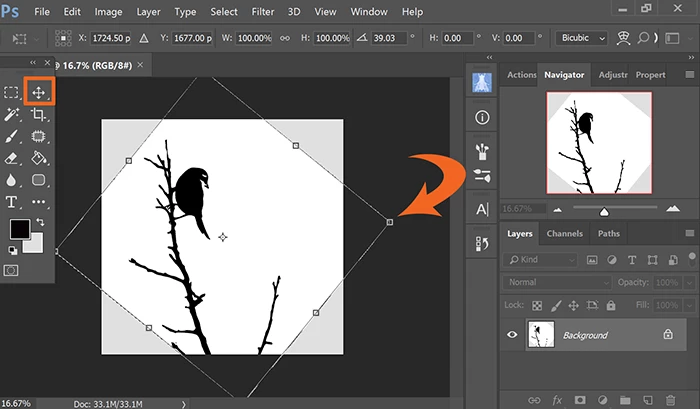
    Go to Edit > Transform > Rotate.  With the Move tool selected, click & drag handles to rotate image.  When done, hit Enter.  See screenshot.

    \
    返信数 2

    fpmercado
    fpmercado作成者
    Participant
    December 14, 2017

    Thank you Nancy.  I applied above to a portion of the shirt to pick up the pattern and worked.  Definitely will go in tutorials asap.

    Abambo
    Community Expert
    Community Expert
    December 14, 2017

    Hi,

    is it possible to mark Nancy’s answer as correct. This will help peers who have similar questions. Thanks.

    Abambo.

    ABAMBO | Hard- and Software Engineer | Photographer
    Nancy OShea
    Community Expert
    Nancy OSheaCommunity Expert解決!
    Community Expert
    December 14, 2017

    Have you worked through any basic tutorials to get familiar with the tools? That's where every beginner should  start.

    Adobe Photoshop Learn & Support

    I use keyboard shortcuts.

    Ctrl+A to select all

    Ctrl+C to copy

    Ctrl+V to paste.

    Go to Edit > Transform > Rotate.  With the Move tool selected, click & drag handles to rotate image.  When done, hit Enter.  See screenshot.

    \

    Nancy O'Shea— Product User & Community Expert