


Known Participant
July 13, 2023
解決済み

How To Get Action Recorded in Selective Color to Retain Absolute Setting?

  • July 13, 2023
  • 返信数 2.
  • 1195 ビュー

I need advice - re: whether what I'm experiencing is a Ps 2023 (rel. 24.6) Bug (that Adobe devs should correct) or if I'm not recording an Action properly. System = Win 11 Pro desktop PC.


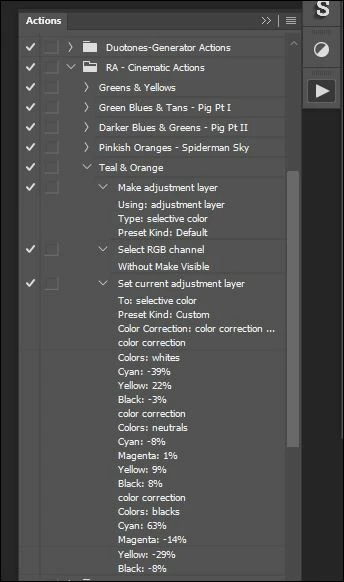
I'm color grading images using a Selective Color Adjustment Layer. I'm only using the whites, neutrals and blacks to do so. And, I have my intensity value (or, whatever it's called) set to "Absolute".


I successfully record an action for each color grade and add it to the set I desire. But ,when I play back the saved action, my images look washed out and at about 50% the intensity of how my original color grades appeared.


I finally noticed that after playing the action, Ps had changed my Selective Color setting from Absolute to Relative. Which I don't want b/c it makes the color grade too subtle relative to how I want it to appear.


I've already experimented with (A) having the setting on Absolute when I record the action  &  (B) actively changing from Absolute to Relative then back to Absolute [in case some physical change was needed to recognize an action step]. Nothing helps. Ps keeps changing the settings from Absolute to Relative. It shouldn't do that - especially if a series of actions is being performed and/or I don't want to have to explain to beginners (in my YouTube tutorials) why they have to do the extra gyrations to fix something that shouldn't be changing...


Can someone confirm that this is a bug and that it will be fixed? Even though I rarely record Actions, I don't think it's my fault. I will not reset my Prefs and have to re-set billions of settings that it's taken me 11 yrs to get the way I like. Thx in advance!
このトピックへの返信は締め切られました。
解決に役立った回答 r-bin

I actually tried getting Absolute to save as part of the action in 2 different ways - just to be sure I covered the bases - and neither worked. When played back, the Action always shifted to Relative...


Things I tried the other day when recording the actions in Selective Color (using only the Whts, Neutrals, Blks - and the CMYK sliders for each) + wanting the method to be Absolute:

1- Absolute was checked when I recorded the action - n.g., when played it converted to Relative.

2- Actively shift from my Absolute setting to Relative then back to Absolute (so there'd be physical action step to capture) - also n.g., when played it too converted the color grade to Relative (vs giving me the desired Absolute).


Hopefully, here's a Dropbox link to a short, unnarrated vid of me running the .atn action in Ps 2023 (rel. 24.6) Win 11 - I use the highlighter to show where it's making the method Relative vs my desired Absolute. https://www.dropbox.com/scl/fi/jdp19znu9n3m6leuda839/RA_RunPsAction-WantAbsoluteMethod_2023-07-14.mp4?rlkey=dmi4hdxr1tvssraqn506t8bhe&dl=0


I am an Actions newbie, so it would help to know if I must do something different than how I'm recording these steps. Thx.


There's something odd about this SelectiveColor. It only records the parameters that you have changed. For example, if you record a layer adjustment step and set Red to C+30 M+30 Y+30, it will be recorded. But if you want to overwrite a step (double click on a step) and change only С+30 to С+20, and leave the rest (M+30 Y+30) untouched, then only С+20 will be recorded in the step and you will lose M+30 Y+30.


To record a method, you must set not only the color parameters during recording, but also change the method.

Those, when you edit a layer, the initial method must not be what you need and you set it manually by clicking on the desired switch. Then it will be recorded and will work.


P.S. I hope you understand me and what needs to be done. If not, let others help who understand. I find it difficult to translate long explanations.

返信数 2

Bojan Živković11378569
Community Expert
Community Expert
July 14, 2023

I am on Win 11 Pro running Ps 24.6.0 and it seems everything works fine. Can you record short video or post some screenshots, perhaps I am not getting it? 

At my side action is playing properly applying user selected/checked colometric. In recorded step I do not have information absolute or relative recorded, it will use whatever is set at the moment of playing action.

Fotomaker01RA作成者
Known Participant
July 14, 2023

Well gee, I'm on Win 11 also. I just made and posted a link to an OBS short vid above - hopefully it links from my public Dropbox....


Thx for the reply. It's been quite frustrating.

Legend
July 14, 2023
Stephen Marsh
Community Expert
Community Expert
July 14, 2023

@r-bin – good find!


Would a script using AM code still have the same problem?

Fotomaker01RA作成者
Known Participant
July 14, 2023

There's something odd about this SelectiveColor. It only records the parameters that you have changed. For example, if you record a layer adjustment step and set Red to C+30 M+30 Y+30, it will be recorded. But if you want to overwrite a step (double click on a step) and change only С+30 to С+20, and leave the rest (M+30 Y+30) untouched, then only С+20 will be recorded in the step and you will lose M+30 Y+30.


To record a method, you must set not only the color parameters during recording, but also change the method.

Those, when you edit a layer, the initial method must not be what you need and you set it manually by clicking on the desired switch. Then it will be recorded and will work.


P.S. I hope you understand me and what needs to be done. If not, let others help who understand. I find it difficult to translate long explanations.


Thank you.


Based on your comments & others who took the time to reply too (much appreciated!) I will now go try a different approach. 


Before, I started with the method on Absolute - even though in one recording I changed it then changed it back (hoping that would record as a step). Now, I'll set the method to Relative before recording and change to Absolute from there during recording.  Fingers crossed. I'll let y'all know how that works!