


Inspiring
June 6, 2022
解決済み

how to save for web slices in 1080 x 1080 in photoshop

  • June 6, 2022
  • 返信数 3.
  • 1276 ビュー

hello community,

Im trying to save for web multiple images that i have in slices in 1080 px in square format but when i try to export the images the are really small how do i fix this?

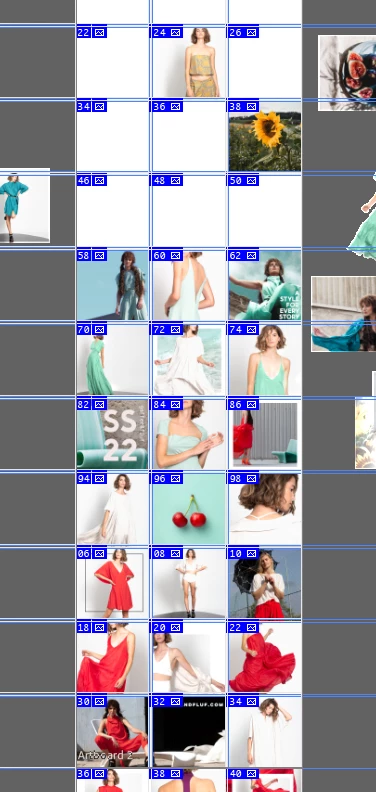
i will attach an image so you can understand better what im trying to do.
このトピックへの返信は締め切られました。
解決に役立った回答 melissapiccone

yes it is an artboart and it is larger it is 17023 width and 19052 height 

umm no the slices are smaller they are approximately 600 px oh...i think thats the problem i'll have to redo the whole documment now?


You should have your images at the size you want to save them  - so 600 is too small. A more "modern" way to do this is with layers and generate. You only need to your file to be the size you want to save your images. Name your layers with the right extension - layer.jpg and turn on generate. https://helpx.adobe.com/photoshop/using/generate-assets-layers.html

返信数 3

Participant
July 5, 2022

Since the update on my computer (macOs Monterey 12.4) last week, when i use "save for web" (legacy) on Photoshop (V 23.4.1) after creating slices with markers on my picture, it doesn't create an "images" files like it usually does when i proceed like this. It doesn't save anything, i can only save, save as or export in png but that's not what I need. Is anybody has the same issue as me or has an idea how to solve it ?
PS : I already reset preferences and it didn't change anything

Thank you !

Stephen Marsh
Community Expert
Community Expert
June 6, 2022

The Save for Web (Legacy) code used to export slices has a 8192px limit on the longest edge.


If your canvas is larger, there are two choices:


1) Crop the canvas to work in sections/tiles under the 8192px longest edge limit


2) Use a script to slice to PSD:


https://community.adobe.com/t5/photoshop-ecosystem-discussions/script-for-splitting-multiple-psds-to-defined-slices/m-p/12592481#M608089


or


https://community.adobe.com/t5/photoshop-ecosystem-discussions/divide-my-image-to-layers/m-p/12467520#U12467520

Then you can use the Export layers to files script that ships with Photoshop.

Kssndrah作成者
Inspiring
June 6, 2022

Hello i'm not familiar with script im trying to export every single image at 1080 pixels

Stephen Marsh
Community Expert
Community Expert
June 6, 2022

What is your canvas size?


 Is the horizontal or vertical edge equal to or larger than 8192 pixels? If so, you will have to divide the canvas into a maximum of 7 slices on the width or height to fit under the 8192 pixel canvas limit for width or height.


Can I presume that each slice is 1080 px square?


More on saving and installing scripts here:


https://prepression.blogspot.com/2017/11/downloading-and-installing-adobe-scripts.html

Kssndrah作成者
Inspiring
June 6, 2022

 i want it to be 1080 px how do i acheve this?