



SMV11.
Participant
May 3, 2022
質問

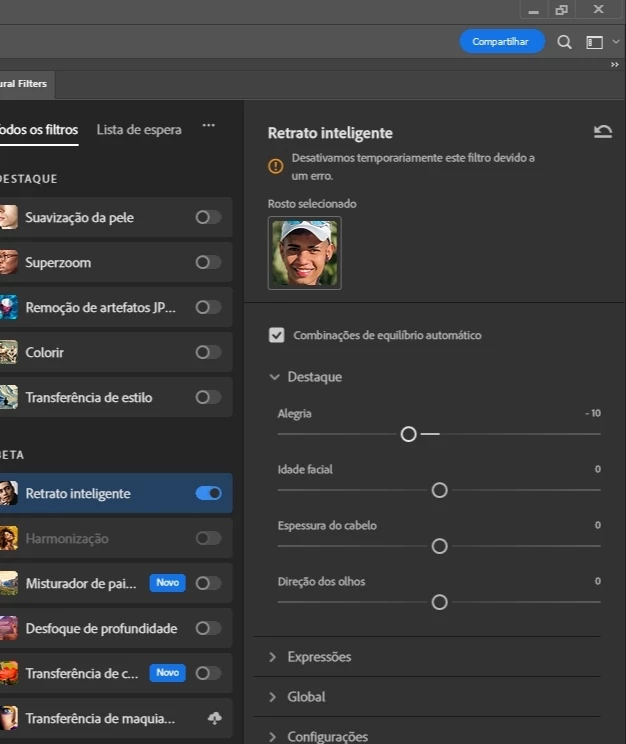
Neural filters ( Retrato inteligente) desativo há mais de 3 semanas)

Há muito tempo que venho tentando usar a ferramenta retrato

inteligente, mas

não consigo, aparece a mensagem que está desativado, alguém sabe quando vai voltar?

Porqu

e já faz muito tempo que está assim.
このトピックへの返信は締め切られました。

返信数 1

Ranjisha Sengupta
Legend
May 3, 2022

Hi there,


We're sorry about the trouble with Neural filters in Photoshop. We're here to help.

Which version of Photoshop and Windows are you using? Have you tested this with any different internet networks? Do you have any firewall/protection software enabled? Are you logged in to the Creative Cloud Desktop app?

Can you check if your graphics drivers are up to date? The issue may persist even after updating the Graphics processor. Check this link to know the score for your graphics processor: https://www.videocardbenchmark.net/directCompute.html

Here's the Photoshop GPU FAQ article for more information: https://helpx.adobe.com/photoshop/kb/photoshop-cc-gpu-card-faq.html

You may use this optional extension for Disable GPU for Neural Filters to force Neural filters to use your CPU instead of your underpowered card:

https://helpx.adobe.com/photoshop/kb/enable-optional-extensions-photoshop-cc.html#disable-gpu-neural

If you still see the issue, please navigate to the following installation location of Photoshop on Windows. 

C:\Program Files\Adobe\Adobe Photoshop 2022 

  • Look for Photoshop.exe and right-click on it to Run as Administrator.  

Try downloading Neural Filters now.  

Please check here for more steps and guidance: https://helpx.adobe.com/photoshop/using/neural-filters-feedback.html.  

For FAQ about Neural Filters, check here: https://helpx.adobe.com/photoshop/using/neural-filters-list-and-faq.html. 


We hope this helps you out! Let us know if it does!


Regards, 

Ranjisha