


Known Participant
April 28, 2021
質問

No Access to Scrubby Zoom or GPU .

  • April 28, 2021
  • 返信数 2.
  • 562 ビュー

Hi

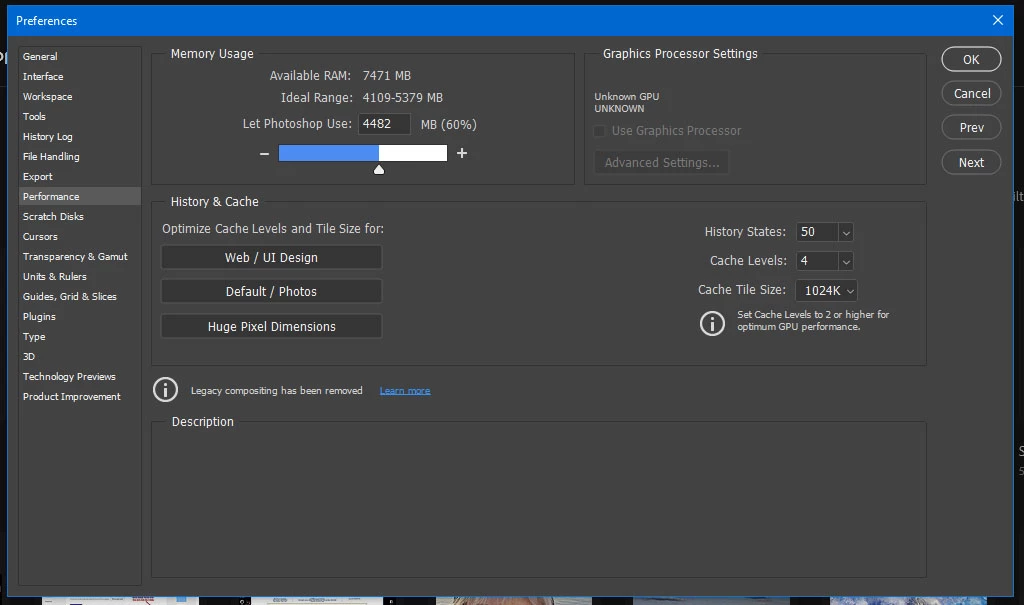
Following an Adobe update, I have lost the use of ‘scrubby zoom’.  Having seen a number of solutions to get it back – involving going to Preferences/Performance/Graphics Processor/Advanced etc, I find, as shown on the attached screen shot, my GPU option is also greyed out hence I can not then go to ‘Advanced’ and complete the fix

Can anyone suggested how I get the GPU option to become ‘live’?

Many Thanks

Andy
このトピックへの返信は締め切られました。

返信数 2

Sahil.Chawla
Adobe Employee
Adobe Employee
May 7, 2021

Hi there,

Sorry to hear that you're not able to use the Scrubby Zoom feature in Photoshop after the last update.

Would you mind sending over Photoshop's Help > System Info dialog text to us? You could paste it in a message here, or use a paste service like http://pastebin.com to provide a link to the full text of the System Info.

Also, please try reverting to a previous version of Photoshop and see if that helps: https://helpx.adobe.com/download-install/using/install-previous-version.html

Regards,
Sahil

NRC13
Inspiring
April 28, 2021

There is a bug in the latest release of Photoshop.  The easiest thing to do is to go backwards one version (to 22.3.0) and wait for Photoshop to fix it.  Adobe technical support told me they are working on a fix.


Go to the Creative Cloud app and click on the three dots on the right of the Photoshop line. Click on "earlier versions"


shytot作成者
Known Participant
April 28, 2021

BRILLIANT!

Cheers NRC13, thats brought good old scrubby zoom back!

Thanks for your reply, much appreciated!


A.