


andrewb51522742
Known Participant
May 29, 2025
解決済み

Photoshop Disable 'Discover' Pop ups and Video Tutorials

  • May 29, 2025
  • 返信数 2.
  • 737 ビュー

Hi,


Does anyone know how I can disable these 'Discover' pop up thats are now appearing in Photoshop please?


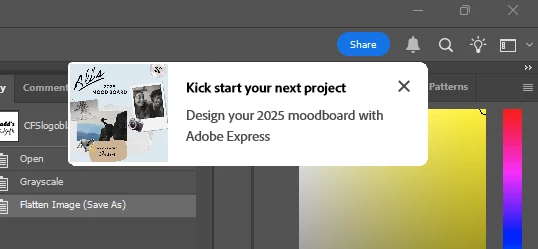
I had a very simple task to do in Photoshop, make an image greyscale, close image. As soon as I converted the image a video popup started playing square in the middle of the screen, over my image telling me how I can rotate the canvas and not my head. Shortly after im getting some Kickstart your Project in the corner of my screen as attached image. 


Is there a way to turn off all these 'helpful' tutorials? I have rich tool tips turned off but this seems to be a different annoyance. These pop ups have literally just delayed me working for 15 minutes trying to find a way to disable them. 


Thanks. 


解決に役立った回答 Jeff Arola

In Photoshop go to Edit>Preferences>Tools and uncheck Show Rich Tooltips, go to Edit>Preferences>Technology Previews and check Enable Focus Mode, then restart Photoshop

返信数 2

Jeff Arola
Community Expert
Jeff ArolaCommunity Expert解決!
Community Expert
May 29, 2025

In Photoshop go to Edit>Preferences>Tools and uncheck Show Rich Tooltips, go to Edit>Preferences>Technology Previews and check Enable Focus Mode, then restart Photoshop

andrewb51522742
Known Participant
May 30, 2025

Thanks Jeff,


Going by the description that comes up when I hover over the Enable Focus Mode, this should stop a lot of the interruptions.


On the plus side it also seems to make the Blue Share button grey so thats another distraction gone. 

Much appreciated. 

Ged_Traynor
Community Expert
Community Expert
May 30, 2025

@andrewb51522742 you can make the share button invisible by amending the UIColors text file 😉

andrewb51522742
Known Participant
May 29, 2025

And theres more...