

Inspiring
October 10, 2018
解決済み

PNG to DEM-TIFF height file max out black white

  • October 10, 2018
  • 返信数 4.
  • 2300 ビュー

How to max out black white in Photoshop? So, maxing out the grey colors extending them to a maximum black level and white level.

このトピックへの返信は締め切られました。
解決に役立った回答 Semaphoric

Use Levels. Alt-Drag the white and black sliders, and you will see where the cutoff point is for the max and min -
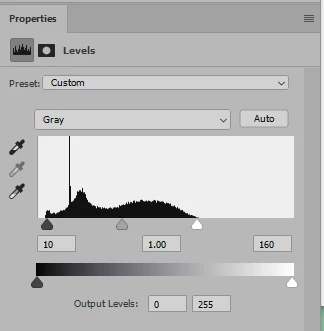


返信数 4

White Vanilla作成者
Inspiring
October 10, 2018

Thank you for all your responses.

rayek.elfin
Legend
October 10, 2018

As far as I am aware, greyscale height maps are usually 16 bit ones.

If you need height maps with full 16bpc greyscale ranges, you will have to look elsewhere, and avoid Photoshop. Unless you don't mind outputting 16bpc PNG images that are choked.

Photoshop's "16bit per channel" mode is not true 16 bit per channel, and will cut off full 16bpc image range to a value range starting at 0 and ending at (2^15) +1. It's basically a programming trick to simplify calculating with the values: 0-32767 + 1 = 32768 values is simpler to calculate with (simple one-shift divisions) rather than 0-32767. Basically what PS works with are 1 to 1 values on the end points and doubling up in the middle.

So, while Photoshop's "16bit" mode requires 16bit to represent this (2^15)+1 , and it only uses that to handle the +1 value to simplify and speed up internal calculations. But in effect if you feed Photoshop a full 0-65535 value range height map greyscale image or a high/full range 32bit image for down-sampling to 16bit, Photoshop will reduce that to a 32768 range one instead of the expected 0-65535 range.

A conversion basically that reduces it to a 15bit value range. Without telling you.

In short, it is impossible to output a full range 0-65535 value range 16bit height map from Photoshop. Of course, the question is whether this matters in practice: the original data actually may not be using the full 16bit value range or not.

Still, PS potentially throws away a huge amount of your 16bit data IF your source data does map beyond 32768 values.

davescm
Community Expert
Community Expert
October 10, 2018

Rayek is right about the 15 bit+1 although from the initial description it would seem that the full range is not currently being used. Semaphorics answer to use levels is the right one for this application.

Whether the 15+1 will make a difference compared to full 16 bit depends on how the height map will be applied. If it will be used for bump then I would suggest any difference would be all but invisible. If however it was used for genuine displacement of the mesh then it may well make a difference depending on the max displacement being used and the resolution required.

Dave

D Fosse
Community Expert
Community Expert
October 10, 2018

All right, Dave, I deleted my post, I'm sure you're right. But I might pick it up again next time

Semaphoric
Community Expert
SemaphoricCommunity Expert解決!
Community Expert
October 10, 2018

Use Levels. Alt-Drag the white and black sliders, and you will see where the cutoff point is for the max and min -


JJMack
Community Expert
Community Expert
October 10, 2018

https://forums.adobe.com/people/Vanilla+Vanilla  wrote

How to max out black white in Photoshop? So, maxing out the grey colors extending them to a maximum black level and white level.

Can you translate that into understandable English or are you trying to describe what threshold does?

JJMack
White Vanilla作成者
Inspiring
October 10, 2018

Oh sorry, so, I have an heightmap in grayscale. In order to use my heightmap in a software program I need to max out the black and white values to let the software know what the highest point of the map is and what the lowest point of the map is.

I need 'max out' the gray colors; 'extend them to' a max black and white values. So, I will create a grayscale image with a max black and white color in it.

JJMack
Community Expert
Community Expert
October 10, 2018

For a bump map I think using a Level or or Curve Adjustment layer would be a good way to adjust you bump map.  I do not think you want to get rid of grays you want a smooth transition in height.

JJMack