


pollyash
Participating Frequently
November 20, 2018
解決済み

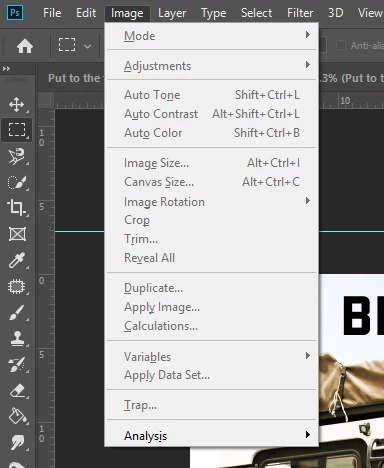
PS not allowing me to access the drop down menus option (see screenshot)
  • November 20, 2018
  • 返信数 2.
  • 5046 ビュー

As you can see from this screen shot, I am unable to click any of the options, and it is like this on all the drop down menus only having one or two things I can select.My PS kept freezing, so i updated the program (Oct 18 update) but now this has happened?

Not sure what to do as I am unsure if its PS broken or I'm not doing something. I've never had this problem before.

Hopefully someone can help!

Thanks

このトピックへの返信は締め切られました。
解決に役立った回答 peterb86513089

This sounds similar to the problem I, and others, are having. There are several threads already discussing problems with the recent Ps CC 2019 update and grayed out menus in Ps. I should start by  mentioning that it is most Windows users having this problem. In my case I first launch Br CC 2019 and the open an image with ACR 11.0 and then open the image to Ps CC 2019. When I proceed this way I find most of the menus in Ps are grayed out. However, others have found that if you open Ps CC 2019 first, and then open the image from Br and ACR the menus in Ps are fine. This also seems to be an issue from Lr to Ps. Therefore, my work around is to launch Ps first.

I have contacted Adobe support and they say that this is a reported issues and they are working on a fix.

Peter

返信数 2

Participant
October 27, 2020

I was having the same problem too. Discovered that a long hold on the left click of the mouse brought it up. Aggravating!

peterb86513089
Inspiring
November 20, 2018

This sounds similar to the problem I, and others, are having. There are several threads already discussing problems with the recent Ps CC 2019 update and grayed out menus in Ps. I should start by  mentioning that it is most Windows users having this problem. In my case I first launch Br CC 2019 and the open an image with ACR 11.0 and then open the image to Ps CC 2019. When I proceed this way I find most of the menus in Ps are grayed out. However, others have found that if you open Ps CC 2019 first, and then open the image from Br and ACR the menus in Ps are fine. This also seems to be an issue from Lr to Ps. Therefore, my work around is to launch Ps first.

I have contacted Adobe support and they say that this is a reported issues and they are working on a fix.

Peter

pollyash
pollyash作成者
Participating Frequently
November 20, 2018

Yes I ended up having to restart my whole computer! And this has fixed the issue for now.

Great to hear they will be fixing this issue!

Thanks for the reply!

Polly