

Participant
April 6, 2020
解決済み

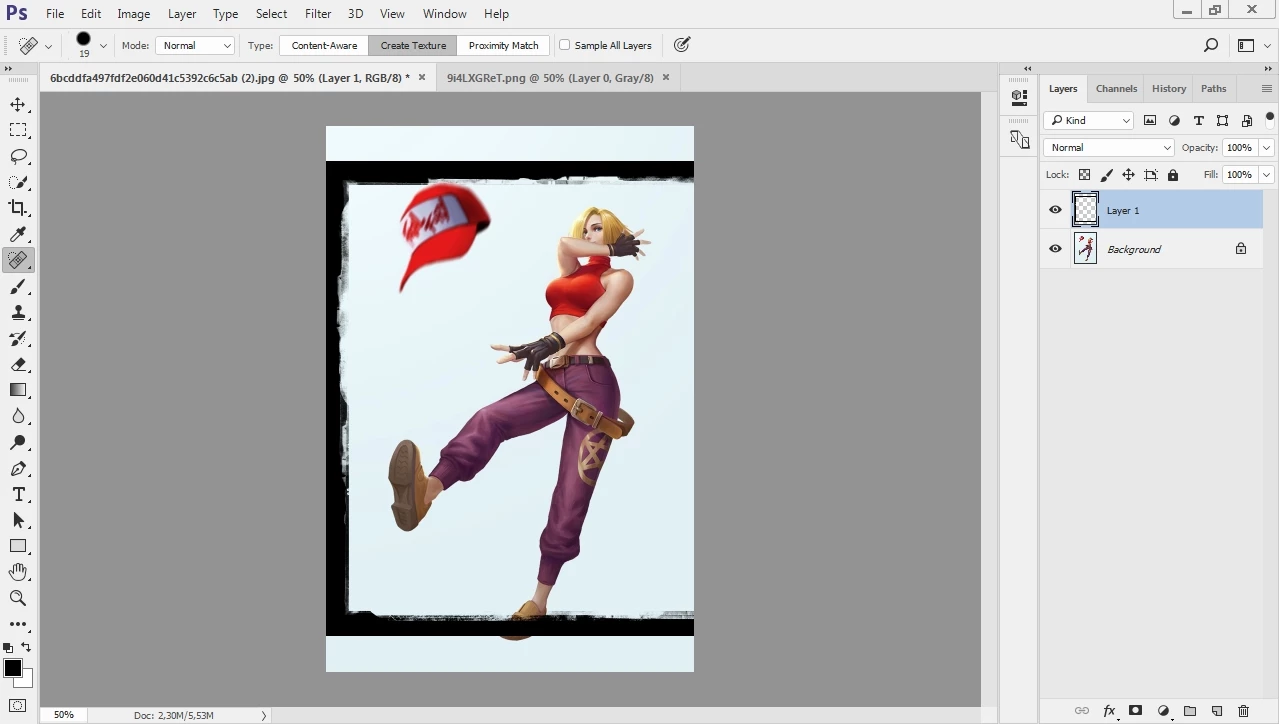
resize layer 1 with the dimension of the background image

  • April 6, 2020
  • 返信数 3.
  • 1242 ビュー

i need to resize layer 1 to the same size as the background, automatically.

I tried with actions, but it doesn't work, how to make a script? 

このトピックへの返信は締め切られました。
解決に役立った回答 Stephen Marsh

Here is a simple script to distort the active layer to match the canvas. The layer to resize needs to be pre-selected/targeted in the layers panel before running the script. When recording the action you can use an absolute/explicit selection of "Layer 1" or you can use a relative keyboard shortcut to select the uppermost layer opt/alt . (dot/period character):


//community.adobe.com/t5/photoshop/scale-layer-to-current-canvas-size-photoshop/td-p/5217315
// Michael L Hale
function main() {
    var doc = app.activeDocument;
    var layer = doc.activeLayer;
    layer.translate(new UnitValue(0 - layer.bounds[0].as('px'), 'px'), new UnitValue(0 - layer.bounds[1].as('px'), 'px'));
    layer.resize((doc.width.value / (layer.bounds[2] - layer.bounds[0])) * 100, (doc.height.value / (layer.bounds[3] - layer.bounds[1])) * 100, AnchorPosition.TOPLEFT);
}
app.activeDocument.suspendHistory('Resize Layer to Canvas', 'main()');


EDIT: This variation will select the layer named "Layer 1":


function main() {
    var doc = app.activeDocument;
    doc.activeLayer = doc.layers.getByName("Layer 1");
    var layer = doc.activeLayer;
    layer.translate(new UnitValue(0 - layer.bounds[0].as('px'), 'px'), new UnitValue(0 - layer.bounds[1].as('px'), 'px'));
    layer.resize((doc.width.value / (layer.bounds[2] - layer.bounds[0])) * 100, (doc.height.value / (layer.bounds[3] - layer.bounds[1])) * 100, AnchorPosition.TOPLEFT);
}
app.activeDocument.suspendHistory('Resize Layer to Canvas', 'main()');


You can record the script into an action as a step.


https://prepression.blogspot.com/2017/11/downloading-and-installing-adobe-scripts.html


EDIT: And here is another script that achieves the same result:

https://gist.githubusercontent.com/jawinn/ab4df1c33d0743e41fd3/raw/72ff297ae42ed029c86be7644bd021ef46971070/Fit%2520Layer%2520To%2520Canvas.jsx

返信数 3

Stephen Marsh
Community Expert
Stephen MarshCommunity Expert解決!
Community Expert
April 7, 2020

Here is a simple script to distort the active layer to match the canvas. The layer to resize needs to be pre-selected/targeted in the layers panel before running the script. When recording the action you can use an absolute/explicit selection of "Layer 1" or you can use a relative keyboard shortcut to select the uppermost layer opt/alt . (dot/period character):


//community.adobe.com/t5/photoshop/scale-layer-to-current-canvas-size-photoshop/td-p/5217315
// Michael L Hale
function main() {
    var doc = app.activeDocument;
    var layer = doc.activeLayer;
    layer.translate(new UnitValue(0 - layer.bounds[0].as('px'), 'px'), new UnitValue(0 - layer.bounds[1].as('px'), 'px'));
    layer.resize((doc.width.value / (layer.bounds[2] - layer.bounds[0])) * 100, (doc.height.value / (layer.bounds[3] - layer.bounds[1])) * 100, AnchorPosition.TOPLEFT);
}
app.activeDocument.suspendHistory('Resize Layer to Canvas', 'main()');


EDIT: This variation will select the layer named "Layer 1":


function main() {
    var doc = app.activeDocument;
    doc.activeLayer = doc.layers.getByName("Layer 1");
    var layer = doc.activeLayer;
    layer.translate(new UnitValue(0 - layer.bounds[0].as('px'), 'px'), new UnitValue(0 - layer.bounds[1].as('px'), 'px'));
    layer.resize((doc.width.value / (layer.bounds[2] - layer.bounds[0])) * 100, (doc.height.value / (layer.bounds[3] - layer.bounds[1])) * 100, AnchorPosition.TOPLEFT);
}
app.activeDocument.suspendHistory('Resize Layer to Canvas', 'main()');


You can record the script into an action as a step.


https://prepression.blogspot.com/2017/11/downloading-and-installing-adobe-scripts.html


EDIT: And here is another script that achieves the same result:

https://gist.githubusercontent.com/jawinn/ab4df1c33d0743e41fd3/raw/72ff297ae42ed029c86be7644bd021ef46971070/Fit%2520Layer%2520To%2520Canvas.jsx

Mohamed Hameed21513110
Inspiring
January 1, 2022

@Stephen Marsh 

This code is great for layering images
But I want to use this code on a paragraph text or a text layer, but I find that the text has changed the font .. Is it possible to match the font size with the dimensions of the design


These images show a text layer and its dimensions outside the design

When executing the code, the dimensions of the text are adapted to the dimensions of the design, but the font size changes
I want a code that matches the font size with the dimensions of the text layer and the dimensions of the design

Stephen Marsh
Community Expert
Community Expert
January 1, 2022

If it wasn't obvious, the hack to that script was never intended to be used on text layers. I'll give it a look, working with text frames and content in Photoshop can be challenging.

Stephen Marsh
Community Expert
Community Expert
April 7, 2020

You will need a script. Try searching for one on the forums.


What should the script do to match the layer size to the background/canvas size?


Should the script distort/stretch both the width and height to match?


Or should the script only size the width of the layer to match the canvas, potentially making the height proportionally larger or smaller than the width?


Or should the script only size the height of the layer to match the canvas, potentially making the width proportionally larger or smaller than the height?


Are all the images canvas that will be processed portrait orientation, or will some be landscape? Should the script intelligently scale to "best fit" for the orientation of portrait or landscape canvas? 

lambiloon
Community Expert
Community Expert
April 7, 2020

Hi, you need to record an action then it works for you first need to learn record to it... regards

Ali Sajjad / Graphic Design Trainer / Freelancer / Adobe Certified Professional
Participant
April 7, 2020

thanks for responding, but as i said in the post. action does not work for this job