


seony54865590
Participant
May 22, 2021
解決済み

Save as Photoshop PDF not seen as Option

  • May 22, 2021
  • 返信数 2.
  • 776 ビュー

Hi,


Just recently updated the photoshop app, but when in trying to save my work it doesn't seem to have the option of saving the file as a PDF in the scroll bar menu:
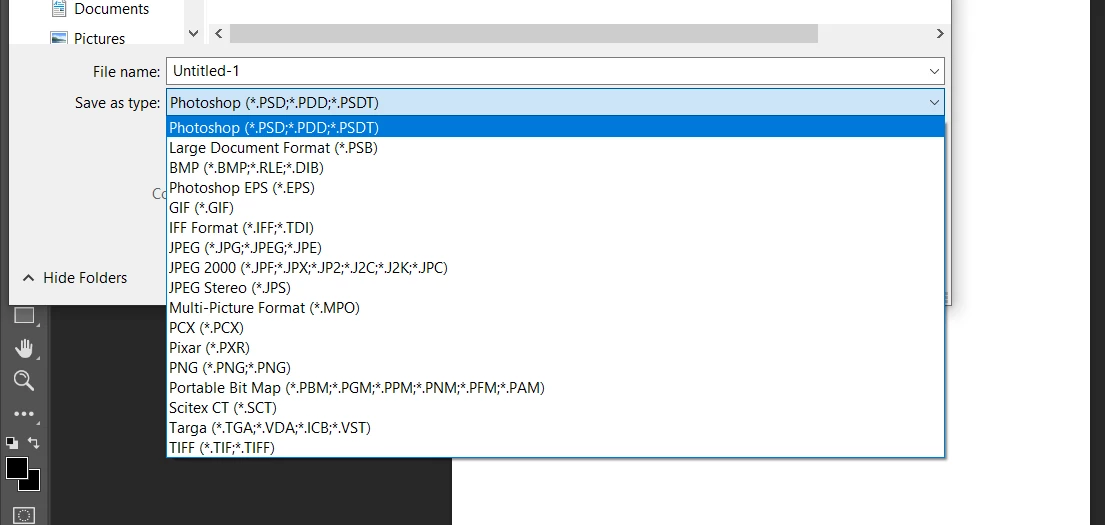
I've tried changing the modes from RGB to CMYK 8 bits, 16 bits, etc.

Not sure why this is happening all of a sudden.

Before the PDFs were able to keep its' layer details without being flattened and still be opened and saved as a PDF.


Please let me know if this is a bug,

Thank You.

このトピックへの返信は締め切られました。
解決に役立った回答 c.pfaffenbichler

File > Save a Copy


No bug, change. 

返信数 2

davescm
Community Expert
Community Expert
May 22, 2021

Since 22.4, if your file contains items that are not supported in your required format (e.g. layers or 16 bits/channel or hidden pixels etc) then the file format is moved from Save As (Shift+Ctrl+S) to the Save a Copy command (Alt+Ctrl+S). This was driven by changes in the Mac Operating System, although the changes are applied to both Mac and Windows versions to keep them aligned.


In the case of PDF it will appear in Save a Copy as the dialogues that follow the choice of the PDF format, allow elements of the file to be lost (e.g. downsampling or not keeping editability). So it is in the Save a Copy category.


https://helpx.adobe.com/photoshop/using/whats-new.html


Dave

c.pfaffenbichler
Community Expert
Community Expert
May 22, 2021

File > Save a Copy


No bug, change. 

JJMack
Community Expert
Community Expert
May 22, 2021

I my opinion  "Save a Copy" has the wrong name its name should be "Save a Version"  I  believe Adobe named it "Save a Copy" because of how Apple change their  file system  to version with a " copy" in the files name.   Adobe could not change all OS version File system so they created  Photoshop file versioning  "Save a Version/Copy" and Change how Photoshop "Save As" Feature Works reverted to how Savs As work years ago where it could not save a flat image file format from a layered Document. However,  for the users  convenience Adobe added a Button into the changed  Save As UI "Save a Version/Copy"   Adobe added versioning to  Photoshop for all OS version.  Adobe did not add this  to iPads Photoshop for it can not save files it  uses cloud documents can not deals with files.

JJMack