


Participant
October 7, 2024
解決済み

Split to layers photoshop script not working

  • October 7, 2024
  • 返信数 2.
  • 1191 ビュー

Hey guys, was wondering if y'all could tell me what I'm doing wrong here. 

I'm trying to use this photoshop script: https://github.com/ES-Collection/Photoshop-Scripts/blob/master/Split%202%20Layers.jsx to put all my individual selections on their own layers. 


I've attached pics of what's going on. It splits it into a bunch of empty layers, like over 100, insead of just putting the 6 selections onto their own layers. I've tried with multiple pixel variations in the opening question box.

このトピックへの返信は締め切られました。
解決に役立った回答 Stephen Marsh
quote

it does the same thing when only using 1 transparent layer


By @Yosa5EA2


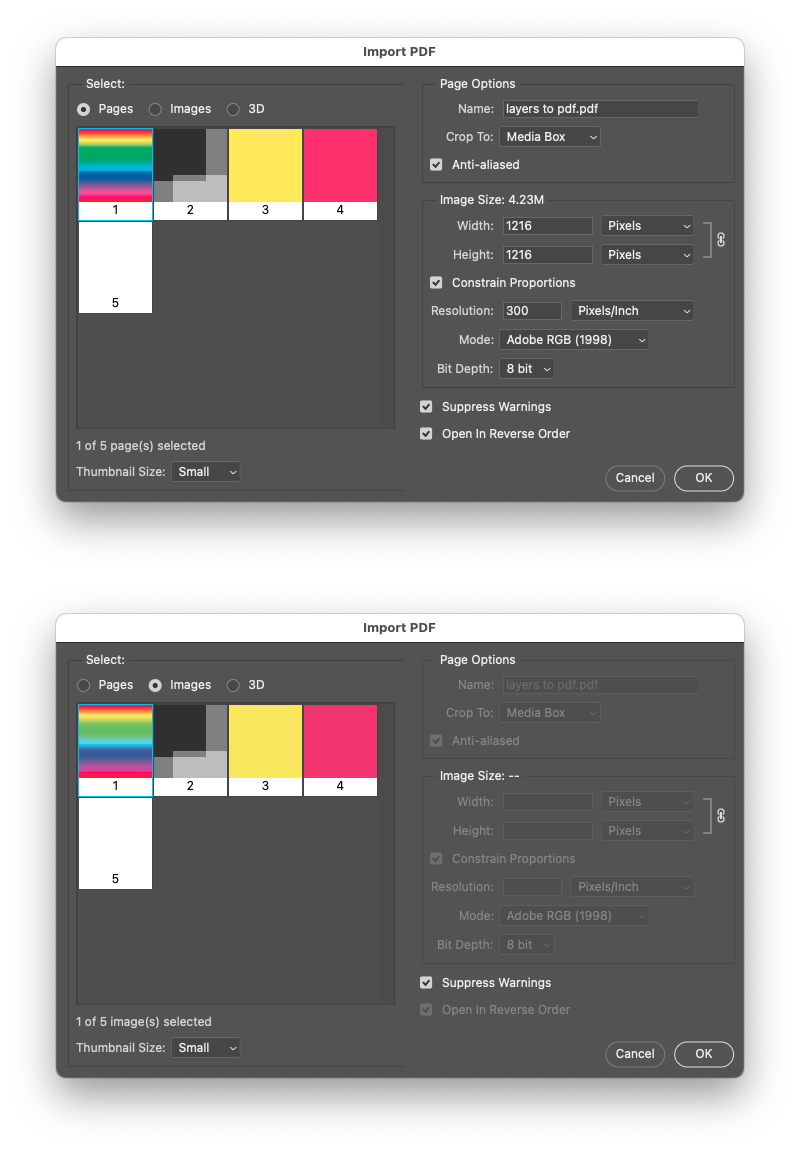
You have a rasterized PDF.


Was this a "generic PDF" where you rasterized the page?


You can import a PDF as either a "page" or as separate "images" into Photoshop:


Otherwise you could try a script that I created to do similar things for coin scans, it relies on the Select > Select Subject command to isolate each individual image:


https://community.adobe.com/t5/photoshop-ecosystem-discussions/how-do-i-seperate-subjects-into-different-seperate-files-automatically/td-p/14449644


返信数 2

Yosa5EA2作成者
Participant
October 8, 2024
screen_recordimg_issue_.mov
Stephen Marsh
Community Expert
Community Expert
October 8, 2024
quote

I've tried with multiple pixel variations in the opening question box.


By @Yosa5EA2


It is expected that there is only a single transparent layer. Your screenshot shows multiple layers.

Yosa5EA2作成者
Participant
October 8, 2024

it does the same thing when only using 1 transparent layer


Stephen Marsh
Community Expert
Stephen MarshCommunity Expert解決!
Community Expert
October 9, 2024
quote

it does the same thing when only using 1 transparent layer


By @Yosa5EA2


You have a rasterized PDF.


Was this a "generic PDF" where you rasterized the page?


You can import a PDF as either a "page" or as separate "images" into Photoshop:


Otherwise you could try a script that I created to do similar things for coin scans, it relies on the Select > Select Subject command to isolate each individual image:


https://community.adobe.com/t5/photoshop-ecosystem-discussions/how-do-i-seperate-subjects-into-different-seperate-files-automatically/td-p/14449644