



user3667089
Participant
January 8, 2023
解決済み

Unable to playback photoshop actions for "Select and Mask" and "Select Subject"

  • January 8, 2023
  • 返信数 5.
  • 778 ビュー
 I am trying to cut out the background and preserve the foreground for a video clip I have. All existing video based commercial solutions does not produce a satisfying result. I found that if I export the video clip into a sequence of PNGs and uses Photoshop's "Select and Mask" + "Select Subject", most of the time it actually produces decent results that requires minimal manual fixes. However, it is very tedious to repeat this process manually for all the PNGs, so I want to find a way to automate this process. 
 

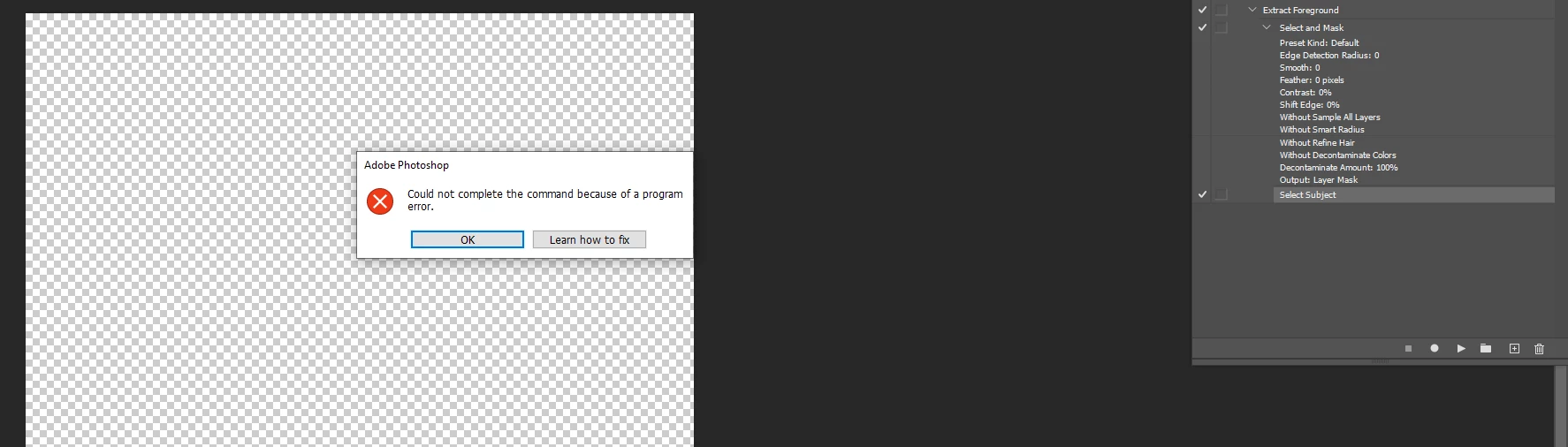
I am trying to achieve this goal with "Photoshop actions". I was able to record "Select and Mask" and "Select Subject" successfully, but when I playback the action, it ends up with error "Could not complete the command because of a program error", and with the image completely removed as shown below.
 

このトピックへの返信は締め切られました。
解決に役立った回答 Stephen Marsh
quote
I guess the next question is how can I remove the background without using "select and mask"?
By @user3667089


1) Select Subject

2) Add Layer Mask


or...


1) Select Subject

2) Select & Mask (output to layer mask)

返信数 5

Stephen Marsh
Community Expert
Stephen MarshCommunity Expert解決!
Community Expert
January 8, 2023
quote
I guess the next question is how can I remove the background without using "select and mask"?
By @user3667089


1) Select Subject

2) Add Layer Mask


or...


1) Select Subject

2) Select & Mask (output to layer mask)

user3667089
user3667089作成者
Participant
January 8, 2023

You are right, if I record the action again and just do "select subject", it records successfully and plays back successfully. The error I reported earlier was because I simply delete the "select and mask" from my previous record and attempted to run "select subject".


I guess the next question is how can I remove the background without using "select and mask"?

Stephen Marsh
Community Expert
Community Expert
January 8, 2023

The screenshot that you showed earlier had a transparent canvas, nothing to select.


Do you have a viable image open when running the action?


I have recorded Select Subject into an action and it plays back fine if the image can be selected. I have also used the action panel "insert menu command" to insert Select Subject without recording and it too works fine in playback.


If you are sure that the image content is selectable (pixel data), then you can see if resetting preferences clears the issue.


user3667089
user3667089作成者
Participant
January 8, 2023

If I run the action without "select and mask", it shows the same "Could not complete the command because of a program error". The only difference is the image is unaltered.

Stephen Marsh
Community Expert
Community Expert
January 8, 2023

I am guessing that select and mask is creating problems for select subject.


What if you just run select subject by itself?