


Participant
May 14, 2020
質問

Warping with one handle at a time OR how to keep edges straight when warping

  • May 14, 2020
  • 返信数 1.
  • 309 ビュー

Hi!
In illustrator and former versions of photoshop I seem to remember being able to control bevels/handles independently while using the warp tool. I can't say for sure but I believe on a mac I held ALT and could rotate a single handle independently of the rest. Basically I want the verticals to stay straight but they twist no matter what key I hold down.
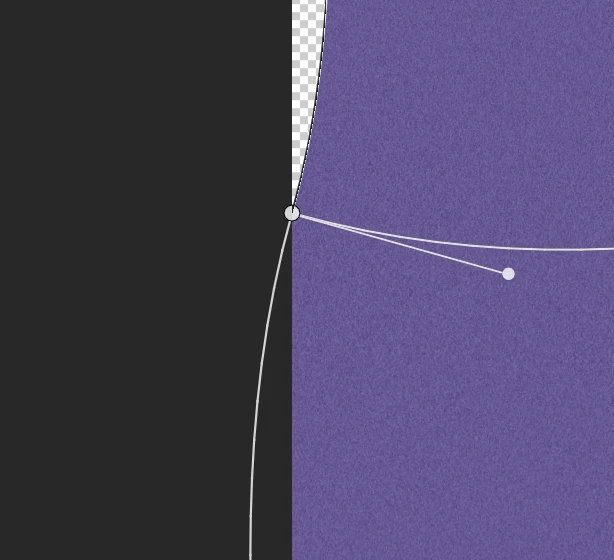


In this screenshot for example , I'd like the vertical edge to remain straight, and only warp the horizontal axis. See below for how I want it to work (done in illustrator as an example)
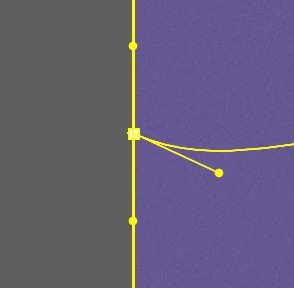


Pretty simple stuff! I'm using a mac, PS2020, and have done this for years so I'm going crazy. Nothing on google addresses this simple task. 

このトピックへの返信は締め切られました。

返信数 1

c.pfaffenbichler
Community Expert
Community Expert
May 14, 2020

In Photoshop only the Warp’s corner points’ handles can be manipulted in this meaninful fashion at current. 

Until recently Photoshop’s Warp did only feature the four corner points as proper points with handles, so your memory might be unclear. 


You can add your vote to a Feature Request on this particular issue 

Photoshop 2020: The handles of the warp-non-corner-points still snap to 90 ̊ angles on editing

and a Bug Report on the »improved« Warp more generally 

https://feedback.photoshop.com/photoshop_family/topics/adobe-photoshop-2020-problems-with-new-warp-tool?utm_source=notification&utm_medium=email&utm_campaign=new_comment&utm_content=reply_button&reply[id]=20524964#reply_20524964