


Ken Nielsen
Legend
August 22, 2020
解決済み

What is this strange icon placed over my photos in Photoshop and how do I remove it?

  • August 22, 2020
  • 返信数 1.
  • 1533 ビュー

Moving to newer computer and all settings are out the window so need to re-investigate and turn off just about everything but this one has me puzzled... What On Earth? more importantly, how do I get rid of this insistant 'Pirates of the Carribbean' graphic that covers all of my photos now?

TIA,


Ken

このトピックへの返信は締め切られました。
解決に役立った回答 Charu Rajput

Hi,

This symbols is visible when you try to use Rotate View Tool. See screenshot. Rotate View Tool is located in the same spot as the Hand Tool in the Toolbar. This is visible when you try to rotate the canvas. Could you please check that this tool is not selected. May be you swicth from Rotate View Tool to Hand Tool, if that works for you.
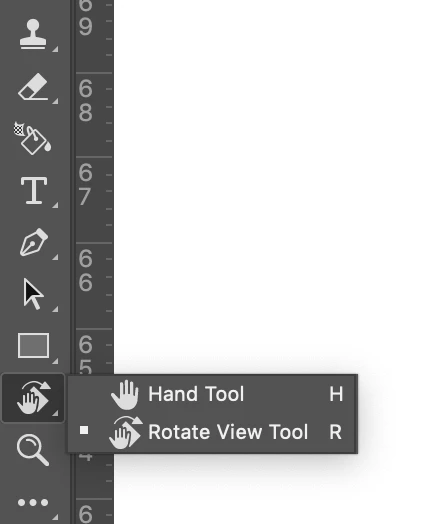


You can read more about this from following link

https://www.photoshopessentials.com/basics/photoshop-rotate-view-tool/#:~:text=Click%20and%20hold%20with%20the%20Rotate%20View%20Tool%20to%20display%20the%20compass.&text=of%2015%20degrees%3A-,Keep%20your%20mouse%20button%20held%20down%20and,image%20to%20rotate%20the%20view.


返信数 1

Charu Rajput
Community Expert
Charu RajputCommunity Expert解決!
Community Expert
August 22, 2020

Hi,

This symbols is visible when you try to use Rotate View Tool. See screenshot. Rotate View Tool is located in the same spot as the Hand Tool in the Toolbar. This is visible when you try to rotate the canvas. Could you please check that this tool is not selected. May be you swicth from Rotate View Tool to Hand Tool, if that works for you.


You can read more about this from following link

https://www.photoshopessentials.com/basics/photoshop-rotate-view-tool/#:~:text=Click%20and%20hold%20with%20the%20Rotate%20View%20Tool%20to%20display%20the%20compass.&text=of%2015%20degrees%3A-,Keep%20your%20mouse%20button%20held%20down%20and,image%20to%20rotate%20the%20view.


Best regards
Ken Nielsen
Ken Nielsen作成者
Legend
August 22, 2020

Oops... It's come back now to haunt me and as you can see... only the hand and not the rotate tool is selected.... buggy program? What is the fix to get rid of the rotate icon even when I only have the hand tool selected?

Ken Nielsen
Ken Nielsen作成者
Legend
August 23, 2020

As suggested by Jane, it should work for you, you need to reset View in the option bar, as mentioned in the link as well that I have shared. Still if it doesn't work for you. You can try resetting for Photoshop prefrences. But try this after nothing works as it will clear all stored preferences as well. Please read following article to reset the Photoshop Preferences. 


https://helpx.adobe.com/in/photoshop/using/preferences.html#:~:text=To%20restore%20preferences%20quickly%20using,next%20time%20you%20start%20Photoshop.

Let us know if this helps you.


I am bearing with it as it has been a wrestling match and I don't want to erase all preferences but want to move ahead. There should be no graphic over my image when just the hand tool is selected... but you can see, while I have only the hand tool selected and even tapping on the 'H' character to be sure it is not stuck still the icon is over the picture and it can be rotated while only the hand and not the 'R' rotate tool is selected. Today, after the computer sits overnight, it is behaving and I will do nothing while it is behaving. I thank you because now I know what the graphic is and what the tools are for either hand or rotate. While it is behaving I will do nothing but go back to work. Thanks for kind patience with helping me.