digidandan
Known Participant
November 28, 2017
解決済み

Why does the eraser tool have a line following it like a tail?

  • November 28, 2017
  • 返信数 1.
  • 3815 ビュー

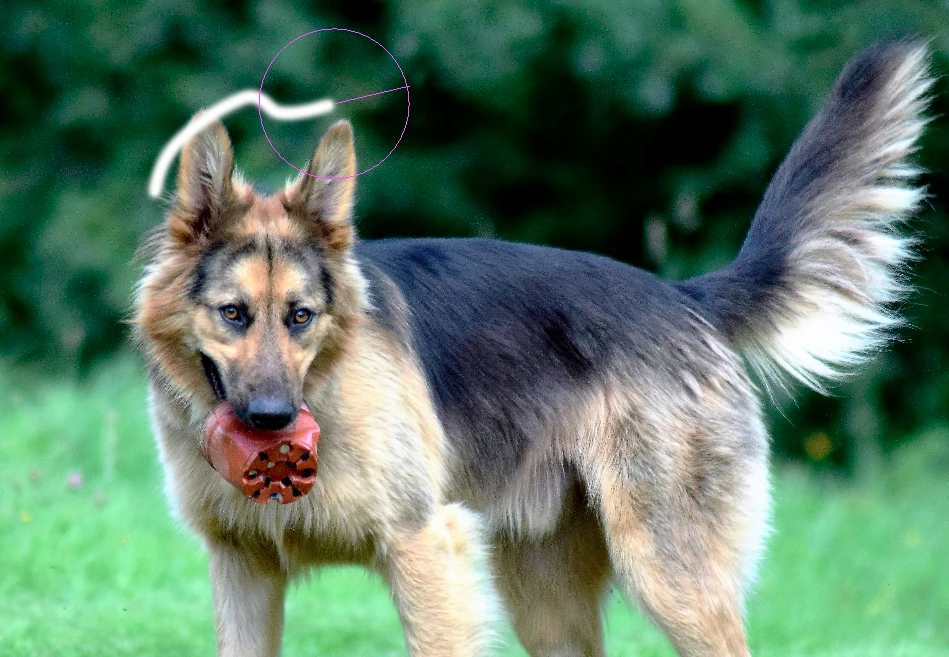
Using CC2018, when I use the eraser tool, set on brush, when I erase, there is a line that appears as I work that looks like it is connecting to the starting point of my erase. It follows the eraser like a tail. It is distracting. How do I get rid of it, and why is it there?

As I look at it, the line is following my brush and "catching up" with my brush as it does the erase. Is it possible that my very fast MAC is not keeping up with the tool?

Thanks
このトピックへの返信は締め切られました。
解決に役立った回答 Terri Stevens

Is this what you are seeing? If so impossible to switch off designed to drive you insane. Not really of course it can be removed

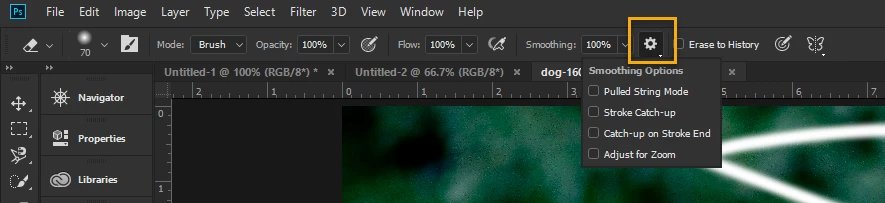
This is part of the new smoothing feature for brush strokes and in fact will work better on a fast machine than a slow one. Two ways to switch it off

1) Reduce smoothing down to 0%

2) Turn off the effect from the smoothing options

Hope that helps.

返信数 1

Terri Stevens
Terri Stevens解決!
Legend
November 28, 2017

Is this what you are seeing? If so impossible to switch off designed to drive you insane. Not really of course it can be removed

This is part of the new smoothing feature for brush strokes and in fact will work better on a fast machine than a slow one. Two ways to switch it off

1) Reduce smoothing down to 0%

2) Turn off the effect from the smoothing options

Hope that helps.

davescm
Community Expert
Community Expert
November 28, 2017

A third way just to get rid of the line  is to leave smoothing on but turn off "Show brush leash While smoothing" in Preferences > Cursors. Whether that leaves you with an acceptable or unacceptable delay depends on your PC

Dave

digidandan
digidandan作成者
Known Participant
November 29, 2017

Thanks for the help. The first option of turning smoothing off ("0") worked perfectly. No tail and no lag. By leaving smoothing on, turning off the brush leash in preferences did NOT work. (I quit PS and re-opened as well). It got rid of the line (leash) but still left the slow delay behind my brush.

Thanks