Participating Frequently
June 23, 2020
解決済み

PS brush "blobbing" at beginning of stroke, Wacom Cintiq

  • June 23, 2020
  • 返信数 4.
  • 3451 ビュー

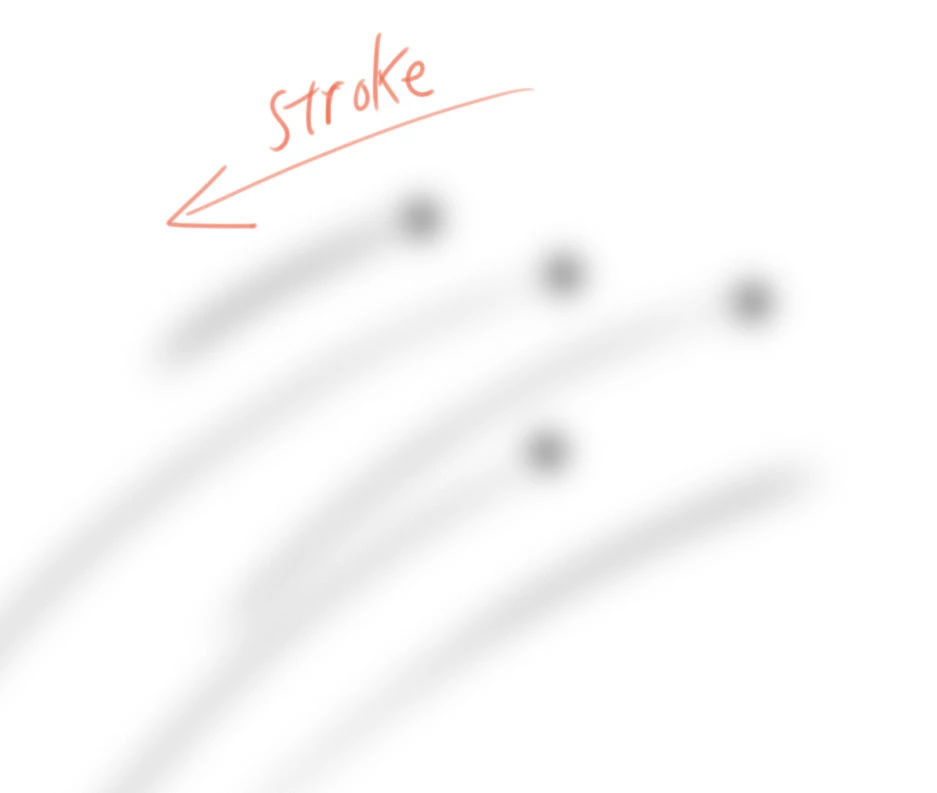
I just upgraded my MacOS from Yosemite to High Sierra so I could use the latest PS verison.  Since then, brushes are giving me hard "blobs" of paint at the beginning of the stroke even when my stroke is super soft pressure. See below. Anyone know of the cause and fix?  Thanks in advance.

I simply can't paint with this. The artwork looks terrible with all these blobs.
このトピックへの返信は締め切られました。
解決に役立った回答 jfi0rin0

I solved the problem myself:

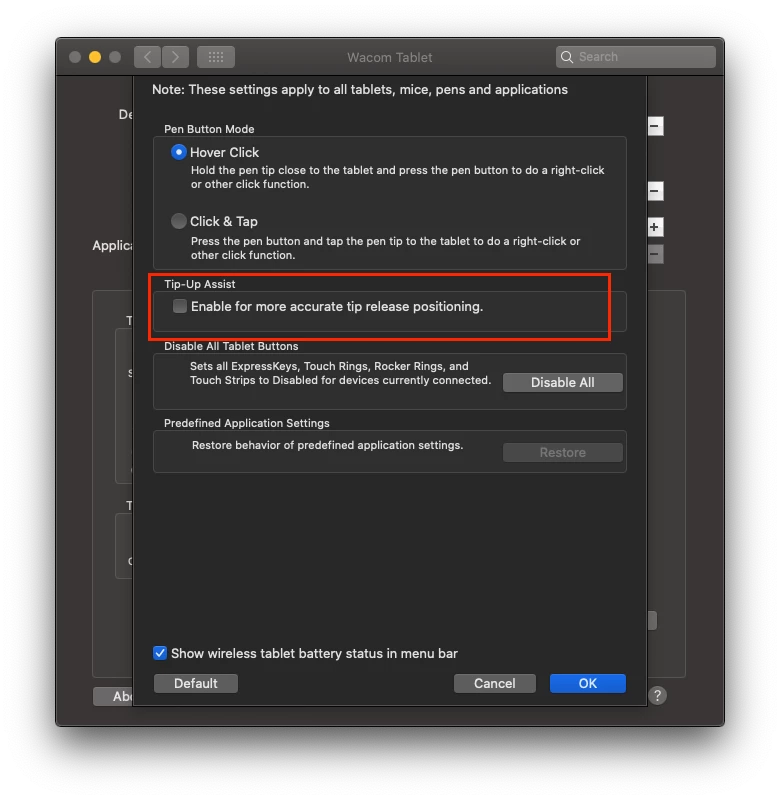
Systemeinstellungen, Wacom Tablet... Optionen... Spitzenausrichtungsassistenten deaktivieren!!!

(Google translation: System Settings, Wacom Tablet ... Options ... Deactivate Tip Alignment Wizard !!!)


😉


Nice find Brigitte5E75! Tip Alignment Wizard is not a feature in my Wacom settings options, but Tip-Up Assist is. Turning that off solved the issue. Thank you!

Sysyem Preferences > Wacom > Options > un-check Tip-Up Assist.

返信数 4

YoshikunGBG
Participant
February 11, 2021

This is a life saver! I almost went nuts trying to fix this with the normal settings. For me if was happening while lifting the pen. THANK YOU for your help.

Participant
February 11, 2021

You are welcome. 🙂

jfi0rin0
Inspiring
October 7, 2020

This has been my issue except the reverse is happeneing. When pressure is used to change the size of the brush it leaves a blob at the very end of the brush stroke. It's extremely frustrating. It has been happeneing since the last 2 updates.

PECourtejoie
Community Expert
Community Expert
October 7, 2020

Hi, can you state if you are on 21.2.4? on Mac/PC? using a wacom? using wintab or windows ink on a PC?

jfi0rin0
Inspiring
October 7, 2020

Thanks for your reply! My setup is as follows:

Mac Pro 2019 OS Catalina 10.15.6 
Wacom Cintiq Pro 24 (6.3.41-2)

Photoshop 21.2.4


Hope that helps,

Thank you!

Participating Frequently
June 30, 2020

The same thing happens to me on OS X Catalina. All driver reinstalled. No Luck. Very frustrating with texture brushes. It works fine on fast strokes.

John Artist作成者
Participating Frequently
October 7, 2020

I've had some luck in Photoshop by turning OFF the airbrush button in the Options Bar.  Of course, this doesn't help you if this is an essential toggle for your art.

PECourtejoie
Community Expert
Community Expert
October 7, 2020

HEllo, are you on 21.2.4? this issue was supposed to be fixed in 21.2.1, according to https://helpx.adobe.com/photoshop/kb/fixed-issues.html#photoshop-desktop-fixed-issues

If you still experience the issue, post in the linked thread.

John Artist作成者
Participating Frequently
June 23, 2020

I just removed the Wacom Driver and reinstalled it. It seems to be working fine for now. 


EDIT:  

OK. This is frustrating. This KEEPS happening. A restart helps, but it keeps happening again and again. Restarting a few times a day is counterproductive.

Anyone with advice?

Thansk!