mattchristensen
Community Manager
Community Manager
March 31, 2021
質問

Discuss: New way to control how label colors and clip names are displayed in the timeline

  • March 31, 2021
  • 返信数 13.
  • 41974 ビュー

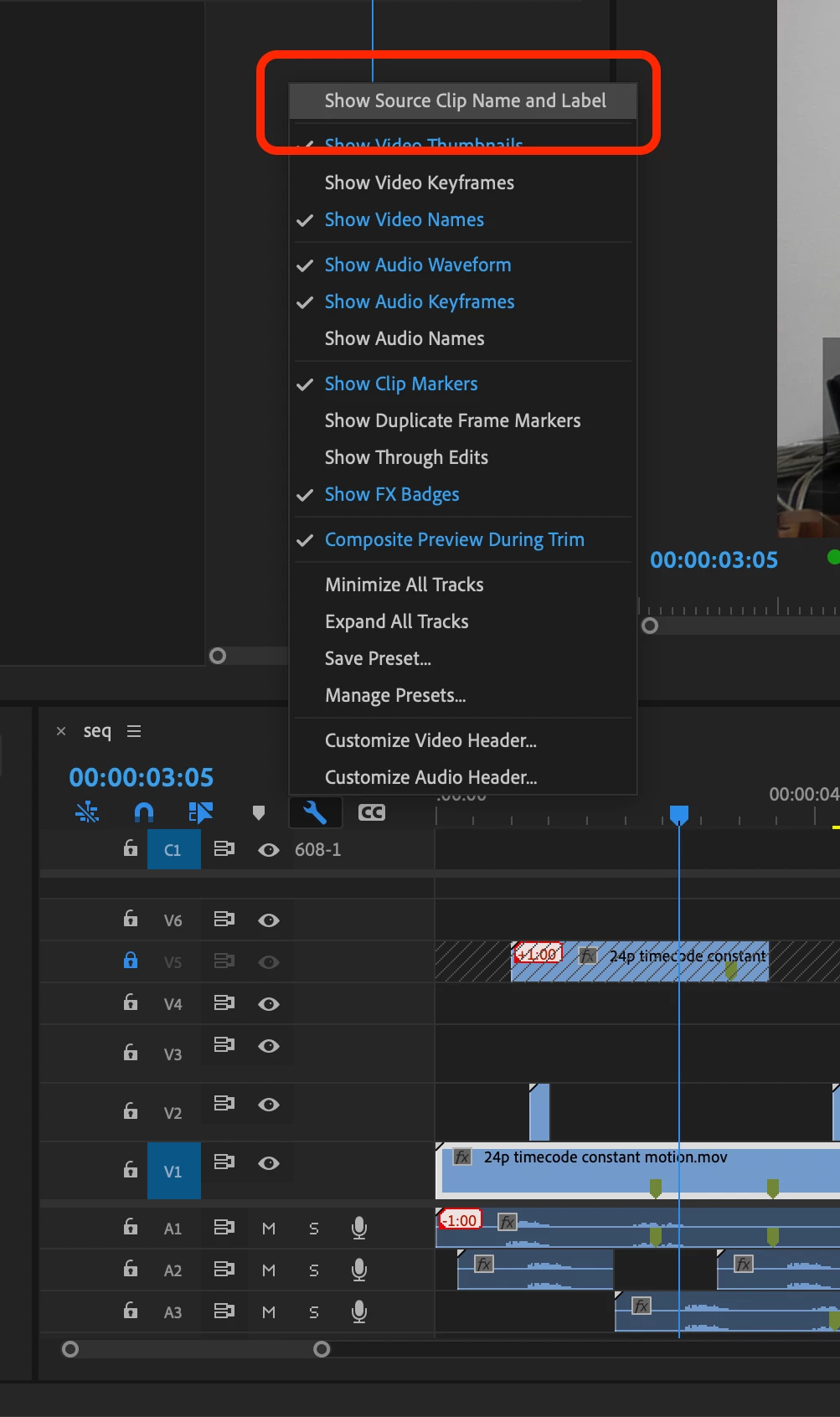
New in Premiere Pro Beta 15.2 (Build 9) is a refined workflow for controlling how label colors and clip names are displayed in the timeline. Previously you could use a checkbox in the Project settings called “Display the project item name and label color for all instances” to control if your timeline clips used their own independent name and label color or matched the source clip in the Project panel. Now, this option has been removed from the Project Settings and can be found as a view option in the wrench menu in the Timeline panel called “Show Source Clip Name and Label”.


This change means you can easily toggle this view setting via a keyboard shortcut. Additionally, if you are working in a Production you now have a way to control this setting and decide if you want your clip name and label colors to be unique to the timeline, or reflect the source clips.


Let us know how this feature is working for you!


返信数 13

Participant
August 15, 2022

My only problem with this feature is that I sync my material in premier manually, so my process is usally drag the clip and the audio file to sync them togther then merge them, then label the clip.


Now whenever I label a clip it doesn't show that the clip has been labelled in the project panel or any other timeline that the merged clip is in.


I need it to show up in each time line that the clip is in and the project panel with the same label.


Now I have to label the clip in the project panel before draging it into any timeline which  would be time consuming and irrational since I work with 150-200 clips a day.

Please fix this so it's actually at all instances or revert back to the old system that was in place or attempt to code the fix that Pierr presented to you while keeping in mind my issue.

R Neil Haugen
Legend
August 15, 2022

Using merge clips for most joining of audio/video isn't considered a "best practice" ... as guaranteed, you lose all the audio metadata in that process.


They strongly suggest merging video & separate audio by the multcam process, which seems a bit of a misnomer because it isn't only intended for the full 'multic-camera' process. It's the intended process for linking any video/audio files together. And it keeps the audio metadata in any resultant export process.


But if you don't have camera audio to use to match with the separate audio, or alternatively, the timecode, well ... that's a bit of a problem, ain't it?


I take it you don't have camera audio nor timecode to match the files with?


Neil

Everyone's mileage always varies ...
Participant
August 17, 2022

I got the feature to work after missing around for a bit so I am good now.


To answer your question we use cameras that don't recored audio and the only way to sync them is doing it manually and then merge the video with the audio so that way whenever you check the source clip it is synced up with the audio already.

I hope my explanation is understandable 


S

Known Participant
April 15, 2022

You did not have to remove it from its original place. You could have given both options. Thisn has caused me problems.

Known Participant
March 12, 2022

Given all of the posts, detailed thoughts and illustrations I've added to this thread and on User Voice, something tells me that I've spent far more time advocating for this to be fixed than Adobe's staff ever spent considering the merits of it being fixed.


Cue Michael Jackson's song "All I want to say is that they don't really care about us..."


Sadly, this issue + the dozens of feature requests on User Voice that have been ignored for years (even some with hundreds of votes) all indicates the above lyric to be true.


I'd love for the Pr team to prove otherwise, by tackling actual issues in Pr rather than wasting time reinventing the wheel as they currently are with the new import and export panels that will be of limited/questionable value to Pr users who get along just fine with the current methods of importing and exporting stuff.


It's rather disingenuous Matt when you say that you considered fixing this problem, but decided it was too much work or too complex to do so, all the while giving the import/export interfaces complete overhauls, which is WAY more work for your team, and when doing so will help the average user so much less than if you actually tackled the current issues we're dealing with in Pr.  It seems your team's list of priorities are out of touch with reality (i.e. OUR reality, the reality that matters, that of your USERS.  NOT the reality of product managers and what they imagine is best for editors while not even using the software on a daily basis like we do.  Sorry to say this, but it's time to get real and stop with the nonsense.)

Bruce Bullis
Community Manager
Community Manager
March 12, 2022

Hello Pierre Louis,


We understand your frustration. I hope to provide further useful context.

First, don't blame Matt: A senior PPro QE and film workflow specialist (as well as a working colorist!), Matt's understanding of these workflows is unsurpassed, and there is no stronger customer advocate on  the PPro team. 

About us not caring: We care.
 
Premiere Pro's users ("Us", in your post) are a diverse group, many of whom rely on PPro for their livelihood, using an astounding variety of workflows. No one uses every feature, and I'm sure everyone questions the value of the work we do, on features upon which they don't rely. 

Example: My PPro team is responsible for (among other things) Dynamic Link, Productions, and Transmit devices. None of these is used by a majority of users, yet if PPro is to remain a viable option for the most demanding professional workflows (feature films, news orgs, broadcasters, sports/event productions) it's important to invest in improving PPro's behavior in those (and other) arcane-yet-demanding functional areas. I doubt many professional editors want to spend time learning an NLE that isn't a viable option, for those workflows. 

Our work on label colors and clip names is a great example of what it sounds like you want us to do; rather than introducing new features, we refined (a.k.a. "fixed problems with") PPro's existing behavior, enabling workflows that relied on that flexibility. Stipulated: We don't expect this behavior to generate a lot of excitement for most users, but as you point out, improvements to existing behavior are often more desirable than new features. 


I too had grown accustomed to the old Import New Project dialog, and was quite frustrated that (in early versions) I couldn't make a new project without using a mouse (a problem the team quickly fixed). But as I looked at the old New Project and New Sequence dialogs "with new eyes", I realized how many of the decisions forced upon users before they even started working required informed choices, about all sorts of not-terribly-relevant technical details. 

"Let's see, I'll need a new project for the new episode I just shot, for my YouTube channel...[opens PPro]...I wonder, which HDR Graphics White (Nits) setting should I use? Are all seven of my scratch disk paths set correctly? Should I set the Timecode display format to Feet + Frames 16mm, or Feet + Frames 35mm? I guess HDV capture should be fine...??!!"

As Kathy Sierra points out in her (great!) book "Badass: Making Users Awesome"*, any time an application changes functionality out from under a user, the users "lose expertise". No one likes to be made to doubt themselves, and any changes to familiar workflows are very likely to be perceived (initially, at least) as a hostile act.

Still, as I hope the workflow example [above] illustrates, some such changes are worthwhile, and desirable. 

Happy to discuss further.


Thanks for using PPro, and for wanting it to be better.

* Fun Fact: "BadAss" was a selection for our team's Book Club. As mentioned; we care.


PS: I'd appreciate clarification: In your first paragraph, what specific behavior are you asking to be "fixed"? 


R Neil Haugen
Legend
March 12, 2022

Bruce,


Hey, I knew you worked heavily on the Ae/dynamic link and scripting things, didn't know you also are on the Productions process. Which has been an INCREDIBLE improvement in the app, thank you very much!


And I'm a (mostly) solo shop user, who's found the Productions model makes my life so vastly much easier, faster, and more productive. I can have all my b-roll, my audio/sounds library, my "special needs" sequence setup templates, all of that available instantly for any project.


Without duping assets ever. Sweet and slick!


One things the vast majority of users seem to miss, is that everyone else out there works very, very differently than they do. One of my main joys at NAB is the aisle discussions by the booth. People sharing their processes, and ain't NOBOBY works the same process like anyone else in the discussion.


One intriguiging group was a TV station lead editor and his four assistants. All hired as total noobs, and taught by him how to edit. And they laughed about how different they all still ended up in their processes. Even with the lead stipulating certain conventions to their proceses so someone else can step in at need.


And I've seen the list of the top 'wanted' things by user requests ... and gotta tell you, there were some really weird things to me that got high on that list. The engineer and I talked about how you had to be high on something to want some of those, but hey ... there they were, way up on the request line.


And some things that to me are very basic still need either updating or fixing. Yea, that's Life. Frustrating at times ...


Neil

Everyone's mileage always varies ...
Participant
January 20, 2022

This only works for overwrite and insert - it doesn't work for copying and pasting, which is a huge issue for the project I'm on now. I'm searching via the transcription feature and copying and pasting parts into another sequence. I'm having to change my custom label colors back every time I paste. NOT HELPFUL - PLEASE FIX. This was not an issue in the previous version when I could check "display the project item name and label color for all instances."

mattchristensen
Community Manager
Community Manager
January 20, 2022

@sarahg44467382 I'm sorry I don't follow the problem you're describing. Could you share some more detail or steps of what you're doing and what you are expecting to happen, but is not happening? Thank you.

Participating Frequently
March 12, 2022

Thanks eveyone for all the work being done on this!
I'm very late to the conversation here, but I just wanted to simply state that I too am deeply missing the ability to have 'non-absolute' labels. I've been using Labels like tags (customizing the name and color to be more useful for my workflow, which then becomes a searchable 'tag' within the timeleine.


As it is in the current release, the labels feature is mostly useless to me - as I did most of my label/tag work within the timeleine.


I'm finding this thread after looking in the request features/bugs area, and submitted the folloing request


I empathize with the issue of complexity / states, but... Premiere is a Professional creative tool (not a consumer product) , and had a tagging system built in to the timeleine (paired with the search timeleine tool + Select label group feature)  that most users were simply unaware of, by just customizing the label names to suit your needs. And while perhaps it was not well know or popular, now premiere has absoulty nothing to offer in that area, while other more NLEs are doubling down on tagging and metatata workflows...


I personaly think that there are many hidden gems in premiere (Audio track effects, for instance) , that could just use a little sunshine, and perhaps dusting off to make a little more friendly for new users - practicaly unveiling 'new' featuers to pros who had not even been aware they existed.

Thanks again everyone!

antoinev11989251
Participating Frequently
December 23, 2021

Hi,

Did I miss something?

The feature Show source clip name and label is not visible nor in project settings nor in the wrench menu,..


R Neil Haugen
Legend
December 23, 2021

That looks like you're not seeing the full list, there should be another couple/three up at the top I think. Huh.


Neil

Everyone's mileage always varies ...
antoinev11989251
Participating Frequently
January 1, 2022

Nope, I see the full list,.. 

Inspiring
August 1, 2021

I am confused. The wrench toggle works nothing like the old checkbox.


Now, tf I go to label one instance of a clip in my timeline green, every other instance of that source clip on my timeline turns green. If I go to the wrench and toggle off "show label" then none of the instances show the label anymore. (BTW, the source name stays up either way). 


But apparently, totally gone is the possibility to make one single clip on a timeline a different color from the other clips in the timeline, regardless of whether they are from the same source. That is what unchecking the old box used to accomplish. And that functionality seems to be gone from premiere.


Can someone explain how I can go back to taking one clip, or a chunk of selected clips, on my timeline and changing their color without changing every instance? This is a big part of my workflow. Thanks in advance. 


BrianLevin
Known Participant
August 2, 2021

This checkbox works exactly as expected on my end, it's identical to the original checkbox hidden in the menus.

Known Participant
May 5, 2021

PROBLEM:


In Pr 15.1 & 15.3 beta, turning on the item name synching results in all duplicated instances of a particular .mogrt renaming to the same name.  This makes absolutely ZERO sense from a user's perspective.  If I duplicate a .mogrt title dozens of times in my Timeline for easy reuse and I want to individually rename some or all of them to know which title is which, I should be able to do so while also synchronizing item names between the Project window and Timeline!  A workaround is to drag a new copy of the .mogrt from the EG panel each time rather than duplicating an existing one, in which case each instance can have its own name, but that's an unreasonable amount of extra work for users, especially if they've modified a .mogrt's properties and want to duplicate it to create a new title that starts off with those same modified properties. 


PLEASE fix this so that it works logically.

Thank you!

Legend
May 5, 2021

I agree that his makes using MOGRTs a lot harder than it needs to be. It's not really new in this beta, but it's still annoying.

R Neil Haugen
Legend
April 5, 2021

I agree with Pierre's latest post. Especially about the "4 states being easier for the user than 2 states".


As though the recent change is better than the old, being able to choose would be an even better upgrade to functionality.


There are many times when I want to change the name or label state of only one 'half' of the states stated. By state, of course.


Neil

Everyone's mileage always varies ...
Known Participant
April 3, 2021


I think this illustration pretty much sums it up.

The only thing it leaves out are the pros and cons from the Pr team's perspective:


Separate Settings

Pro: would provide flexible options that respect the needs of all users

Con: takes more work to code in needed flexibility


Unified Settings

Pro: less work to code plus keeps new inflexible design 'consistent' with inflexibility of previous design*

Con: it remains an inflexible design


*To be fair, the argument of consistency (i.e. as Matt wrote: "aligns with how Premiere Pro has worked up until this point".) turns from a Pro into a Con when it is used to perpetuate an inflexible design.


Question: Does anyone need to change this setting on such a regular basic that the extra half second it would take them to turn 2 settings on/off vs 1 would actually outweigh the benefits of flexibility to all other users?


I'd love to hear other people's thoughts regarding this.  Thanks!

Known Participant
April 3, 2021

"This change means you can easily toggle this view setting via a keyboard shortcut."

I just realized that there's a simple solution that would make it possible for users to toggle both separate settings I suggest on/off at the same time, thus providing both convenience and flexibility at the same time:  Give users the option of assigning a keyboard shortcut to each of the two individual syncing options I'm proposing, and allow the same shortcut to be assigned to both, thus effectively linking both options together so users can easily turn both on/off in a single step!


This would effectively remove the only true Con for Seperate settings and the only Pro worth mentioning for the current unified setting.  Here's an updated illustration to show the changes:


Note: If a user has one sync option on and the other off, and they use an identical keyboard shortcut that turns both settings on/off, then in this rare situation the toggle could simply default to turning the off option to on, before toggling both options off when the shortcut is pressed again.


What do you think?


BrianLevin
Known Participant
April 4, 2021

I'm in favor of Pierre's suggestion but totally understand if it means a programmer spends time doing this vs. fixing problematic bugs or improving the software stability, I'll take that instead. While I wouldn't personally benefit from separating these values (especially if it's now keyboard mapable to on/off this checkbox), I can absolutely see how you would especially as an editor who does a TON of turnover work and VFX editing.

Legend
April 3, 2021

I like that this has been removed from the Project settings, but I do understand why some want Label Colors and Source Clip Name to be separated.