



'Collect Files and Copy to Location' Not Including LUT files
- Issue - When I Collect Files and Copy to a New Location, Pr is not including LUTs (.cube) files when copying media folders.
- Adobe Premiere Pro version number: 24.2.1 Build 2
- Operating system - Windows
- System Info: CPU, GPU, RAM, HD:
CPU Intel(R) Core(TM) i7-7820X CPU @ 3.60GHz 3.60 GHz
GPU and Driver Version NVIDIA GeForce GTX 1080 Ti, Driver version 551.61
RAM 64 GB
Hard Drive Internal SSD
- Video format: RED R3D Raw File. Red R3D Details: Camera Firmware Version: 7.4.1
Camera Sensor: DRAGON-X 6K S35; Minimum Color Version: 2; Resolution: 5568x3132; FrameRate Num: 24000. Sample file is also attached.
- Workflow details: Sequence settings are 5568 x3132, 23:976, Color Space Rec 709. Importing R3D Raw files directly from copies of camera media. Local copy was made using Shotput. Imported via Media Browser. Project started out on LucidLink Cloud Storage and was then Collected and Copied to local interal SDD at conclusion of contract.
- Steps to reproduce - (Very important!) File > Project Manager > Manually select all 16 sequences in project > Select Collect Files and Copy to New Location > Select Options *Exclude Unused Clips *Include Audio Conform Files *Include Preview Files
- Expected result - .Cube LUTs should be collected and copied exaclty as they are organized next to Red media and metadata, allowing the raw footage to retain its color correction.
- Actual result - .Cube LUTs are not included in the Collection and Copying of media, thus breaking color workflow. I need to hunted down each .LUT file in the orginal media folder and copy and paste it into the Collected version. Then relauch the Premiere project. Sometimes - and I could not successfully reproduce this a version of the .cube would be copied over but a "_." was added at the begining of the file name, also breaking the color workflow.
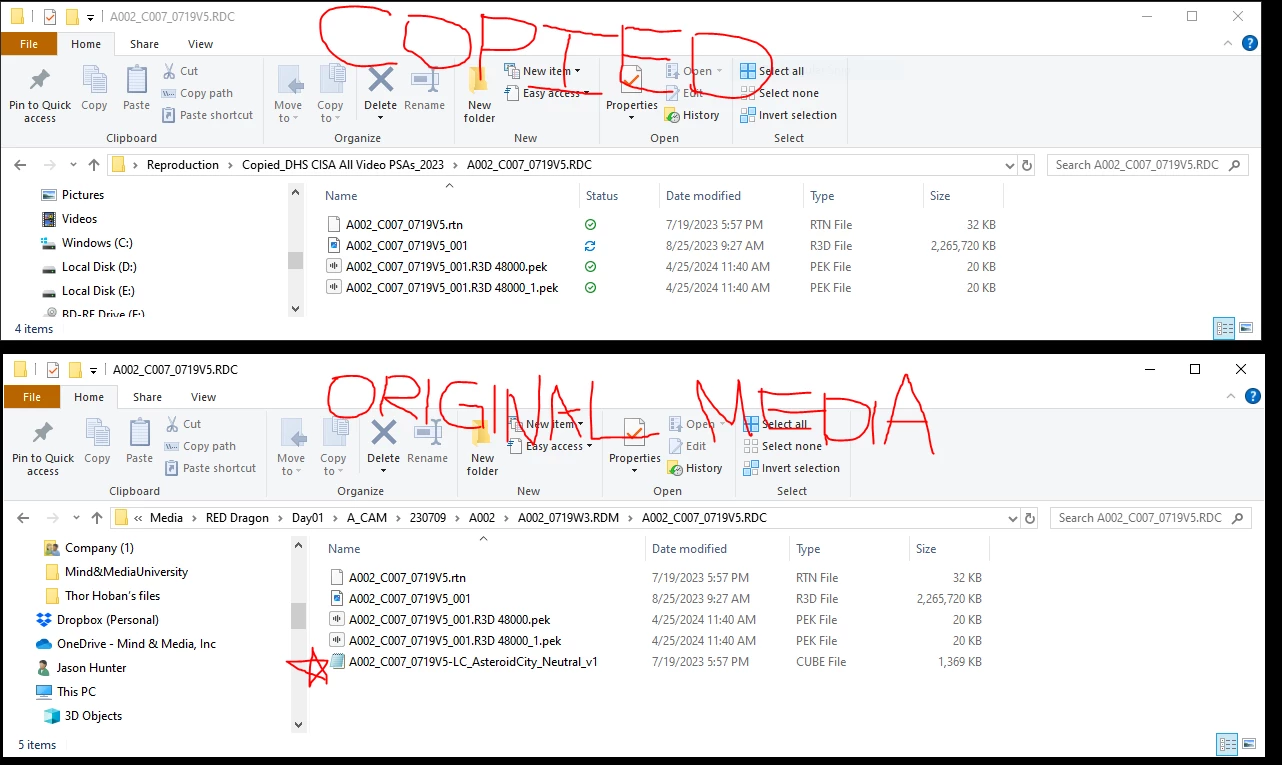
Same Red Media and Lut https://we.tl/t-Hjf2QLc3gs
 AdChoices