



rachelcenter
Legend
Dec 5, 2024 4:33 PM UTC
Released

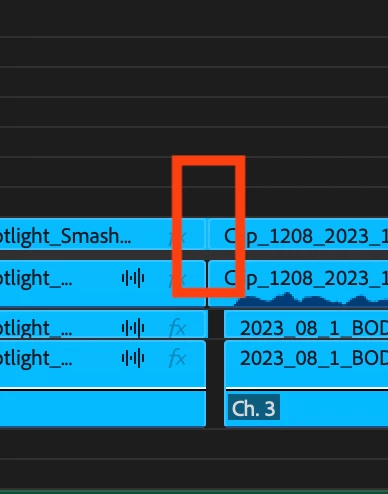
P: Premiere 2025.1.0 you cant see the cut mark any more on video tracks if track is too skinny

on premiere 2025.1.0 you cant see the cut mark any more on video tracks if track is too skinny. can you please fix this? yes issue occurs on new and old premiere projects.
 

29 replies

Known Participant
Dec 16, 2024 2:48 PM UTC

PPRO v25.1.0 (Build 73)

MacOS 14.7


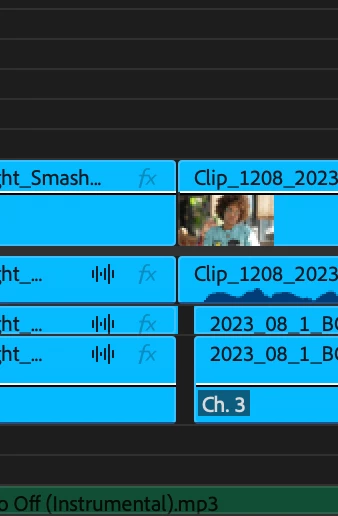
When clips or slugs are at minimum track height, the cuts lines between adjacent clips are either invisible or 1 white pixel borders *WHEN video names are enabled. However, the cut line IS visible at minimum track height when video names are DISABLED.


I don't know if this is considered an 'aesthetic choice' or an unintentional bug but it is not helpful as I use slugs extensively to mark timeline sections and this workflow is impeded when I minimize track heights for complex timelines. Even though you can tell where clips begin and end generally by clip names, it isn't precise at different magnifications.


Translate
jamieclarke
Community Manager
Community Manager
Dec 12, 2024 2:21 PM UTC

This is a known issue and has been resolved in the latest beta version 25.2 build 42 or higher

Translate
leakuslokus
Inspiring
Dec 10, 2024 9:11 PM UTC

Hello again 🙂


Since 25.1. the stroke opacity and color that indicate in and out points in a timeline have changed and while I understand the aesthetic improvement, this change has been a little impractical. 

Not that it's not a good change, it's just gotten a touch too hard to tell where clips start and end. 

I use pr a lot and this caused immediate hickups for me.


Maby it's just a bug, maybe the tweaking went a little off the road or maybe its just me - anway I thought it ma ybe worth pointing out.


I've attached screenshots of 25.0. and 25.1. in case my text here doesnt cut it ^^


Thx & bye

Translate
Ann Bens
Community Expert
Community Expert
Dec 10, 2024 9:39 PM UTC

Known issue: fixed in beta.

Translate
Participant
Dec 10, 2024 6:18 PM UTC

Yep now I did, but when I posted it wasn't under this topic 😉

Translate
R Neil Haugen
Legend
Dec 10, 2024 5:38 PM UTC

Did you read the post immediately above yours?

Translate
Everyone's mileage always varies ...
Participant
Dec 10, 2024 2:23 PM UTC

Since the last update, it's barely possible to distinguish cuts in the timeline when video tracks are minimized. They should be visible, just like the cuts in the audio tracks right below. Hope Adobe will correct this in the next update !

Translate
Participant
Dec 10, 2024 12:01 AM UTC

The part that divides the clips used to be visible, but now it blends with the label color, making it hard to notice the division between clips... Will this be fixed in the next update?

Translate
R Neil Haugen
Legend
Dec 10, 2024 12:57 AM UTC

This can be made a bit more visible by changing your label color and brightness. Yea, it's not ideal.

Translate
Everyone's mileage always varies ...
jamieclarke
Community Manager
Community Manager
Dec 6, 2024 2:33 PM UTC

This is a known issue and has been resolved in the latest beta version 25.2 build 42 or higher

Translate
rachelcenter
Legend
Dec 6, 2024 12:21 AM UTC
  • Issue - on premiere 2025.1.0 you cant see the cut mark any more on video tracks if track is too skinny
  • Adobe Premiere Pro version number: 2025.1.0
  • Operating system - macOs sequoia 15.1.1
  • System Info: CPU, GPU, RAM, HD:
    • CPU: if you go to system report -> graphics/dsplays, there is nothing that says Cpu anywhere. I see "type gpu apple m2 ultra"

    • GPU (Intel-based Macs and PCs)  "type: gpu apple m2 ultra"

    • GPU driver (PC)
    • RAM: 128gb

    • Hard Drive: external 4tb ssd usb c

  • Video format: its different every day, mxf., mp4
  • Workflow details: put two back to back clips on the timeline
  • Steps to reproduce - (Very important!) put two back to back clips on the timeline, make track as skinny as possible
  • Expected result - i should see 2 separate clips on the timeline
  • Actual result -  two back to back clips look like one massive clip with no breaks in it
Translate
Ann Bens
Community Expert
Community Expert
Dec 5, 2024 5:45 PM UTC

A simple solution for now is to slightly increase the height of the track.

Translate